# Add row to second table based on field value of table 1
**URL:** https://community.baserow.io/t/add-row-to-second-table-based-on-field-value-of-table-1/5799
**Category:** Baserow Help
**Created:** [July 31, 2024, 1:43pm UTC](https://community.baserow.io/t/add-row-to-second-table-based-on-field-value-of-table-1/5799 "2024-07-31T13:43:01Z")
**Posts on this page:** 4
**Page:** 1
### Author:  [@Mary](https://community.baserow.io/u/Mary)
#### Post date: [July 31, 2024, 1:43pm UTC](https://community.baserow.io/t/add-row-to-second-table-based-on-field-value-of-table-1/5799/1 "2024-07-31T13:43:01Z")
Please fill in the questionnaire below.
## Help Questionnaire
I have 2 tables, tblProject and tblSample
**tblProject**
ProjectID
Customer (lookup)
sample wanted (y/n)
**tblSamples**
SampleID
ProjectID (related)
Formula Number
Date Sent
I would like a related record to be created in the samples table, if sample wanted is yes. Is this possible? If so how. (One project can have many samples and sample numbers)
I am using [baserow.io](http://baserow.io)
Thanks!
Mary
#### What are the specs of the service or server you are using to host Baserow.
#### Which version of Baserow are you using.
#### How have you configured your self-hosted installation?
#### What commands if any did you use to start your Baserow server?
### Describe the problem
#### Describe, step by step, how to reproduce the error or problem you are encountering.
#### Provide screenshots or include share links showing:
#### How many rows in total do you have in your Baserow tables?
#### Please attach full logs from all of Baserow’s services
---
### Author:  [@olgatrykush](https://community.baserow.io/u/olgatrykush)
#### Post date: [August 1, 2024, 10:56am UTC](https://community.baserow.io/t/add-row-to-second-table-based-on-field-value-of-table-1/5799/2 "2024-08-01T10:56:42Z")
Hey @Mary, you can build this formula using `filter` + `contains` functions. Just make sure the field `sample wanted (y/n)` is a text field. If it isn’t, you can convert it to a text field using the `totext` function.
Here’s the example:
`filter(field('Samples_wanted_'), contains(totext(field('Samples_wanted_')), 'yes'))`
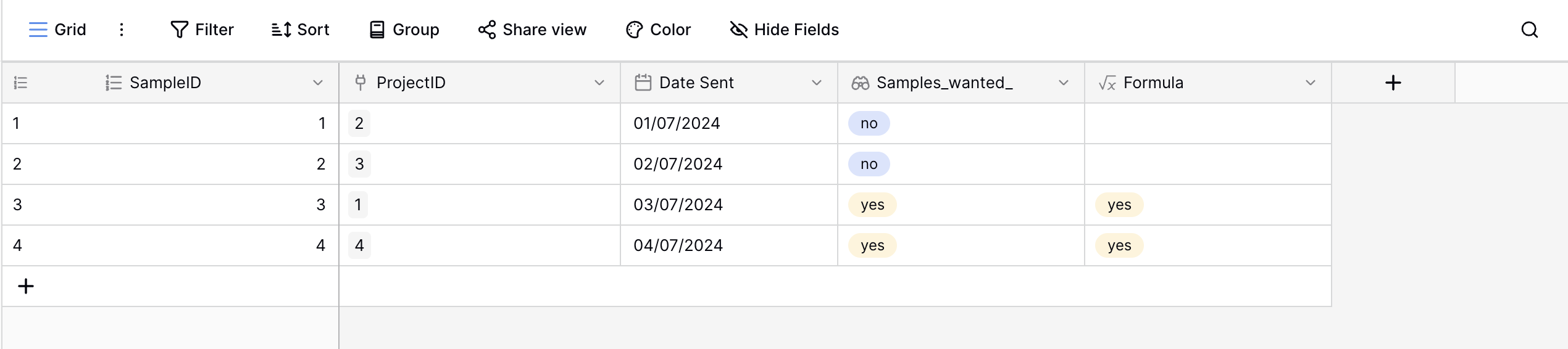
Then you can hide the Samples\_wanted\_ field:

Is it what you’re looking for?
---
### Author:  [@Mary](https://community.baserow.io/u/Mary)
#### Post date: [August 1, 2024, 11:49am UTC](https://community.baserow.io/t/add-row-to-second-table-based-on-field-value-of-table-1/5799/3 "2024-08-01T11:49:40Z")
Thank you! Does this create a new row in the samples table when the samples wanted field in the projects table is set to yes. I appreciate your help.
---
### Author:  [@olgatrykush](https://community.baserow.io/u/olgatrykush)
#### Post date: [August 1, 2024, 12:42pm UTC](https://community.baserow.io/t/add-row-to-second-table-based-on-field-value-of-table-1/5799/4 "2024-08-01T12:42:43Z")
Hey @Mary, I’m not sure I fully understand your question. We just look for the data in the Project table and then filter it using a formula. You can also create a new view and use filters to show only rows where “Samples wanted” equals 'yes’, as here:
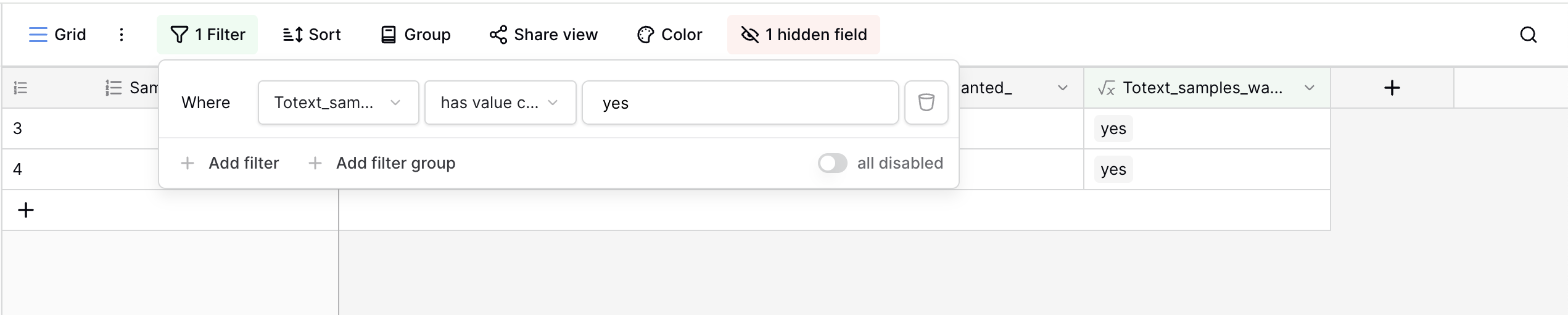
Note: Since the filtering feature doesn’t work with lookups, we first converted it to text using the formula field and `totext` function.