# Adding new rows screws up Autonumber and Row ID#
**URL:** https://community.baserow.io/t/adding-new-rows-screws-up-autonumber-and-row-id/5782
**Category:** Baserow Help
**Tags:** help-wanted
**Created:** [July 30, 2024, 5:45pm UTC](https://community.baserow.io/t/adding-new-rows-screws-up-autonumber-and-row-id/5782 "2024-07-30T17:45:19Z")
**Posts on this page:** 20
**Page:** 1
### Author:  [@FrancoisS](https://community.baserow.io/u/FrancoisS)
#### Post date: [July 30, 2024, 5:45pm UTC](https://community.baserow.io/t/adding-new-rows-screws-up-autonumber-and-row-id/5782/1 "2024-07-30T17:45:19Z")
### Describe the problem
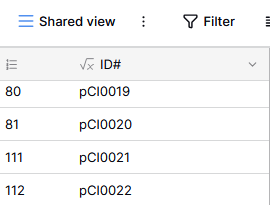
The Row ID sometimes jumps several numbers when we add a single row, which also screws up the autonumber function. This has happened on several Tables. The only way to fix it is to reset the autonumber but that creates opportunity for incorrectly renaming entries. I am not sure if filters were active at the time, but disabling all filters does not return any of the missing rows. It looks like they were deleted.
Seems similar to this problem: [Help regarding rows number - #4 by bram](https://community.baserow.io/t/help-regarding-rows-number/4514/4) except that disabling all filters does not return any of the missing rows.
#### Describe, step by step, how to reproduce the error or problem you are encountering.
With or without filters on (not sure if filters cause the problem or not, cf [Rows filtered out when unrelated cells are modified](https://community.baserow.io/t/rows-filtered-out-when-unrelated-cells-are-modified/5781)), add rows until the row ID number jumps unexpectedly instead of just incrementing by +1. Only happens occasionally.
---
### Author:  [@olgatrykush](https://community.baserow.io/u/olgatrykush)
#### Post date: [July 31, 2024, 8:18am UTC](https://community.baserow.io/t/adding-new-rows-screws-up-autonumber-and-row-id/5782/2 "2024-07-31T08:18:49Z")
Hey @FrancoisS, is there a chance that some of your collaborators deleted the missing rows?
What you can do is set a row count instead of a row identifier. Would that work for your case?
> [@Help regarding rows number](https://community.baserow.io/t/help-regarding-rows-number/4514/4):
>
> If you prefer to see a sequential count, then you can change that by clicking on the icon above the IDs. See the video below for example:
---
### Author:  [@FrancoisS](https://community.baserow.io/u/FrancoisS)
#### Post date: [July 31, 2024, 9:17am UTC](https://community.baserow.io/t/adding-new-rows-screws-up-autonumber-and-row-id/5782/3 "2024-07-31T09:17:53Z")
Hi @olgatrykush, thanks for your swift reply! Unfortunately no: i have seen it happen under my own eyes: there were some filters on, my collaborator clicked on the “add new row” button, and instead of just displaying the next number it jumped twenty numbers ahead as if twenty rows had been created then deleted instantly. Disabling the filters did not return the missing rows so I am not sure if the filters played a role in this or if it was just a coincidence.
This happened in the past in many of my tables (I think without any filters on), prompting me to use an Autonumber column instead of the row ID to create my unique ID#. It doesn’t help if it keeps happening though.
I cannot use the row count instead because I need unique IDs for each row that do not change according to the order of these rows.
---
### Author:  [@olgatrykush](https://community.baserow.io/u/olgatrykush)
#### Post date: [July 31, 2024, 9:31am UTC](https://community.baserow.io/t/adding-new-rows-screws-up-autonumber-and-row-id/5782/4 "2024-07-31T09:31:58Z")
Sure, let me ask the development team to check this. 👌
---
### Author:  [@FrancoisS](https://community.baserow.io/u/FrancoisS)
#### Post date: [July 31, 2024, 10:12am UTC](https://community.baserow.io/t/adding-new-rows-screws-up-autonumber-and-row-id/5782/5 "2024-07-31T10:12:45Z")
Thanks!
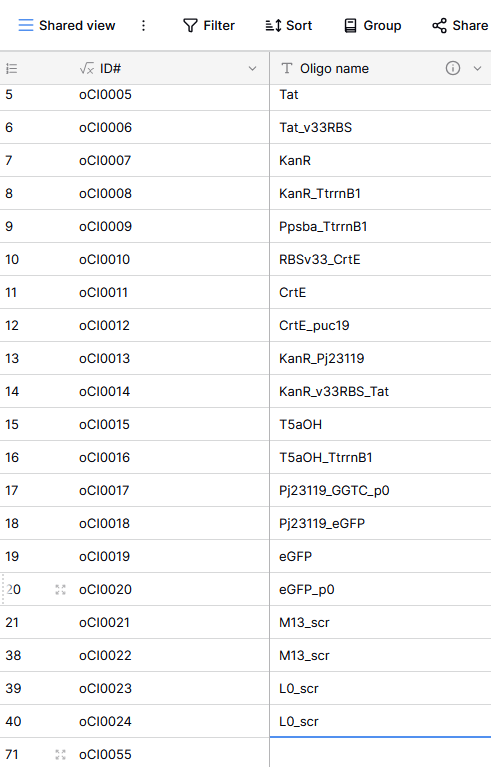
It just happenned again on a different table, definitely without any filter on. Could it be that it happens whenever a table is being used again after a while?
Could you also give me an idea of how long it might take your dev team to look into this? I am a new user so I am not familiar with how quickly you can fix things.
---
### Author:  [@olgatrykush](https://community.baserow.io/u/olgatrykush)
#### Post date: [July 31, 2024, 11:13am UTC](https://community.baserow.io/t/adding-new-rows-screws-up-autonumber-and-row-id/5782/6 "2024-07-31T11:13:27Z")
> [@FrancoisS](#):
>
> Could you also give me an idea of how long it might take your dev team to look into this? I am a new user so I am not familiar with how quickly you can fix things.
If that is a bug, it will probably be fixed in the next release, which is scheduled for the end of August to the beginning of September.
---
### Author:  [@FrancoisS](https://community.baserow.io/u/FrancoisS)
#### Post date: [July 31, 2024, 11:29am UTC](https://community.baserow.io/t/adding-new-rows-screws-up-autonumber-and-row-id/5782/7 "2024-07-31T11:29:49Z")
Ok that would be great. Please don’t hesitate to involve me to help resolving this, as this is top priority for me before I push Baserow on the rest of my team.
---
### Author:  [@frederikdc](https://community.baserow.io/u/frederikdc)
#### Post date: [July 31, 2024, 12:37pm UTC](https://community.baserow.io/t/adding-new-rows-screws-up-autonumber-and-row-id/5782/8 "2024-07-31T12:37:54Z")
@FrancoisS : can you also check any sorting that might be applied on the table? It is possible that the row id’s are not following each other because of sorting.
I am not able to replicate the issue where creating a new record skips multiple row id’s. You might try to following steps
1. Add a new column of the type formula
2. enter `row_id()` of the formula.
3. Sort the table based on that new column with no other filters or sorting applied
Are there still numbers missing of records that you have not deleted? And do the number correspond with the numbers on the left side?
---
### Author:  [@FrancoisS](https://community.baserow.io/u/FrancoisS)
#### Post date: [July 31, 2024, 12:44pm UTC](https://community.baserow.io/t/adding-new-rows-screws-up-autonumber-and-row-id/5782/9 "2024-07-31T12:44:15Z")
Yeah I can’t replicate it every time either, it seems to happen most often when the Table has been left alone for a few days.
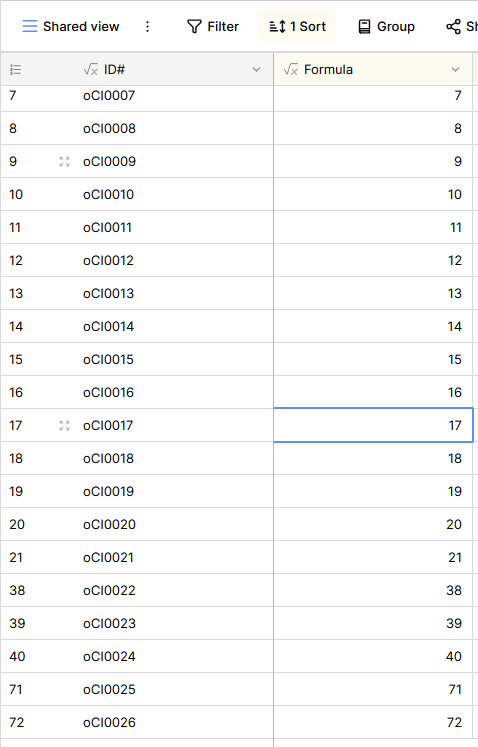
I just tried the steps you suggested and the missing records are still missing. None of my tables were sorted so I don’t think that was the issue.
---
### Author:  [@frederikdc](https://community.baserow.io/u/frederikdc)
#### Post date: [July 31, 2024, 12:48pm UTC](https://community.baserow.io/t/adding-new-rows-screws-up-autonumber-and-row-id/5782/10 "2024-07-31T12:48:20Z")
Based on the screenshot, the records with ID 22 until 37 has been removed or have never existed? Are you missing any data that indicates that they are removed?
Just a side-question: is it a problem if a couple of id’s are never generated? Even if a range of numbers is skipped, the id remains unique.
---
### Author:  [@FrancoisS](https://community.baserow.io/u/FrancoisS)
#### Post date: [July 31, 2024, 12:56pm UTC](https://community.baserow.io/t/adding-new-rows-screws-up-autonumber-and-row-id/5782/11 "2024-07-31T12:56:33Z")
That is exactly my problem: it looks like additional rows are being added then instantly deleted. At first I thought I might have deleted these rows by mistake while setting up the Tables, but this keeps happening on multiple Tables and I am sure we’re not deleting anything.
The problem occured yesterday when I tried to add row 22 and instead obtained row 38, and it occured again today when I tried to get row 41 and instead got row 71. Both time I had to reset my Autonumber column to fix the numbering of my ID# column.
Unfortunately my whole system is to link each entry to a physical space in the lab, so I need consecutive IDs so as not to waste space. It would result on useless labels being printed and sample boxes remaining half-empty. This would be a dealbreaker for me.
---
### Author:  [@frederikdc](https://community.baserow.io/u/frederikdc)
#### Post date: [July 31, 2024, 1:17pm UTC](https://community.baserow.io/t/adding-new-rows-screws-up-autonumber-and-row-id/5782/12 "2024-07-31T13:17:18Z")
Do you have a premium or higher subscription so that you have access to the Audit logs? This would allow you to lookup if the rows were created and immediately deleted or never existed.
---
### Author:  [@FrancoisS](https://community.baserow.io/u/FrancoisS)
#### Post date: [July 31, 2024, 1:40pm UTC](https://community.baserow.io/t/adding-new-rows-screws-up-autonumber-and-row-id/5782/13 "2024-07-31T13:40:34Z")
No unfortunately I am still on the free subscription until I can convince the rest of my team to use Baserow. I am positive that these rows were not deleted by user input, though, so I am enclined to think they just never existed, if that’s a possibility.
---
### Author:  [@frederikdc](https://community.baserow.io/u/frederikdc)
#### Post date: [August 1, 2024, 11:15am UTC](https://community.baserow.io/t/adding-new-rows-screws-up-autonumber-and-row-id/5782/14 "2024-08-01T11:15:30Z")
> [@FrancoisS](#):
>
> so I am enclined to think they just never existed, if that’s a possibility.
It is possible, however unlikely that it happens for multiple tables in a short amount of time.
But the fact is that you cannot be 100% sure that the id’s will be consecutive numbers. Is it possible to manually add the number? If you sort the records on the id that you manually provide, you are always sure that it is the next available number.
---
### Author:  [@FrancoisS](https://community.baserow.io/u/FrancoisS)
#### Post date: [August 1, 2024, 1:58pm UTC](https://community.baserow.io/t/adding-new-rows-screws-up-autonumber-and-row-id/5782/15 "2024-08-01T13:58:43Z")
The problem with manually generated IDs (besides being tedious) is that people often make mistakes and we end up with duplicates or gaps.
Not being able to guarantee consecutive numbers would actually be a deal breaker for me.
It is a shame because I really loved Baserow so far. Do you think it is something that might get fixed anytime soon?
The only reasonable fix I could think of is to create hundreds of blanks entries in advance myself and generate their ID afterwards to fix any gap, so that users don’t encounter the bug, but that’s less than ideal…
---
### Author:  [@frederikdc](https://community.baserow.io/u/frederikdc)
#### Post date: [August 5, 2024, 5:23am UTC](https://community.baserow.io/t/adding-new-rows-screws-up-autonumber-and-row-id/5782/16 "2024-08-05T05:23:11Z")
> [@FrancoisS](#):
>
> Not being able to guarantee consecutive numbers would actually be a deal breaker for me.
The id not being a consecutive number should only occur in unexpected rare occasions, not something that happens frequently. This makes it hard to create a fix for it.
Is it possible to set up the same structure in a new database and see if this happens again?
---
### Author:  [@FrancoisS](https://community.baserow.io/u/FrancoisS)
#### Post date: [August 5, 2024, 9:36am UTC](https://community.baserow.io/t/adding-new-rows-screws-up-autonumber-and-row-id/5782/17 "2024-08-05T09:36:00Z")
No the structure is quite intricate by now and I’m already spending far more time on Baserow than I should. I wouldn’t say it happens frequently, but it’s possible that when it happens, several of my sheets are affected at once and I just discover them one by one when I create a new row, making it look like it happens more often than it really does.
Or alternatively it could happen more on days when my internet connection is poor.
In the meantime, I think I will fix it by creating in advance all the rows of the databases where the numbering should be consecutive, so that I can fix it on the spot by resetting autonumber if it happens.
---
### Author:  [@FrancoisS](https://community.baserow.io/u/FrancoisS)
#### Post date: [August 14, 2024, 9:45am UTC](https://community.baserow.io/t/adding-new-rows-screws-up-autonumber-and-row-id/5782/18 "2024-08-14T09:45:06Z")
Over the last few weeks, I have been careful to only add rows when the connection with Baserow was stable (when the little pop up asking me to refresh my browser was absent), and it seemed to help keeping my row numbr consecutives.
Unfortunately it just happened again now, and this time there is also a discrepency in between the row IDs and the autonumber: both lost rows, but not the same amount: I went from 101 to 112 in the row IDs, but the autonumber jumped from 62 to 85.
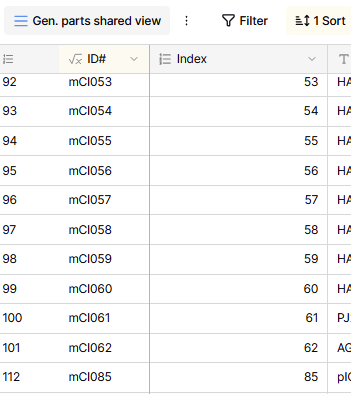
It happened when I created 34 new rows at once by copy-pasting text rows into the sheet.
---
### Author:  [@FrancoisS](https://community.baserow.io/u/FrancoisS)
#### Post date: [August 14, 2024, 10:04am UTC](https://community.baserow.io/t/adding-new-rows-screws-up-autonumber-and-row-id/5782/19 "2024-08-14T10:04:31Z")
Just happened on another one of my tables:
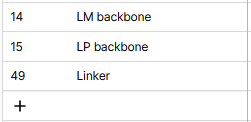
It really looks like occurences are clustered. Dosn’t matter for this table though.
---
### Author:  [@FrancoisS](https://community.baserow.io/u/FrancoisS)
#### Post date: [August 19, 2024, 10:50am UTC](https://community.baserow.io/t/adding-new-rows-screws-up-autonumber-and-row-id/5782/20 "2024-08-19T10:50:29Z")
Happened again on several table. It looks like it might be happening without any user input: as if invisible rows were created and deleted over the weekend and I only notice what happenned when I create a new row on Monday.
[Next page](https://community.baserow.io/t/adding-new-rows-screws-up-autonumber-and-row-id/5782.md?page=2)