# Automation steps help please
**URL:** https://community.baserow.io/t/automation-steps-help-please/11931
**Category:** Baserow Help
**Tags:** automation
**Created:** [February 1, 2026, 12:02pm UTC](https://community.baserow.io/t/automation-steps-help-please/11931 "2026-02-01T12:02:24Z")
**Posts on this page:** 6
**Page:** 1
### Author:  [@mikemitch](https://community.baserow.io/u/mikemitch)
#### Post date: [February 1, 2026, 12:02pm UTC](https://community.baserow.io/t/automation-steps-help-please/11931/1 "2026-02-01T12:02:24Z")
### Are you using our SaaS platform ([Baserow.io](http://Baserow.io)) or self-hosting Baserow?
Self-hosted
### What do you need help with?
CONFUSED WITH AUTOMATION STEPS.
IMAGINE 10 ROWS IN TABLE A - THE FIRST IS MY “HEADER” ROW (A DATAFIELD IDENTIFIES THIS)…THE OTHER 9 ARE LINE ITEMS FOR THIS HEADER (QTY, ID ETC)
ALL ROWS HAVE A DATAFIELD “STATUS”.
IN ANOTHER TABLE (TABLE B) , USERS WILL LOAD WEEKLY A LIST OF DRAWINGS - EACH UNIQUE ONE BEING THE EXACT SAME ID FOR THE PRIMARY FIELD ON ALL 10 OF MY RECORDS (THE HEADER + 9 LINES).
WHAT ARE THE AUTOMATION STEPS TO DETECT A NEW ROW IN TABLE B - THEN FIND ALL 10 RECORDS IN TABLE A WITH THE SAME ID - AND UPDATE ALL 10 RECORDS IN TABLE A WITH A NEW STATUS VALUE ?
I GET LOST WITH “ITERATION” AS ONE OF THE STEPS…TRIED LOTS OF COMBINATIONS…
THANKS ALL
---
### Author:  [@picklepete](https://community.baserow.io/u/picklepete)
#### Post date: [February 2, 2026, 10:51am UTC](https://community.baserow.io/t/automation-steps-help-please/11931/2 "2026-02-02T10:51:22Z")
> [@mikemitch](#):
>
> WHAT ARE THE AUTOMATION STEPS TO DETECT A NEW ROW IN TABLE B - THEN FIND ALL 10 RECORDS IN TABLE A WITH THE SAME ID - AND UPDATE ALL 10 RECORDS IN TABLE A WITH A NEW STATUS VALUE ?
Good morning, could you try something like this?
- Trigger: rows created in `tableB`.
- List rows node, filtered so that it finds all records where `tableB.rows.0.IdField` = `tableA.IdField`.
- Iteration node (iterates on the list rows results)
- Update row node ( **inside** the iteration node), which sets your status field.
Cheers,
Peter Evans
---
### Author:  [@mikemitch](https://community.baserow.io/u/mikemitch)
#### Post date: [February 2, 2026, 11:06am UTC](https://community.baserow.io/t/automation-steps-help-please/11931/3 "2026-02-02T11:06:20Z")
Thanks Peter - will give it a try.
---
### Author:  [@mikemitch](https://community.baserow.io/u/mikemitch)
#### Post date: [February 2, 2026, 11:34am UTC](https://community.baserow.io/t/automation-steps-help-please/11931/4 "2026-02-02T11:34:06Z")
Peter sorry to be a pain - and thanks for all help…..not done Automation before.
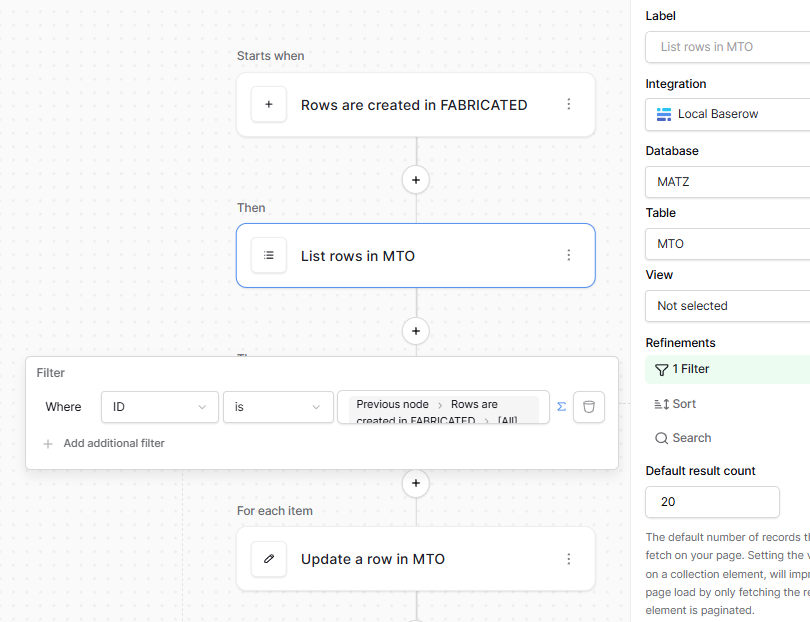
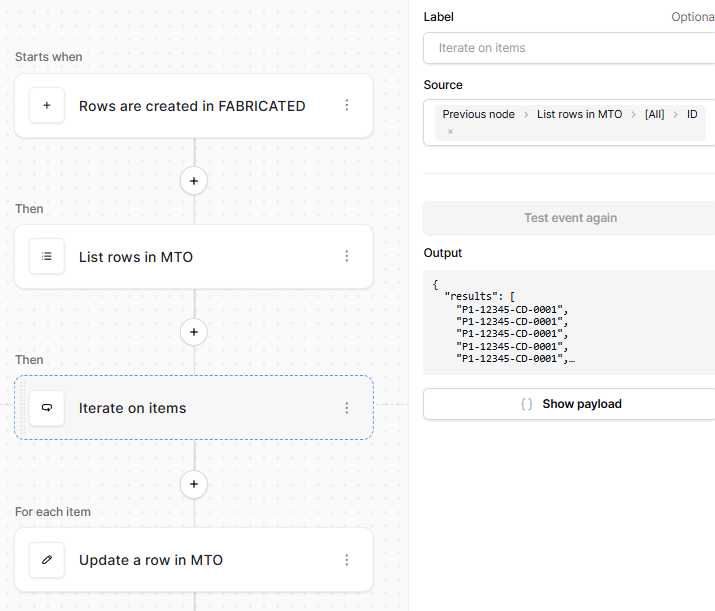
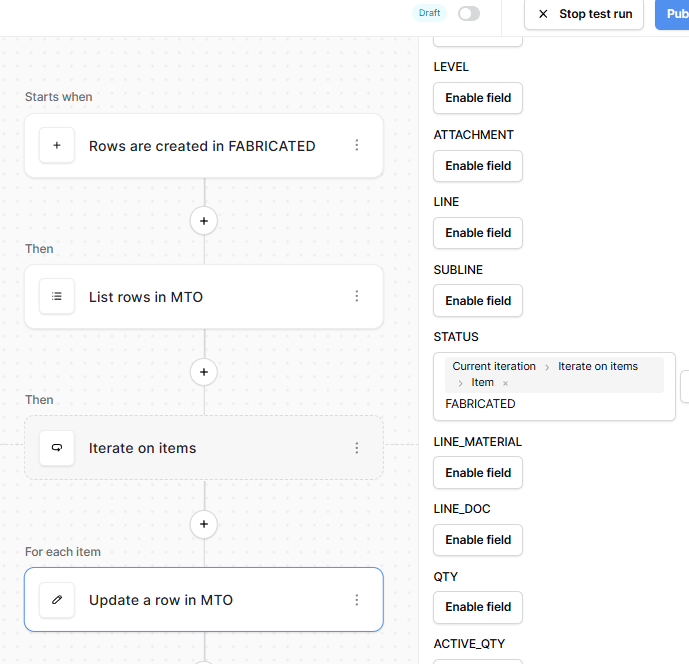
Following your advice I kinda got this far but not hanging together (Fabricated was my Table B) - MTO is Table A.
What I am missing and Baserow documentation is obtuse on it - what is the structure and what and how are the parameters handed off ?
what am I doing wrong !!!
Very Best regards - really appreciate your help and insights.
Mike in SW London
---
### Author:  [@picklepete](https://community.baserow.io/u/picklepete)
#### Post date: [February 3, 2026, 11:22am UTC](https://community.baserow.io/t/automation-steps-help-please/11931/5 "2026-02-03T11:22:51Z")
Hi @mikemitch,
Two quick observations based on those screenshots:
- In `List rows in MTO`: the filter is using “All”, which will be an array (a list of) records. In this step, you’re trying to find all MTO records which match the newly created row in FABRICATED, right? You’re likely looking for a single value in MTO (i.e. an ID) that matches what is in FABRICATED, not a list of records.
- In `Iterate on items`: you _can_ iterate on the IDs, but just so you know, there’s a link to the right of the `List rows in MTO` (in the pop-up that appears) that says “Select”. This will give you access to all records, not just the IDs, when you iterate. This is useful for the next step, `Update a row in MTO` if you wanted to change the `STATUS` to something other than “{ID} FABRICATED”.
If you’re running into issues with the workflow, the first bulletpoint is probably the cause, it’s just not finding the correct records in “MTO”. If you want to debug what the `List rows in MTO` node is finding, you can click the “Test event” button and inspect the output in the “Show payload” pop-up.
Cheers,
Peter Evans
---
### Author:  [@mikemitch](https://community.baserow.io/u/mikemitch)
#### Post date: [February 3, 2026, 11:36am UTC](https://community.baserow.io/t/automation-steps-help-please/11931/6 "2026-02-03T11:36:34Z")
Thanks again Peter - will give it a try….(again!!!)