# Automations: clearing a Boolean field
**URL:** https://community.baserow.io/t/automations-clearing-a-boolean-field/12507
**Category:** Baserow Help
**Created:** [June 10, 2026, 10:16am UTC](https://community.baserow.io/t/automations-clearing-a-boolean-field/12507 "2026-06-10T10:16:10Z")
**Posts on this page:** 20
**Page:** 1
### Author:  [@Rickus3126](https://community.baserow.io/u/Rickus3126)
#### Post date: [June 10, 2026, 10:16am UTC](https://community.baserow.io/t/automations-clearing-a-boolean-field/12507/1 "2026-06-10T10:16:10Z")
### Are you using our SaaS platform ([Baserow.io](http://Baserow.io)) or self-hosting Baserow?
SaaS
### What do you need help with?
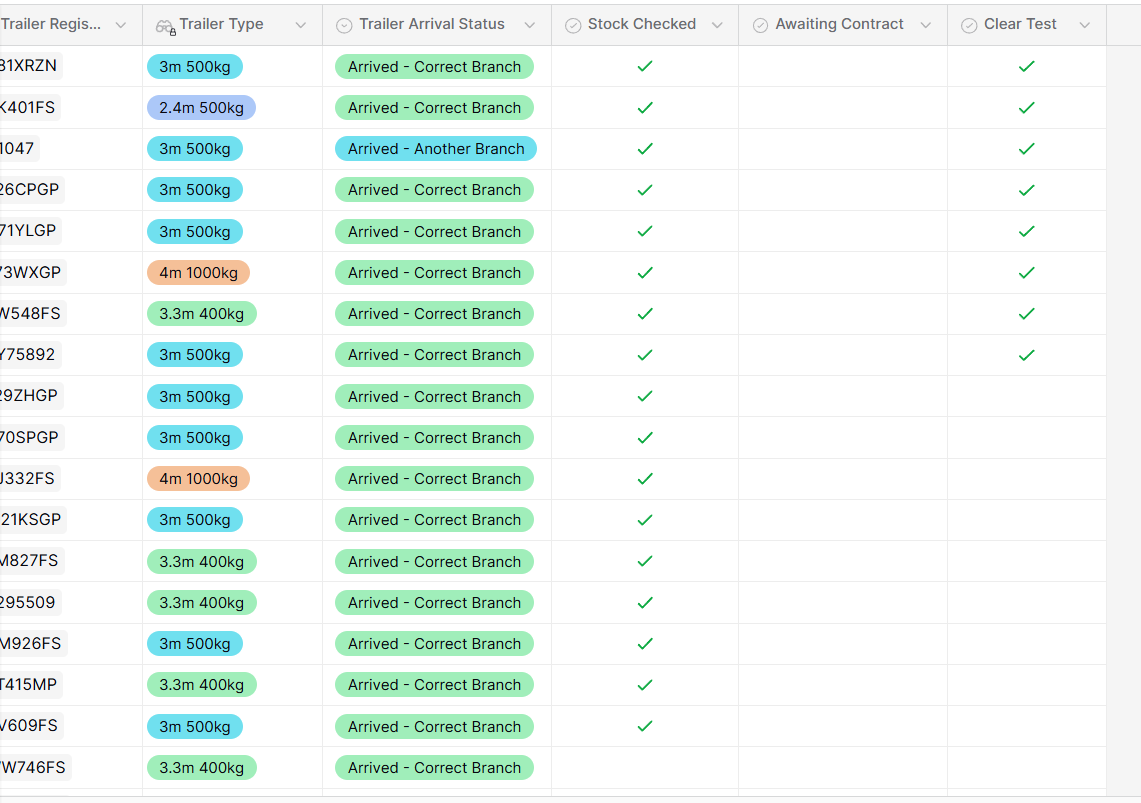
So I have a Boolean field called “Stock Checked” this field gets ticked once the specific info in the row has been confirmed. Easy. But now every Monday, I need to clear the “Stock Checked” field for the admin team to do it all over again during the new week. There is about 650 rows to clear every Monday morning. I was trying to do an automation but it seems like its not working. Not too sure what I am doing wrong.
the automation route i had was as follow:
start with periodic trigger
there after an Iterator
update row.
with everything set up like it should. i come to find that it has not cleared my boolean field.
---
### Author:  [@picklepete](https://community.baserow.io/u/picklepete)
#### Post date: [June 10, 2026, 11:16am UTC](https://community.baserow.io/t/automations-clearing-a-boolean-field/12507/2 "2026-06-10T11:16:56Z")
Hello @Rickus3126,
> I was trying to do an automation but it seems like its not working. Not too sure what I am doing wrong.
Would you mind screenshottting your workflow, the iterator and update row forms? It’ll provide some context to debug this further.
Cheers,
Peter Evans
---
### Author:  [@frederikdc](https://community.baserow.io/u/frederikdc)
#### Post date: [June 10, 2026, 11:17am UTC](https://community.baserow.io/t/automations-clearing-a-boolean-field/12507/3 "2026-06-10T11:17:45Z")
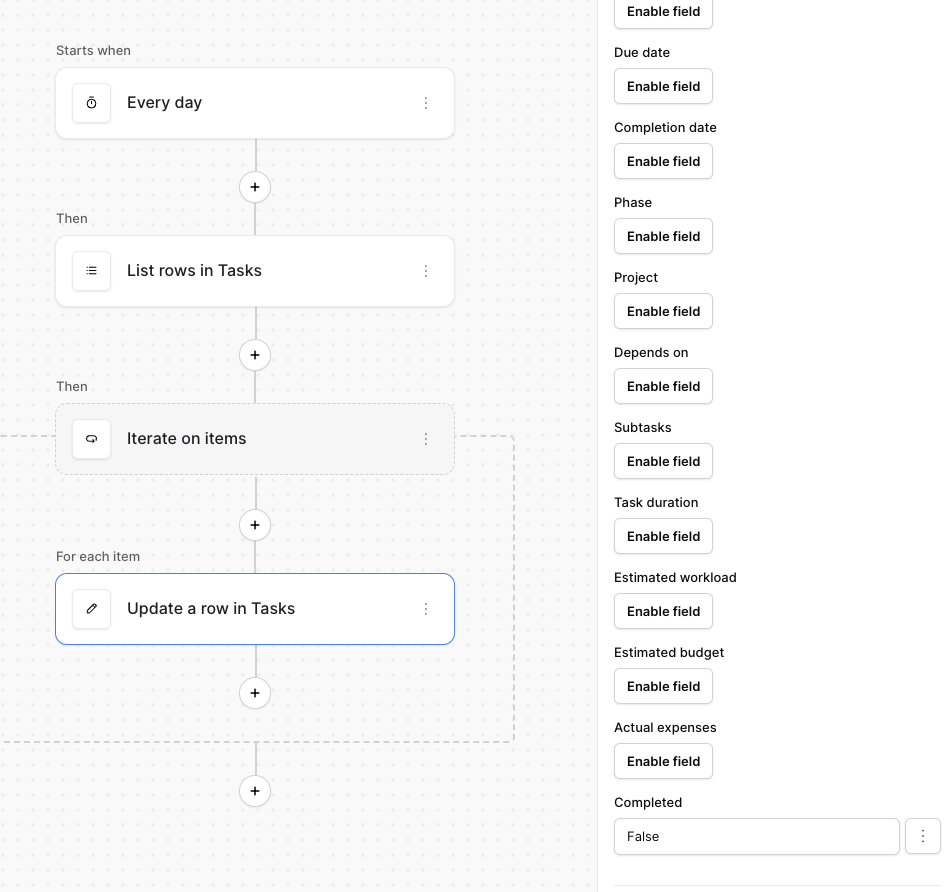
Hi, setting the value to False should clear the Boolean field
---
### Author:  [@Rickus3126](https://community.baserow.io/u/Rickus3126)
#### Post date: [June 10, 2026, 1:44pm UTC](https://community.baserow.io/t/automations-clearing-a-boolean-field/12507/4 "2026-06-10T13:44:47Z")
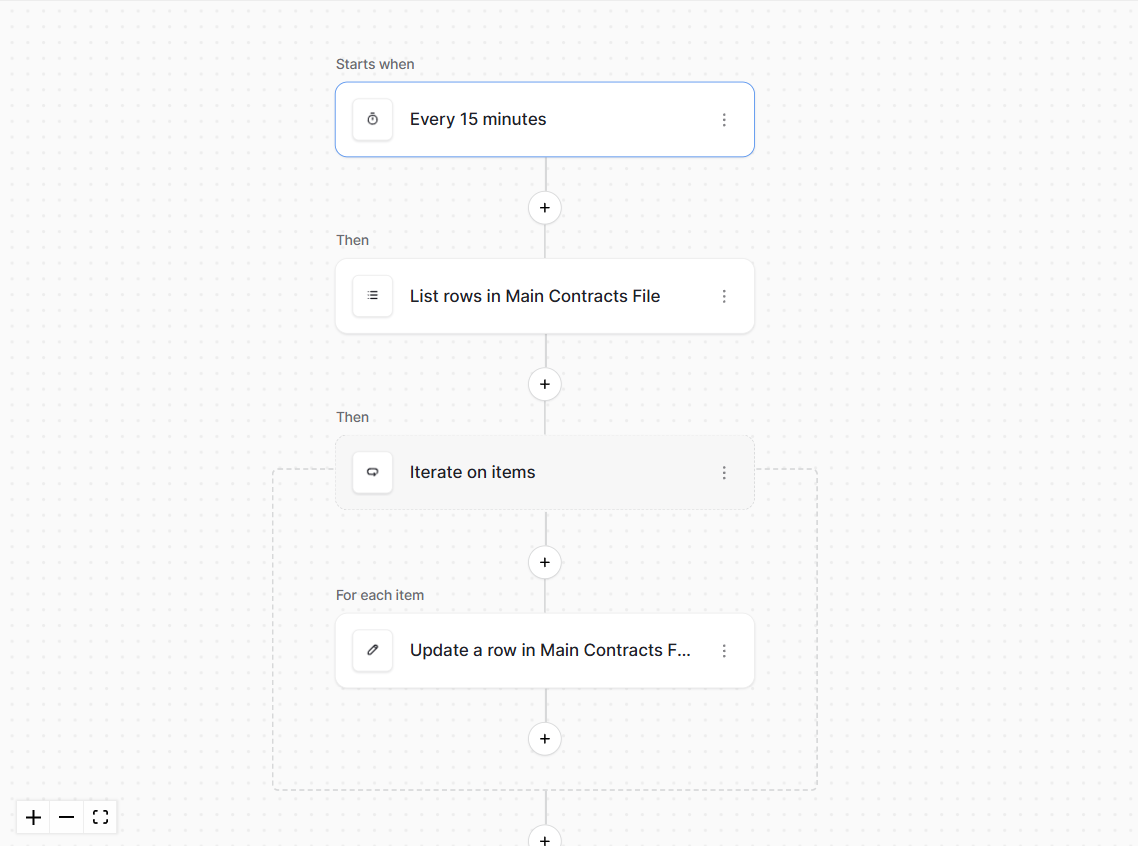
in List Rows, i’ve put a filter on to filter the field with the checked boolean. from there Iterate on items and update the Clear Test fiels from true to false.
---
### Author:  [@Rickus3126](https://community.baserow.io/u/Rickus3126)
#### Post date: [June 10, 2026, 1:45pm UTC](https://community.baserow.io/t/automations-clearing-a-boolean-field/12507/5 "2026-06-10T13:45:11Z")
---
### Author:  [@Rickus3126](https://community.baserow.io/u/Rickus3126)
#### Post date: [June 10, 2026, 1:46pm UTC](https://community.baserow.io/t/automations-clearing-a-boolean-field/12507/6 "2026-06-10T13:46:39Z")
i have set it up as per your example. For the test i did a clear every 15min. however it did not work.
---
### Author:  [@picklepete](https://community.baserow.io/u/picklepete)
#### Post date: [June 10, 2026, 1:48pm UTC](https://community.baserow.io/t/automations-clearing-a-boolean-field/12507/7 "2026-06-10T13:48:49Z")
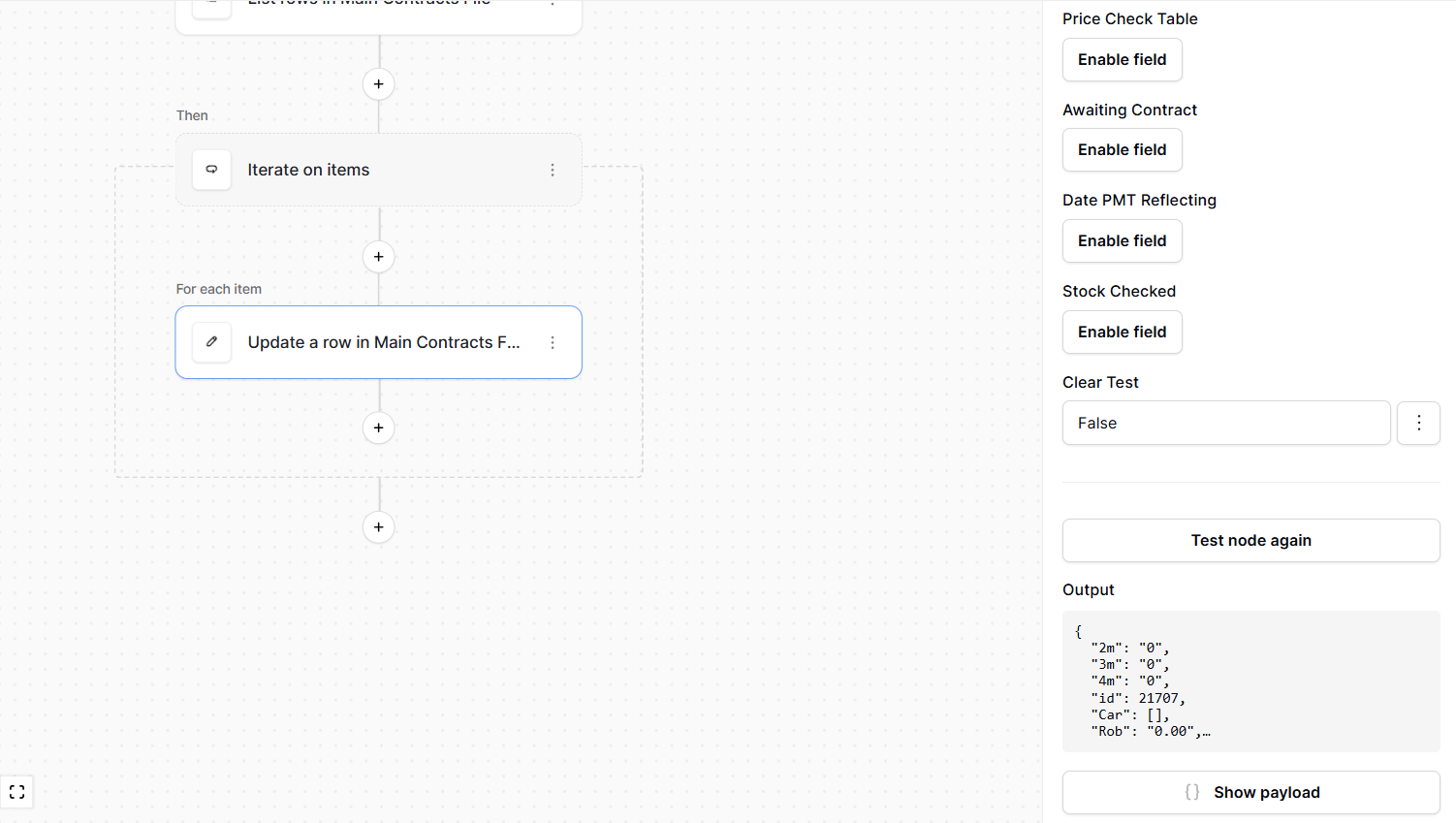
Thanks @Rickus3126, can you screenshot the forms themselves in automation? We could do with seeing how `iterate`and `update row` are configured.
Cheers,
Peter
---
### Author:  [@Rickus3126](https://community.baserow.io/u/Rickus3126)
#### Post date: [June 10, 2026, 2:46pm UTC](https://community.baserow.io/t/automations-clearing-a-boolean-field/12507/8 "2026-06-10T14:46:55Z")
---
### Author:  [@Rickus3126](https://community.baserow.io/u/Rickus3126)
#### Post date: [June 10, 2026, 2:46pm UTC](https://community.baserow.io/t/automations-clearing-a-boolean-field/12507/9 "2026-06-10T14:46:58Z")
---
### Author:  [@Rickus3126](https://community.baserow.io/u/Rickus3126)
#### Post date: [June 11, 2026, 4:44am UTC](https://community.baserow.io/t/automations-clearing-a-boolean-field/12507/10 "2026-06-11T04:44:30Z")
Infact. it is creating new rows at the bottom every time it runs.
---
### Author:  [@frederikdc](https://community.baserow.io/u/frederikdc)
#### Post date: [June 11, 2026, 6:52am UTC](https://community.baserow.io/t/automations-clearing-a-boolean-field/12507/11 "2026-06-11T06:52:09Z")
> [@Rickus3126](#):
>
> nfact. it is creating new rows at the bottom every time it runs.
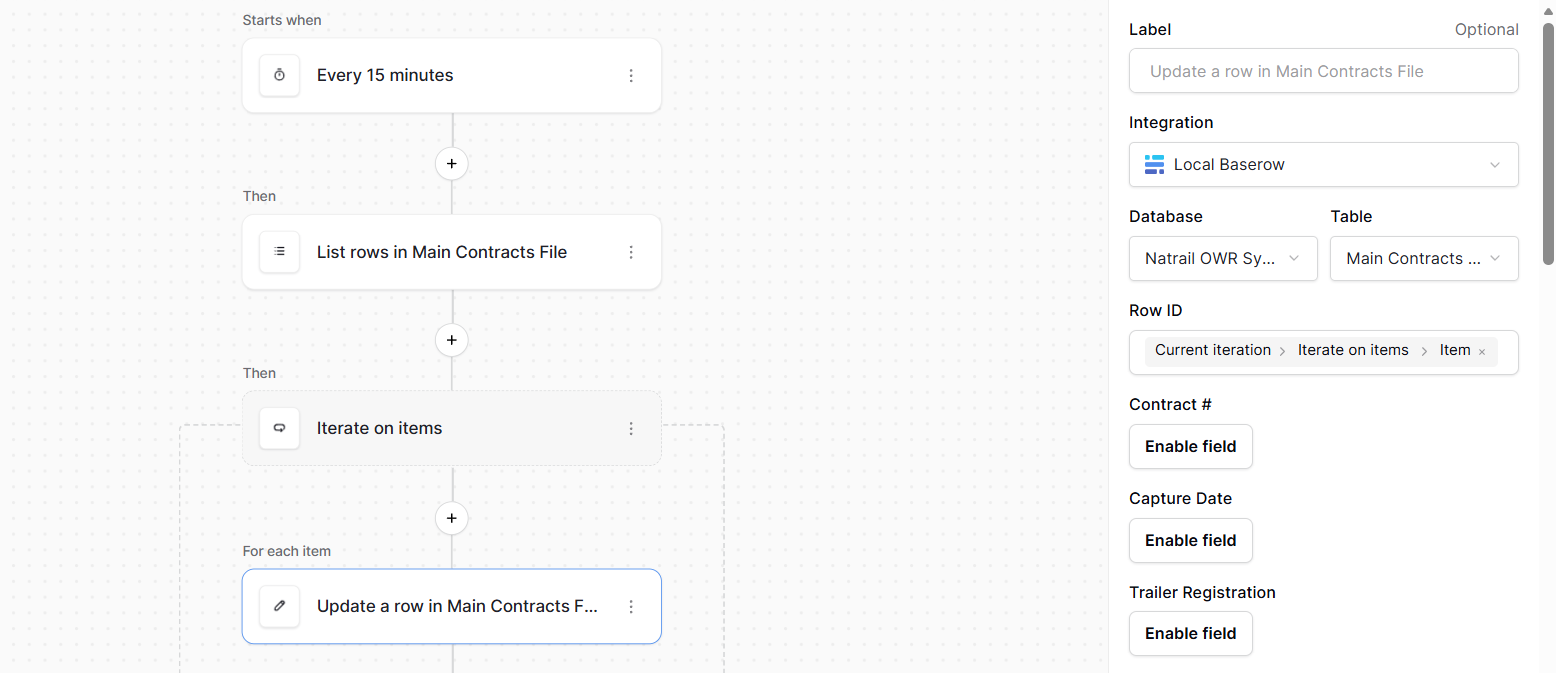
This is probably because the Row ID of the record that needs to be updated is not set correctly
---
### Author:  [@Rickus3126](https://community.baserow.io/u/Rickus3126)
#### Post date: [June 11, 2026, 8:24am UTC](https://community.baserow.io/t/automations-clearing-a-boolean-field/12507/12 "2026-06-11T08:24:52Z")
---
### Author:  [@Rickus3126](https://community.baserow.io/u/Rickus3126)
#### Post date: [June 11, 2026, 8:24am UTC](https://community.baserow.io/t/automations-clearing-a-boolean-field/12507/13 "2026-06-11T08:24:55Z")
its not a single row that needs to update. its about 650 in total
---
### Author:  [@picklepete](https://community.baserow.io/u/picklepete)
#### Post date: [June 11, 2026, 8:39am UTC](https://community.baserow.io/t/automations-clearing-a-boolean-field/12507/14 "2026-06-11T08:39:43Z")
Hi @Rickus3126, I think I see the problem.
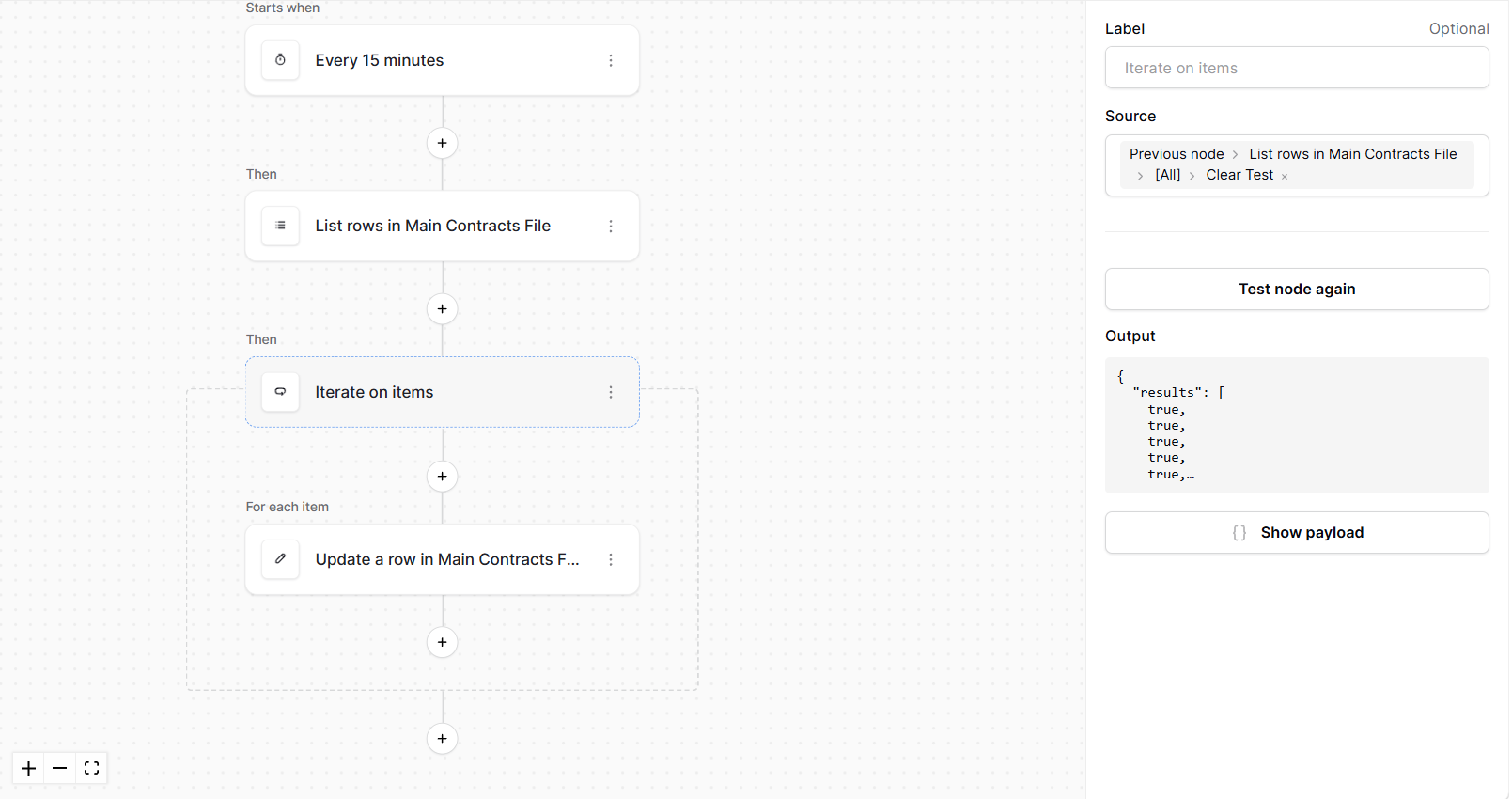
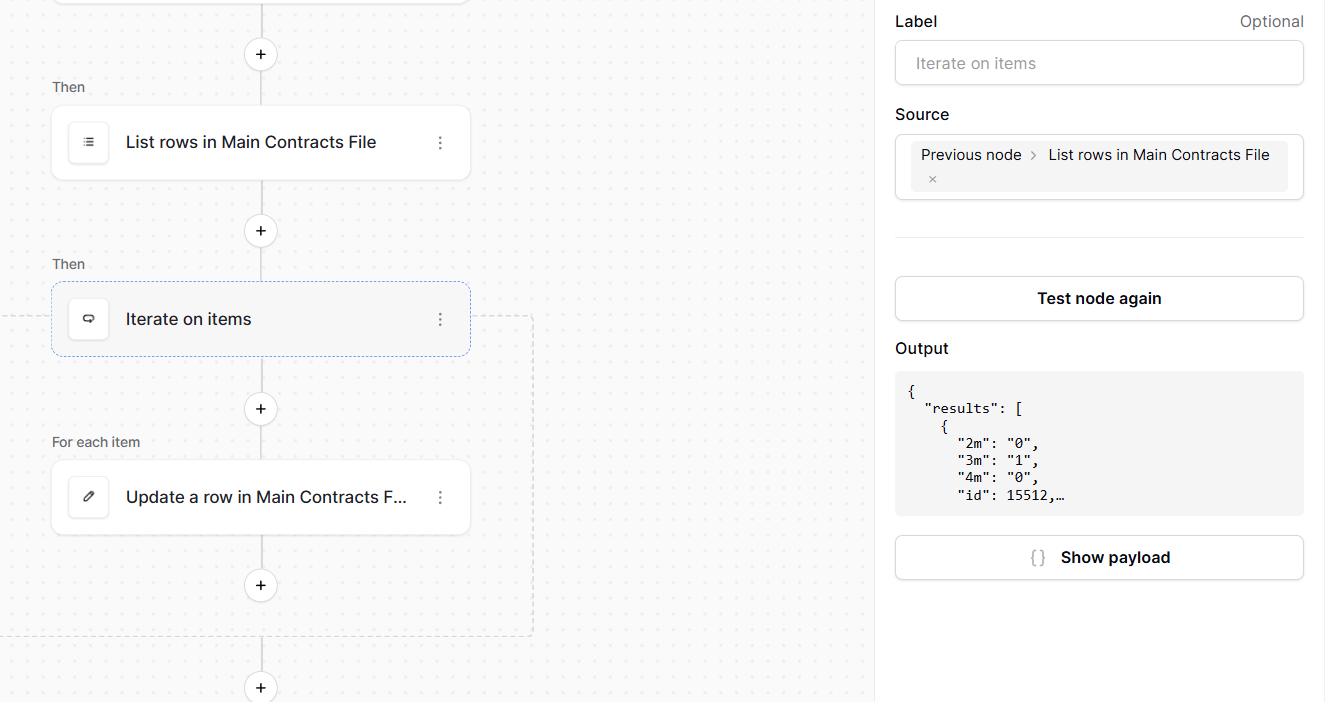
- **Iterate on items** : you’re selecting the `Clear Test` _field_. Please change this to `Previous node` \> then click the “select” next to “List rows in Main Contracts File”. This means we’ll loop over each _row_. Right now you’re iterating on each boolean field.
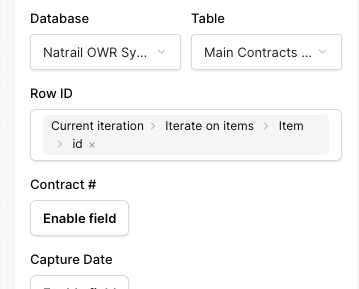
- **Update a row** : in your ID field at the moment you’re trying to pass an ID, but you’re actually passing the boolean field itself. Once the iterate part is fixed, you can select `Current iteration` \> `Iterate on items` \> `ID`.
Now, we’ll iterate over those rows, and update `Clear Test` to “false”.
Cheers,
Peter
---
### Author:  [@Rickus3126](https://community.baserow.io/u/Rickus3126)
#### Post date: [June 11, 2026, 9:06am UTC](https://community.baserow.io/t/automations-clearing-a-boolean-field/12507/15 "2026-06-11T09:06:44Z")
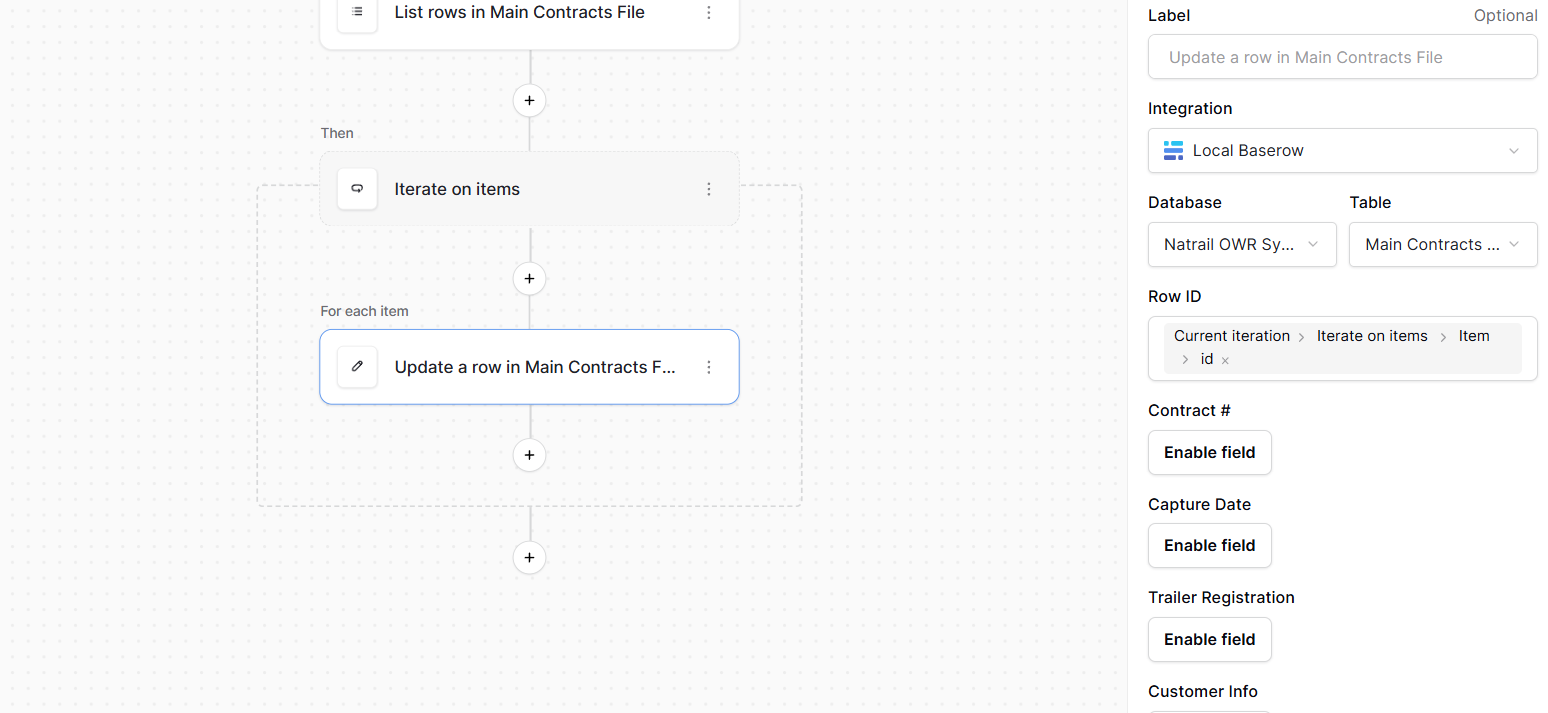
I followed your steps and got this error at update a row
Value error for “row\_id”: The value must be an integer or convertible to an integer.
---
### Author:  [@picklepete](https://community.baserow.io/u/picklepete)
#### Post date: [June 11, 2026, 9:09am UTC](https://community.baserow.io/t/automations-clearing-a-boolean-field/12507/16 "2026-06-11T09:09:41Z")
Thanks @Rickus3126,
And just to confirm: you changed the `Iterate on items` source?
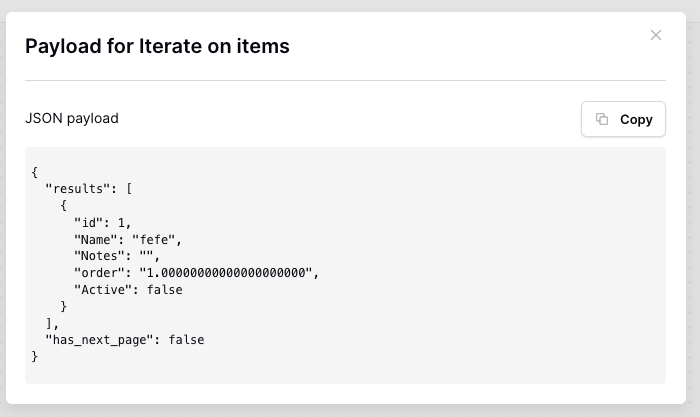
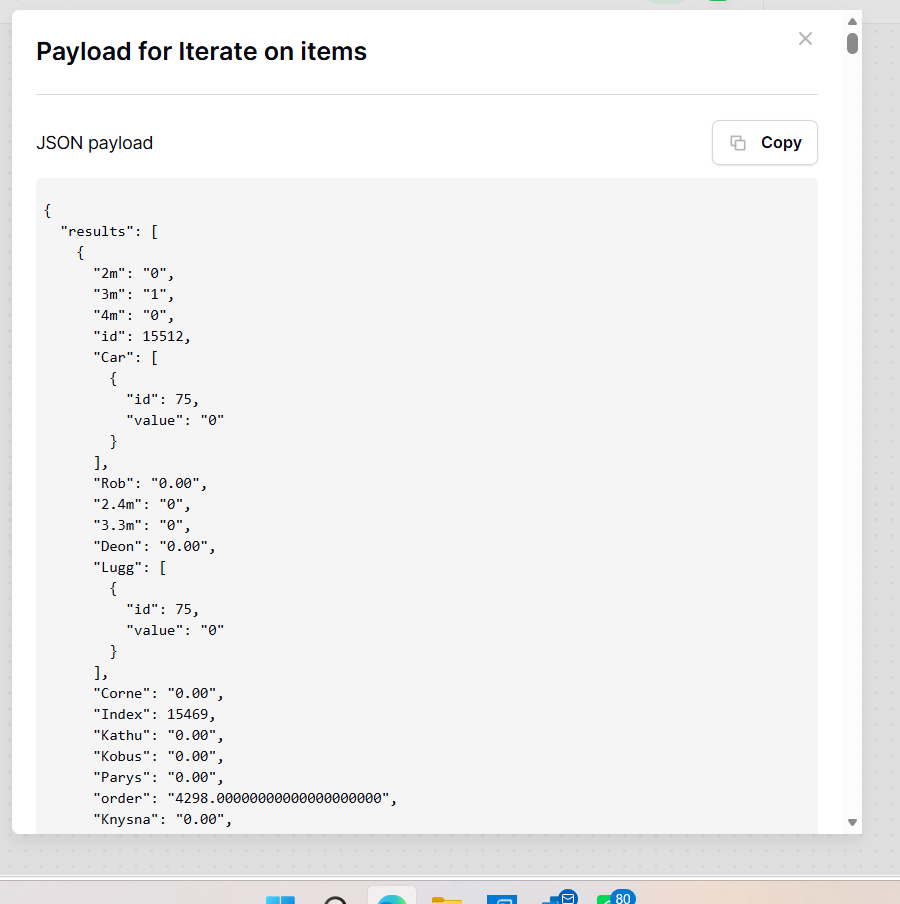
Could you screenshot the output of the `Iterate on items`? Like this:
Cheers,
Peter
---
### Author:  [@Rickus3126](https://community.baserow.io/u/Rickus3126)
#### Post date: [June 11, 2026, 9:14am UTC](https://community.baserow.io/t/automations-clearing-a-boolean-field/12507/17 "2026-06-11T09:14:45Z")
---
### Author:  [@picklepete](https://community.baserow.io/u/picklepete)
#### Post date: [June 11, 2026, 9:17am UTC](https://community.baserow.io/t/automations-clearing-a-boolean-field/12507/18 "2026-06-11T09:17:28Z")
Thanks @Rickus3126,
I think something else is going on, and screenshots might not get us there quickly! Would you mind exporting this application & database, clicking “Export structure only” (this won’t share any sensitive data with me, just the structure of the applications) and sending it to me as a direct message? You should be able to by going to my [profile page](https://community.baserow.io/u/picklepete/summary).
Cheers,
Peter
---
### Author:  [@Rickus3126](https://community.baserow.io/u/Rickus3126)
#### Post date: [June 11, 2026, 9:20am UTC](https://community.baserow.io/t/automations-clearing-a-boolean-field/12507/19 "2026-06-11T09:20:47Z")
---
### Author:  [@picklepete](https://community.baserow.io/u/picklepete)
#### Post date: [June 15, 2026, 1:12pm UTC](https://community.baserow.io/t/automations-clearing-a-boolean-field/12507/20 "2026-06-15T13:12:36Z")
Thanks for the export @Rickus3126! I can confirm things are working correctly. Two things to note:
1. “Update a row” definitely needs to have a row ID of: `Current iteration` → `Iterate on items` → `Item` → `id`. This ensures that when you loop over your rows, Baserow is updating the correct row.
1. The reason why you saw that error (about `row_id` not being numeric) is because the nodes above it had stale test data. If substantial changes are made to the nodes above, you need to click “test event” again to make sure each node has the correct test data to work with.
I tested these changes by:
1. Showing your hidden field in the table, and checking the checkbox in a few rows
2. Updating that `row_id` in automation so that it used `Item` → `id`
3. Clicking “Start test run”
My rows all have an unchecked boolean field now 🎉
Thank you for sharing the export, I hope the above works for you.
Cheers,
Peter
[Next page](https://community.baserow.io/t/automations-clearing-a-boolean-field/12507.md?page=2)