# Bug UI: Row Identifier column truncates 4+ digit values, making them unreadable
**URL:** https://community.baserow.io/t/bug-ui-row-identifier-column-truncates-4-digit-values-making-them-unreadable/13018
**Category:** Technical Help
**Tags:** view, baserow
**Created:** [October 4, 2026, 6:24am UTC](https://community.baserow.io/t/bug-ui-row-identifier-column-truncates-4-digit-values-making-them-unreadable/13018 "2026-10-04T06:24:59Z")
**Posts on this page:** 5
**Page:** 1
### Author:  [@khalil.io](https://community.baserow.io/u/khalil.io)
#### Post date: [October 4, 2026, 6:24am UTC](https://community.baserow.io/t/bug-ui-row-identifier-column-truncates-4-digit-values-making-them-unreadable/13018/1 "2026-10-04T06:24:59Z")
### Are you using our SaaS platform ([Baserow.io](http://Baserow.io)) or self-hosting Baserow?
SaaS
### What are the exact steps to reproduce this issue?
In the Grid view of a table, the Row Identifier column truncates values of 4 or more digits, making the numbers nearly impossible to read. Additionally, the width of this column cannot be resized.
### Attach screenshots, videos, or logs that demonstrate the issue.
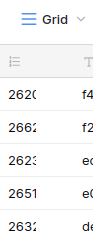
---
### Author:  [@davide](https://community.baserow.io/u/davide)
#### Post date: [October 5, 2026, 9:40am UTC](https://community.baserow.io/t/bug-ui-row-identifier-column-truncates-4-digit-values-making-them-unreadable/13018/2 "2026-10-05T09:40:08Z")
Hey @khalil.io,
which browser are you using?
Is your browser zoom set to anything other than 100%? That might cause this problem.
Row IDs should be clearly visible up to 6 numbers


---
### Author:  [@khalil.io](https://community.baserow.io/u/khalil.io)
#### Post date: [October 17, 2026, 6:48am UTC](https://community.baserow.io/t/bug-ui-row-identifier-column-truncates-4-digit-values-making-them-unreadable/13018/3 "2026-10-17T06:48:03Z")
Hello @davide,
Sorry for the delay in responding.
Browsers tested:
```
Zen Browser (Firefox-based)
Helium Browser (Chrome-based)
```
Zoom is at 100%; reducing it doesn’t help either.
---
### Author:  [@olgatrykush](https://community.baserow.io/u/olgatrykush)
#### Post date: [October 22, 2026, 4:19pm UTC](https://community.baserow.io/t/bug-ui-row-identifier-column-truncates-4-digit-values-making-them-unreadable/13018/4 "2026-10-22T16:19:49Z")
Hey @khalil.io, I just tested it in Zen Browser, and it works with 4+ digits (all the digits are visible). 🤔

---
### Author:  [@khalil.io](https://community.baserow.io/u/khalil.io)
#### Post date: [October 22, 2026, 4:58pm UTC](https://community.baserow.io/t/bug-ui-row-identifier-column-truncates-4-digit-values-making-them-unreadable/13018/5 "2026-10-22T16:58:41Z")
Hi @olgatrykush,
I just updated Zen Browser to the latest version (1.23.4b (Firefox 158.0.1) (64-bit)). The problem persists. Is the Zen Browser you’re using running on Linux? Maybe that’s where the difference — and the problem — lies.
I tried several zoom levels and there was no variation either.
Zoom 100%

Zoom 50%

Zoom 180%

I’m also attaching some screenshots from the browser’s Inspector:


To try to match your screenshot, **in which the margin-left isn’t so reduced** , I disabled the flex and **now it displays correctly** :


```auto
.grid-view__row-info {
align-items: center;
line-height: 32px;
/* display: flex; */
}
```