# Custom Domain Issue On Render
**URL:** https://community.baserow.io/t/custom-domain-issue-on-render/5956
**Category:** Technical Help
**Tags:** self-hosting
**Created:** [August 23, 2024, 11:39am UTC](https://community.baserow.io/t/custom-domain-issue-on-render/5956 "2024-08-23T11:39:10Z")
**Posts on this page:** 3
**Page:** 1
### Author:  [@techteamup](https://community.baserow.io/u/techteamup)
#### Post date: [August 23, 2024, 11:39am UTC](https://community.baserow.io/t/custom-domain-issue-on-render/5956/1 "2024-08-23T11:39:10Z")
_Note that I added (.) in place of . because I’m restricted on the allowed number of URLs in the post._
#### How have you self-hosted Baserow.
I used Render, using the button here: [Installation on Render](https://baserow.io/docs/installation%2Finstall-on-render)
#### What are the specs of the service or server you are using to host Baserow.
Render Standard with 1 core and 2GB RAM (the default)
#### Which version of Baserow are you using.
1.26.1
#### How have you configured your self-hosted installation?
It’s using the default Render Build & Deploy settings from the docs page above.
#### What commands if any did you use to start your Baserow server?
It ran via the button install - there don’t appear to be any commands in the Render settings.
### Describe the problem
Baserow is working on the default Render domain, but on a custom Render domain it returns a 404 error.
#### Describe, step by step, how to reproduce the error or problem you are encountering.
Everything works correctly on the default Render domain, currently “baserow-f7ie(.)onrender(.)com” but when a custom domain is added, such as “data(.)techteamup(.)com” the custom domain returns a 404 Site not found page, and the default Render domain keeps working.
I have tried a fresh install, but had the same issue.
I have set the BASEROW\_PUBLIC\_URL in the Render Environment Variables, but the problem persists.
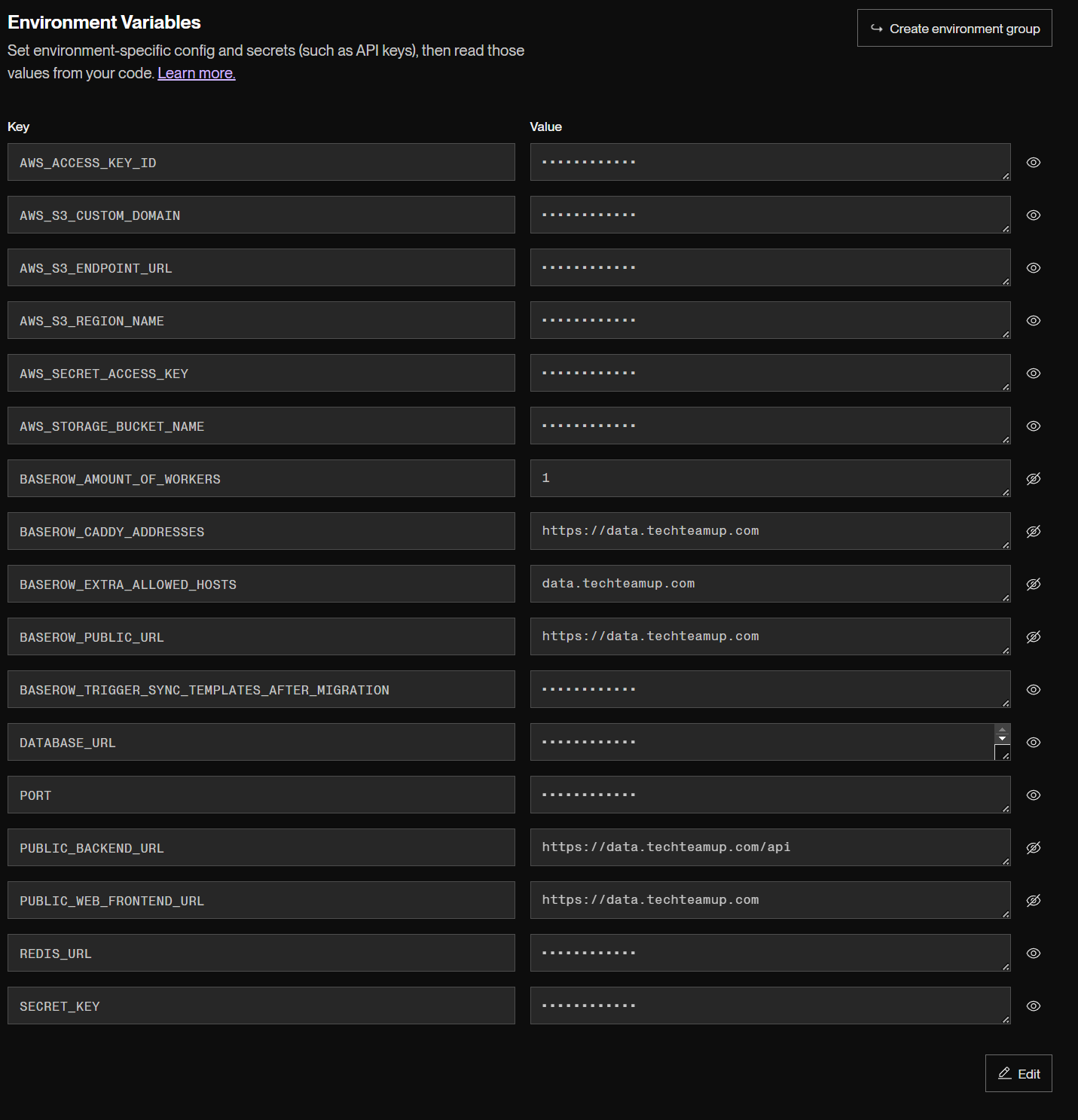
I have also tried setting the other variables to this domain, BASEROW\_CADDY\_ADDRESSES, BASEROW\_EXTRA\_ALLOWED\_HOSTS, PUBLIC\_BACKEND\_URL, PUBLIC\_WEB\_FRONTEND\_URL in case that made a difference, but it hasn’t. Screenshot of environment variables:
These are the only logged errors when trying to access [data.techteamup.com](http://data.techteamup.com):
[GET] 404 data(.)techteamup(.)com/ clientIP=“135.148.100.196” requestID=“0aa98f21-536a-4833” responseTimeMS=506 responseBytes=164832 userAgent=“”
WARNING 2024-08-23 11:35:31,226 django.request.log\_response:241- Not Found: /api/builder/domains/published/by\_name/data(.)techteamup(.)com/
I discussed this with Render support, but they’re sure it’s a problem with the app.
---
### Author:  [@bram](https://community.baserow.io/u/bram)
#### Post date: [August 28, 2024, 8:26am UTC](https://community.baserow.io/t/custom-domain-issue-on-render/5956/2 "2024-08-28T08:26:31Z")
Hi @techteamup, I’m not a render expert, but I looked into it. With the Baserow render deployment, it looks like it overwrites `BASEROW_PUBLIC_URL` with the `RENDER_EXTERNAL_URL` environment it receives. That means that there is no point in manually setting `BASEROW_PUBLIC_URL`.
Do you know if it’s possible to change the `RENDER_EXTERNAL_URL`, either via environment variables, or maybe by promoting your custom domain to a primary domain (or something like that)?
It also won’t have an effect to set `PUBLIC_WEB_FRONTEND_URL`, `PUBLIC_BACKEND_URL`, `BASEROW_CADDY_ADDRESS` and `BASEROW_EXTRA_ALLOWED_HOSTS`.
---
### Author:  [@bram](https://community.baserow.io/u/bram)
#### Post date: [August 28, 2024, 8:28am UTC](https://community.baserow.io/t/custom-domain-issue-on-render/5956/3 "2024-08-28T08:28:36Z")
This is the `.sh` script we use to configure the correct environment variables [deploy/render/render\_env.sh · develop · Baserow / baserow · GitLab](https://gitlab.com/baserow/baserow/-/blob/develop/deploy/render/render_env.sh?ref_type=heads). I guess that changing line 5 to something like:
```auto
export BASEROW_PUBLIC_URL=${BASEROW_PUBLIC_URL:-$RENDER_EXTERNAL_URL}
```
would solve your problem, but it does require you to wait for the next release.