# Custom port appears in published app URL
**URL:** https://community.baserow.io/t/custom-port-appears-in-published-app-url/11706
**Category:** Uncategorized
**Created:** [December 11, 2025, 1:53pm UTC](https://community.baserow.io/t/custom-port-appears-in-published-app-url/11706 "2025-12-11T13:53:18Z")
**Posts on this page:** 2
**Page:** 1
### Author:  [@umbighouse](https://community.baserow.io/u/umbighouse)
#### Post date: [December 11, 2025, 1:53pm UTC](https://community.baserow.io/t/custom-port-appears-in-published-app-url/11706/1 "2025-12-11T13:53:18Z")
I setup a self hosted Baserow Docker install. My docker-compose.yml file is shown below.
- I’m using the v2.0.3 all-in-one image
- I use a custom port for Baserow (in this example, 12345)
- This setup sits behind an Nginx Proxy Manager reverse proxy.
I can access Baserow at **[http://192.168.1.xx:12345](http://192.168.1.xx:12345)** fine. The issue I’m having is that when I publish an Application Builder app, it turns the URL into something like this:
**[https://baserowapp.mydomain.com:12345](https://baserowapp.mydomain.com:12345)**
This link doesn’t work. However, if I use **[https://baserowapp.mydomain.com](https://baserowapp.mydomain.com)**, it works fine.
How can I keep Baserow from including the custom port in the published app URL?
**docker-compose.yml**
services:
baserow:
container\_name: baserow
image: baserow/baserow:2.0.3
environment:
BASEROW\_PUBLIC\_URL: ‘[http://192.168.1.xx:12345](http://192.168.1.xx:12345)’
BASEROW\_EXTRA\_ALLOWED\_HOSTS: ‘192.168.1.xx,[http://baserowapp.mydomain.com](http://baserowapp.mydomain.com)’
ports:
- “12345:80”
- “56789:443”
volumes:
- baserow\_data:/baserow/data
volumes:
baserow\_data:
**Nginx Proxy Manager**
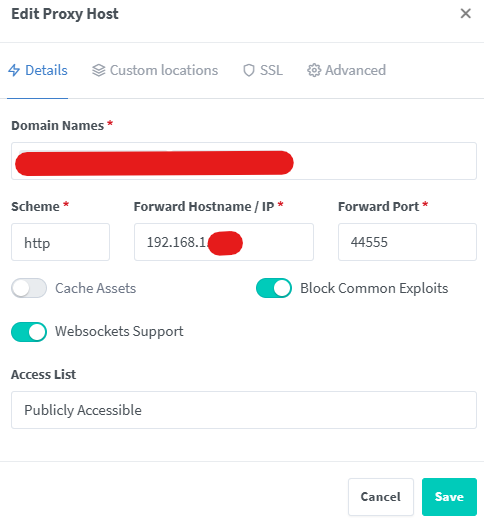
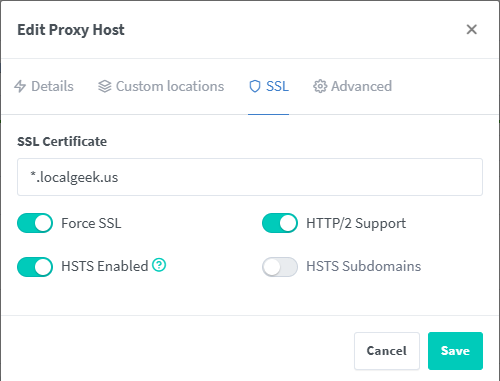
ps- I have a **Caddyfile** in the same Docker directory, but not sure if it’s needed. It’s the default one- I didn’t make any changes to it.
> {
> on\_demand\_tls {
> ask {$PRIVATE\_BACKEND\_URL:localhost:8000}/api/builder/domains/ask-public-domain-exists/
> }
>
> ```auto
> {$BASEROW_CADDY_GLOBAL_CONF}
>
> ```
>
> }
>
> {$BASEROW\_CADDY\_ADDRESSES} {
> tls {
> on\_demand
> }
>
> ```auto
> @is_baserow_tool {
> expression "{$BASEROW_PUBLIC_URL}".contains({http.request.host})
> }
>
> handle @is_baserow_tool {
> handle /api/* {
> reverse_proxy {$PRIVATE_BACKEND_URL:localhost:8000}
> }
>
> handle /ws/* {
> reverse_proxy {$PRIVATE_BACKEND_URL:localhost:8000}
> }
>
> handle /mcp/* {
> reverse_proxy {$PRIVATE_BACKEND_URL:localhost:8000}
> }
>
> handle /assistant/* {
> reverse_proxy {$PRIVATE_BACKEND_URL:localhost:8000}
> }
>
> handle_path /media/* {
> @downloads {
> query dl=*
> }
> header @downloads Content-disposition "attachment; filename={query.dl}"
>
> # Allow to call head from public url to get size
> header {
> Access-Control-Allow-Origin {$BASEROW_PUBLIC_URL:http://localhost}
> Access-Control-Allow-Methods "GET, HEAD, OPTIONS"
> Access-Control-Allow-Headers "*"
> Access-Control-Expose-Headers "Content-Length, Content-Type"
> }
>
> file_server {
> root {$MEDIA_ROOT:/baserow/media/}
> }
> }
>
> handle_path /static/* {
> file_server {
> root {$STATIC_ROOT:/baserow/static/}
> }
> }
> }
>
> reverse_proxy {$PRIVATE_WEB_FRONTEND_URL:localhost:3000}
>
> ```
>
> }
---
### Author:  [@davide](https://community.baserow.io/u/davide)
#### Post date: [December 12, 2025, 12:57pm UTC](https://community.baserow.io/t/custom-port-appears-in-published-app-url/11706/2 "2025-12-12T12:57:16Z")
Hey @umbighouse,
have you tried setting ` BASEROW_PUBLIC_URL=https://baserowapp.mydomain.com`?
You should be able to find the right settings for your setup here: [Installing Baserow behind Nginx](https://baserow.io/docs/installation%2Finstall-behind-nginx)