# Email Automation Sends Empty Emails – Variables Not Populating
**URL:** https://community.baserow.io/t/email-automation-sends-empty-emails-variables-not-populating/12618
**Category:** Automations Builder
**Created:** [July 3, 2026, 12:07pm UTC](https://community.baserow.io/t/email-automation-sends-empty-emails-variables-not-populating/12618 "2026-07-03T12:07:05Z")
**Posts on this page:** 3
**Page:** 1
### Author:  [@jos](https://community.baserow.io/u/jos)
#### Post date: [July 3, 2026, 12:07pm UTC](https://community.baserow.io/t/email-automation-sends-empty-emails-variables-not-populating/12618/1 "2026-07-03T12:07:05Z")
I’m trying to set up a simple automation to send an email reminder on the day of a concert. Musicians submit gigs through a form linked to my WhatsApp channel, and the data is stored in a `Gig Submissions` table.
The automation has three parts:
1. **Trigger:** “Rows are created” on the `Gig Submissions` table.
2. **Router:** Checks if the `Fecha del concierto / Concert Date` is today.
3. **Send Email:** Sends a reminder to `jos@alofto.com` with the concert details.
**The Problem:**
The automation **sends the emails** , but the **email body is empty** – none of the field values are populating.
**What I Have Tried (and the results):**
1. **SMTP Integration is Working:** I can send emails successfully via the “Send Email” node when I use **static text** (e.g., “This is a test”). I also receive the built-in **form notification** emails, so the SMTP setup is correct.
2. **Router Condition Works:** The Router node correctly identifies concerts happening today. If I change the condition to check for yesterday, the emails stop. If I keep it on `today()`, the emails are sent. The issue is not with the Router’s logic.
3. **Variable Syntax Attempts:** I have tried the following syntaxes in the Subject and Body fields, but none of them populate with data:
4. **“Get a single row” Workaround:** I attempted to use a “Get a single row” node after the Router. However, the Router only outputs “Branch taken” and does not pass the `row_id`, so the “Get a single row” node cannot fetch the correct record.
5. **Testing Limitations:** When I use “Start test run” and select a specific row, the test completes successfully, but the resulting email is still empty. The workflow is in **Draft** mode, but the test should still populate variables.
6. **Field IDs are Correct:** I have confirmed the internal field IDs (e.g., `field_9250689` for `Grupo / Band`), but using them in the `{{ get('...') }}` function does not work in the email node.
**Summary:**
The email is being sent, the Router condition is working, and the SMTP integration is functional. **The core issue is that variable references in the “Send Email” node are not being replaced with actual field values.**
Has anyone else encountered this bug? Is there a specific formula syntax for the Automation Builder’s “Send Email” node that I am missing? Or is this a known issue with the Automation Builder?
Thank you for any help!
---
### Author:  [@olgatrykush](https://community.baserow.io/u/olgatrykush)
#### Post date: [July 13, 2026, 10:44am UTC](https://community.baserow.io/t/email-automation-sends-empty-emails-variables-not-populating/12618/3 "2026-07-13T10:44:22Z")
Hello @jos, sorry for the delay and thanks for the detailed explanation! Could you let us know whether you’re using Baserow Cloud or a self-hosted instance? If you’re self-hosting, could you also share your Baserow version and how you’re deploying it (e.g. Docker, Docker Compose, Kubernetes)?
---
### Author:  [@frederikdc](https://community.baserow.io/u/frederikdc)
#### Post date: [July 16, 2026, 11:41am UTC](https://community.baserow.io/t/email-automation-sends-empty-emails-variables-not-populating/12618/4 "2026-07-16T11:41:39Z")
Hi,
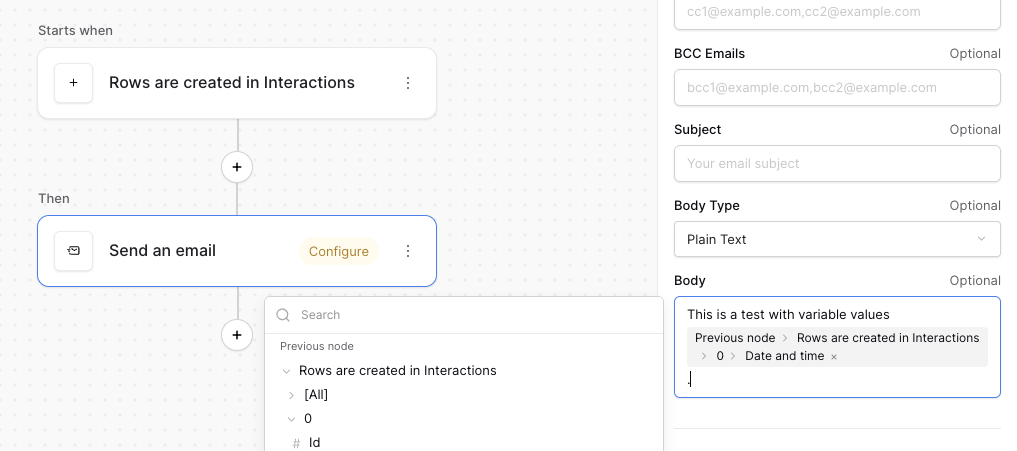
The problem might be in the syntax you use to compose the email. You don’t need any brackets like some HTML template engines, but just referring to the field you want to fill in.
Check the screenshot below as an example