# Filter from other table
**URL:** https://community.baserow.io/t/filter-from-other-table/9363
**Category:** Application Builder
**Created:** [February 3, 2025, 2:47pm UTC](https://community.baserow.io/t/filter-from-other-table/9363 "2025-02-03T14:47:07Z")
**Posts on this page:** 14
**Page:** 1
### Author:  [@patrick](https://community.baserow.io/u/patrick)
#### Post date: [February 3, 2025, 2:47pm UTC](https://community.baserow.io/t/filter-from-other-table/9363/1 "2025-02-03T14:47:07Z")
Hi. Is it possible to create a filter in an application builder table from a linked database table?
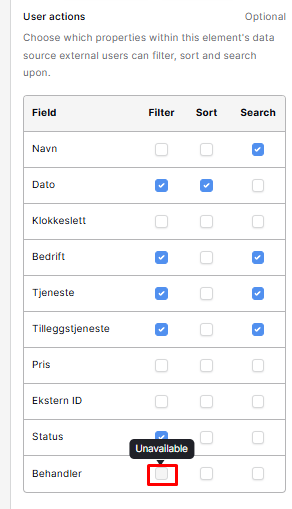
I have a table for users and a table for cases. I want to let application users filter cases based on the connected user for those cases in a application builder table, but the filter field seem to be inactive and unavailable:
---
### Author:  [@picklepete](https://community.baserow.io/u/picklepete)
#### Post date: [February 3, 2025, 2:51pm UTC](https://community.baserow.io/t/filter-from-other-table/9363/2 "2025-02-03T14:51:37Z")
Hi @patrick,
I’m afraid at the moment the following field types are not filterable:
- Link to table
- Created by
- Modified by
- Collaborators
We hope to improve upon them in the future, but at the moment you will see “Unavailable” when you hover over their checkboxes.
Cheers,
Peter Evans
---
### Author:  [@patrick](https://community.baserow.io/u/patrick)
#### Post date: [February 3, 2025, 2:57pm UTC](https://community.baserow.io/t/filter-from-other-table/9363/3 "2025-02-03T14:57:49Z")
Ok, thank you for the quick reply! Any workarounds for this? I tried to add a formula and a lookup field to duplicate the value to another field type but that didn’t work.
---
### Author:  [@picklepete](https://community.baserow.io/u/picklepete)
#### Post date: [February 4, 2025, 9:04am UTC](https://community.baserow.io/t/filter-from-other-table/9363/4 "2025-02-04T09:04:01Z")
Hi @patrick,
I asked our specialist, @frederikdc about this, and he suggested that you create a rollup or formula field that converts the primary field (the first one on the left in your “Behandler” table) to a single text field. You can then allow logged-in users to filter upon that single text field from the application builder.
I hope this helps!
Cheers,
Peter Evans
---
### Author:  [@patrick](https://community.baserow.io/u/patrick)
#### Post date: [February 5, 2025, 11:33am UTC](https://community.baserow.io/t/filter-from-other-table/9363/5 "2025-02-05T11:33:34Z")
Thanks for the suggestion. I couldn’t figure this out using a rollup or formula field, but I added automation using webhook and Make to duplicate the value from the link to table-field to a single select-field which I’m able to filter on in the application builder.
---
### Author:  [@spook](https://community.baserow.io/u/spook)
#### Post date: [May 23, 2025, 4:48am UTC](https://community.baserow.io/t/filter-from-other-table/9363/6 "2025-05-23T04:48:06Z")
> [@picklepete](#):
>
> that converts the primary field (the first one on the left in your “Behandler” table) to a single text field. Y
Sorry to hijack this thread, but I thought it might be better than starting a new one as I think I’m having the same issue, and I must be doing something wrong when trying to follow your advice…
I have 2 linked tables: Policies and Customers
- I have created a rollup field in “Policies” with the function “max” to look up the CustomerID form the Customers table
- In the App Builder, when I create a table using “Policies” as my data source, I cannot filter by CustomerID
- So I created a formula field which is basically `totext(field('Customer ID'))`. But I still can’t filter by that in the App Builder.
What am I doing wrong?
Thanks in advance.
---
### Author:  [@cwinhall](https://community.baserow.io/u/cwinhall)
#### Post date: [May 26, 2025, 10:15am UTC](https://community.baserow.io/t/filter-from-other-table/9363/7 "2025-05-26T10:15:49Z")
> [@spook](#):
>
> totext(field(‘Customer ID’))
The `totext` function is still actually going to return an object rather than a string that you are expecting. Could you test the formula `join(field(‘Customer ID’),‘,’) to see if this works as you’d expect?
---
### Author:  [@spook](https://community.baserow.io/u/spook)
#### Post date: [May 28, 2025, 6:18am UTC](https://community.baserow.io/t/filter-from-other-table/9363/8 "2025-05-28T06:18:10Z")
> [@cwinhall](#):
>
> join(field(‘Customer ID’),‘,’)
Thanks for the reply. I tried a few options:
`join(field('Customer ID'),',')` failed with error: “Error with formula: argument number 1 given to function join was of type number but the only usable type for this argument is a list of text values obtained from a lookup.”
`join(totext(field('Customer ID')),',')` also failed with error: “Error with formula: argument number 1 given to function join was of type text but the only usable type for this argument is a list of text values obtained from a lookup.”
So I tried creating a lookup field called `cust-id` insread of using a roll-up as my souce field. So my formula was now `join(totext(field('cust-id')),',')`. This actually worked, but I still can’t filter by that field:

---
### Author:  [@spook](https://community.baserow.io/u/spook)
#### Post date: [June 2, 2025, 5:27am UTC](https://community.baserow.io/t/filter-from-other-table/9363/9 "2025-06-02T05:27:44Z")
Hi @cwinhall or @olgatrykush , sorry to bug you, but do you have any ideas about this?
---
### Author:  [@olgatrykush](https://community.baserow.io/u/olgatrykush)
#### Post date: [June 5, 2025, 11:05am UTC](https://community.baserow.io/t/filter-from-other-table/9363/10 "2025-06-05T11:05:13Z")
@cwinhall or @picklepete any ideas on what is going wrong here? 🤔
---
### Author:  [@be\_Berlin](https://community.baserow.io/u/be_Berlin)
#### Post date: [June 5, 2025, 8:42pm UTC](https://community.baserow.io/t/filter-from-other-table/9363/11 "2025-06-05T20:42:01Z")
Hi @spook ,
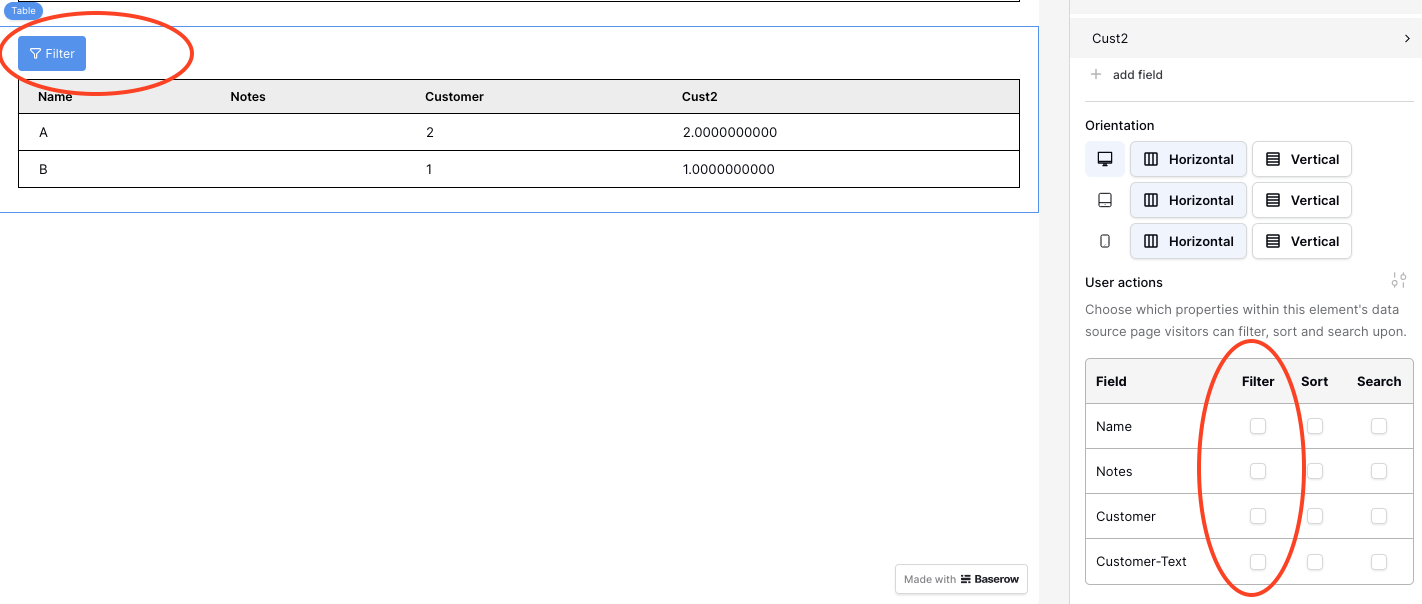
I tried it myself and for the first moment it looks like if I have the same problem: within the backend of the Application builder the checkboxes for Customer-ID can’t be activated (more precise: they don’t react to a mouse click)
BUT: At the moment I wanted to give up I noticed that nevertheless a new FILTER-Button has appeared left top of the table. I switched to “preview”-mode and found that the filter worked as expected.
See also Screenshot.
Is it a table within the Application Builder that you would like to add a filter? Have you checked if you can filter for the customer-ID ALTHOUGH you can’t click the check-box (more precise: it looks like if you can’t click)
---
### Author:  [@spook](https://community.baserow.io/u/spook)
#### Post date: [June 6, 2025, 3:42am UTC](https://community.baserow.io/t/filter-from-other-table/9363/12 "2025-06-06T03:42:12Z")
> [@be\_Berlin](#):
>
> in the Application Builder that you would like to add a filter? Have you checked if you can filter for the customer
Thanks for your reply @be_Berlin. I checked and unfortunately, that isn’t the case for me. I can filter by other fields, and the “Filter” button appears, but I still can’t filter by the Customer ID. In fact, if I hover over the toggle to filter it, it says “Unavailable”.
---
### Author:  [@picklepete](https://community.baserow.io/u/picklepete)
#### Post date: [June 6, 2025, 10:16am UTC](https://community.baserow.io/t/filter-from-other-table/9363/13 "2025-06-06T10:16:59Z")
Hello everyone, apologies for the slow reply.
Since the launch of the application builder external user sorting/filtering feature, the following fields have not been supported for _filtering_:
1. Link to table
2. Created by
3. Modified by
4. Collaborators
In a repeat, or table element, if you wish to applying filtering on those fields, you will see an “Unavailable” label appear ontop of a disabled checkbox.
This is because we have some technical limitations in the application builder that prevent those field types from working correctly, they will require more development to be fully supported.
It’s also worth remembering that if you construct a formula, where the _resulting field type_ becomes one of those 4 fields, you will still be unable to filter upon it.
@spook - based on this:
> So I tried creating a lookup field called `cust-id` insread of using a roll-up as my souce field. So my formula was now `join(totext(field('cust-id')),',')` . This actually worked, but I still can’t filter by that field:
That formula must resolve into one of those 4 fields, which means you’re unable to filter upon it, that’s why the checkbox is disabled.
Hopefully at some point we will be able to dedicate some resources to this problem and fully flesh out external user filtering for all fields, but in the meantime we have to leave this “Unavailable” label in place, please accept my apologies for the inconvenience!
Cheers,
Peter Evans
---
### Author:  [@spook](https://community.baserow.io/u/spook)
#### Post date: [June 8, 2025, 6:14am UTC](https://community.baserow.io/t/filter-from-other-table/9363/14 "2025-06-08T06:14:33Z")
Thanks Peter. Can you think of any way I can make a formula that will allow me to filter it?