# How to delete a field (formula) with reference to a previously deleted field?
**URL:** https://community.baserow.io/t/how-to-delete-a-field-formula-with-reference-to-a-previously-deleted-field/9567
**Category:** Uncategorized
**Created:** [February 28, 2025, 8:47am UTC](https://community.baserow.io/t/how-to-delete-a-field-formula-with-reference-to-a-previously-deleted-field/9567 "2025-02-28T08:47:09Z")
**Posts on this page:** 3
**Page:** 1
### Author:  [@DavidCeulemans](https://community.baserow.io/u/DavidCeulemans)
#### Post date: [February 28, 2025, 8:47am UTC](https://community.baserow.io/t/how-to-delete-a-field-formula-with-reference-to-a-previously-deleted-field/9567/1 "2025-02-28T08:47:09Z")
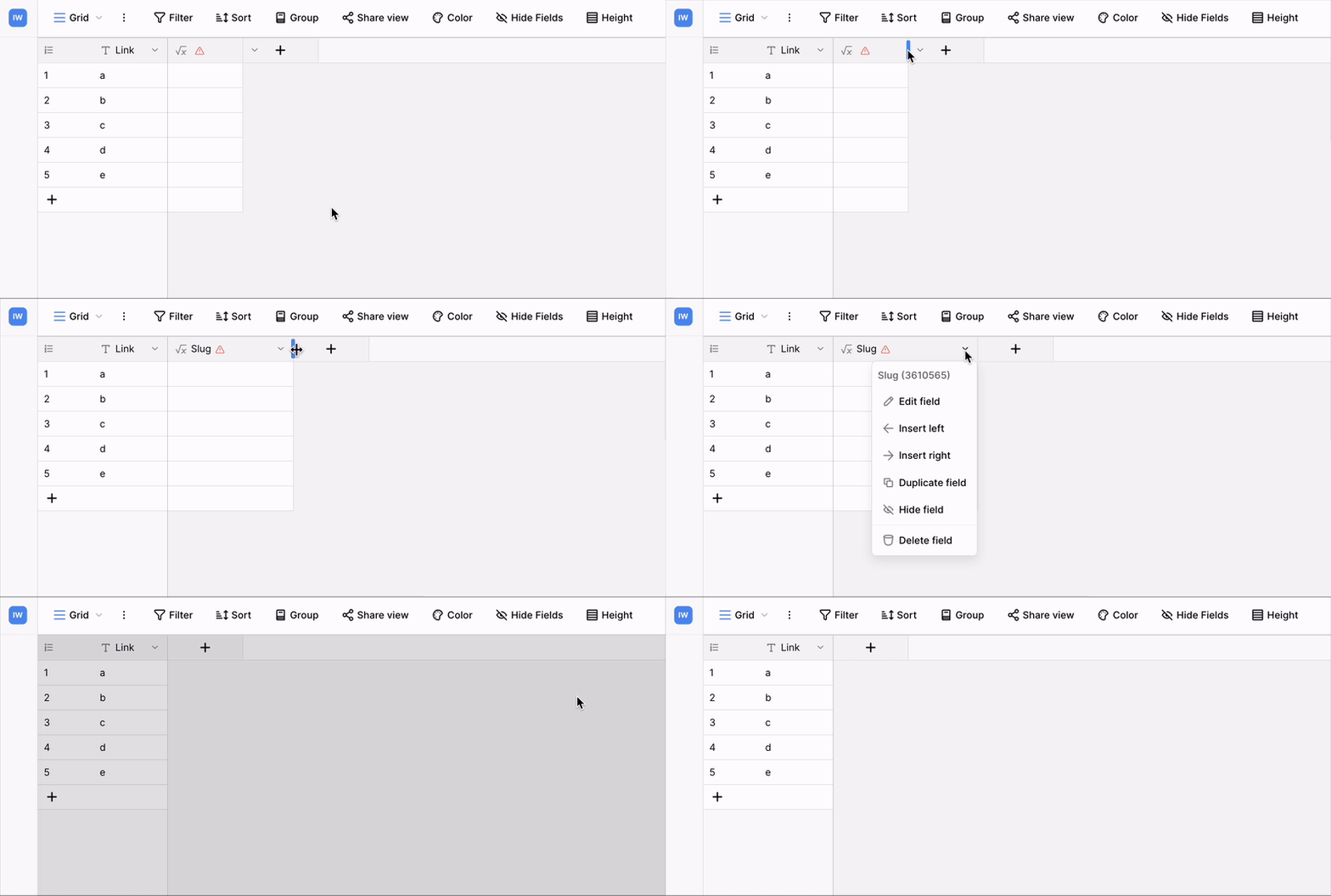
I have several formula fields that have references to delete fields. I can’t seem to perform actions on them (also no delete), and there name isn’t shown.
I could ‘hide’ them, but I want to remove those.
how can I do that?
thanks,
David
---
### Author:  [@olgatrykush](https://community.baserow.io/u/olgatrykush)
#### Post date: [March 4, 2025, 8:29am UTC](https://community.baserow.io/t/how-to-delete-a-field-formula-with-reference-to-a-previously-deleted-field/9567/2 "2025-03-04T08:29:53Z")
Hey @DavidCeulemans, could this be related to the field width?
---
### Author:  [@DavidCeulemans](https://community.baserow.io/u/DavidCeulemans)
#### Post date: [March 5, 2025, 8:20pm UTC](https://community.baserow.io/t/how-to-delete-a-field-formula-with-reference-to-a-previously-deleted-field/9567/3 "2025-03-05T20:20:51Z")
Olga,
Thank you, that was indeed the trick.
Wasn’t really obvious, but it works 😇
David