# Issues with N8N and Baserow Integration
**URL:** https://community.baserow.io/t/issues-with-n8n-and-baserow-integration/4130
**Category:** Technical Help
**Tags:** self-hosting, api, n8n
**Created:** [December 14, 2023, 11:02pm UTC](https://community.baserow.io/t/issues-with-n8n-and-baserow-integration/4130 "2023-12-14T23:02:50Z")
**Posts on this page:** 19
**Page:** 1
### Author:  [@seanclt](https://community.baserow.io/u/seanclt)
#### Post date: [December 14, 2023, 11:02pm UTC](https://community.baserow.io/t/issues-with-n8n-and-baserow-integration/4130/1 "2023-12-14T23:02:50Z")
### Self-Hosted Installation and Setup Questions
#### How have you self-hosted Baserow.
I have docker Desktop Installed on my MacBook 2019
#### What are the specs of the service or server you are using to host Baserow.
2.4 GHz 8-Core Intel Core i9
64GB RAM
#### Which version of Baserow are you using.
1.21.2
#### How have you configured your self-hosted installation?
#### What commands if any did you use to start your Baserow server?
Following command to configure & Run at the same time
docker run
–name baserow
-detach
-e BASEROW\_PUBLIC\_URL=baserow:9080
-e BASEROW\_CADDY\_ADDRESSES=baserow:9080
-v baserow\_volume:/baserow/data
-p 9080:80
-p 9443:443
–add-host baserow:172.17.0.2
–add-host n8n:172.17.0.3
–restart unless-stopped
baserow/baserow:latest
### Describe the problem
With these settings I am able to now Connect from my n8n using BASEROW\_PUBLIC\_URL
but none of the two URLs work in opening baserow Home page on my MacBook, it seems I can’t access the baserow from outside the docker
#### Describe, step by step, how to reproduce the error or problem you are encountering.
1. Start Baserow as shown above
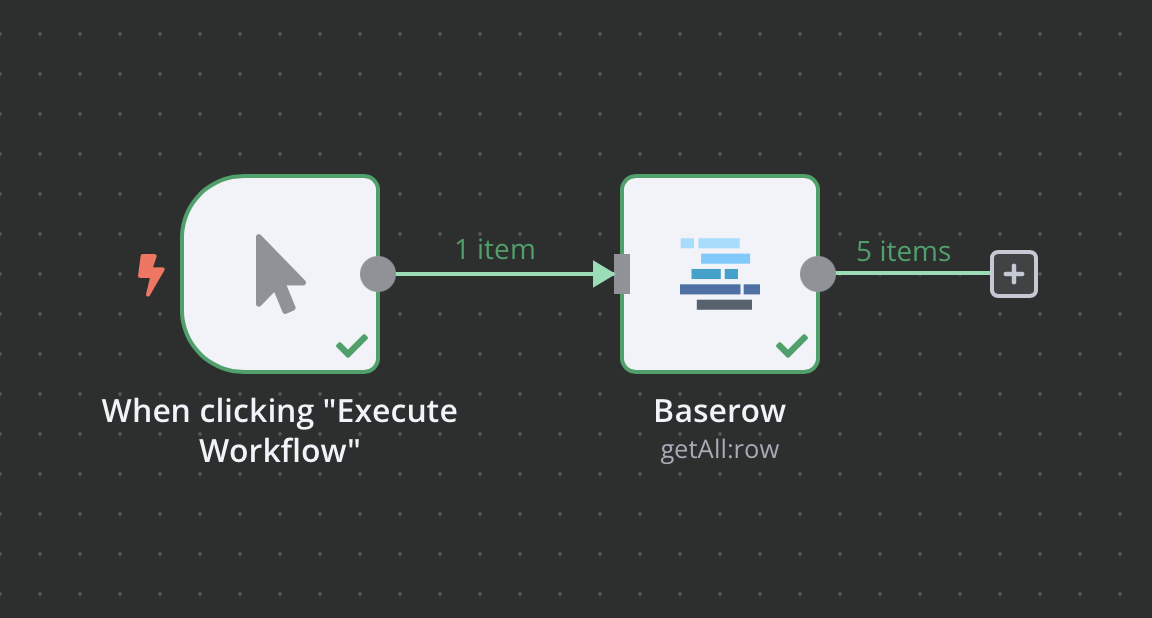
2. go to your n8n GUI on host machine \> Workflow \> add baserow as an action \> Get Row \> and the BASEROW\_PUBLIC\_URL will work for credentials
3. then also launch BASEROW\_PUBLIC\_URL on my host machine and it doesn’t work.
4. Unable to ping baserow from host machine
ping baserow
PING baserow (172.17.0.2): 56 data bytes
Request timeout for icmp\_seq 0
Request timeout for icmp\_seq 1
from the looks of it both containers are setup same way both are connected to bridge network automatically, I can hit n8n URL on my hostname but can’t do the same on my host machine, I did added bridge IP and hostname to my host file on my host machine
#### Provide screenshots or include share links showing
NA
#### How many rows in total do you have in your Baserow tables?
NA
#### Please attach full logs from all of Baserow’s services
couldn’t figure out how to attache a log file
---
### Author:  [@olgatrykush](https://community.baserow.io/u/olgatrykush)
#### Post date: [December 15, 2023, 10:35am UTC](https://community.baserow.io/t/issues-with-n8n-and-baserow-integration/4130/2 "2023-12-15T10:35:39Z")
@joffcom, we need your help here, please. 🙏
---
### Author:  [@joffcom](https://community.baserow.io/u/joffcom)
#### Post date: [December 15, 2023, 12:38pm UTC](https://community.baserow.io/t/issues-with-n8n-and-baserow-integration/4130/3 "2023-12-15T12:38:37Z")
Hey @seanclt,
Baserow isn’t a host that your machine can resolve, can you try localhost:9080 and see if that works?
---
### Author:  [@seanclt](https://community.baserow.io/u/seanclt)
#### Post date: [December 15, 2023, 1:11pm UTC](https://community.baserow.io/t/issues-with-n8n-and-baserow-integration/4130/4 "2023-12-15T13:11:03Z")
Good Morning
I tried all 3
localhost:9080
Baserow:9080
& 172.17.0.2:9080
I also added baserow 172.17.0.2 to my host file to see if it would help but it didn’t
I am unable to ping baserow ip but I can ping my n8n ip
---
### Author:  [@joffcom](https://community.baserow.io/u/joffcom)
#### Post date: [December 15, 2023, 5:00pm UTC](https://community.baserow.io/t/issues-with-n8n-and-baserow-integration/4130/5 "2023-12-15T17:00:30Z")
This is where docker networking gets tricky, where you have port for baserow set can you try using -p 0.0.0.0:9080:80 this will tell docker to listen on 9080 on all IPs and you might have more luck.
---
### Author:  [@seanclt](https://community.baserow.io/u/seanclt)
#### Post date: [December 15, 2023, 7:15pm UTC](https://community.baserow.io/t/issues-with-n8n-and-baserow-integration/4130/6 "2023-12-15T19:15:22Z")
Thank you, Greatly appreciate you looking into it
**Still having the same issue, Following is my updated command**
docker stop baserow
docker rm baserow
docker run
–name baserow
-detach
-e BASEROW\_PUBLIC\_URL=[http://baserow:9080](http://baserow:9080)
-e BASEROW\_CADDY\_ADDRESSES=[http://baserow:9080](http://baserow:9080)
-e HOST\_PUBLISH\_IP=127.0.0.1
-v baserow\_volume:/baserow/data
-p 0.0.0.0:9080:80
-p 9443:443
–add-host baserow:172.17.0.2
–add-host n8n:172.17.0.3
–restart unless-stopped
baserow/baserow:latest
Symptoms
1. Unable to hit any of the 3 URLs, localhost, baserow or IP from my Host machine (Mac)
2. can ping baserow from n8n machine
3. can do curl from baserow to n8n machine
I was wondering if these ports 5678(n8n) or 9880(baserow) would show up on my host machine if I do netstat -a
I am desperate this thing is keeping me up
---
### Author:  [@joffcom](https://community.baserow.io/u/joffcom)
#### Post date: [December 16, 2023, 6:27am UTC](https://community.baserow.io/t/issues-with-n8n-and-baserow-integration/4130/7 "2023-12-16T06:27:03Z")
🤔 so I suspect it will be the same issue still and we just need to let the baserow container know you can connect. From what I remember it is expecting you to connect using the baserow host but your machine doesn’t know what that is.
Luckily docker knows as you are telling it with the —add-hosts so each container can use the name with no issues.
I will set up baserow and n8n on my MacBook today and see if I can come up with a setup that works. I am sure it will just be a missing config option
---
### Author:  [@joffcom](https://community.baserow.io/u/joffcom)
#### Post date: [December 17, 2023, 12:20pm UTC](https://community.baserow.io/t/issues-with-n8n-and-baserow-integration/4130/8 "2023-12-17T12:20:18Z")
Hey @seanclt,
Assuming you are planning to keep baserow local and not expose it to the outside world all you need to do is update your hosts file to point `baserow` at the container for your local machine. If you were using a “proper” domain or tunnel service you wouldn’t need to worry about this.
The command below will add the record and you can use the docker compose file at the bottom is what I have used to get everything working.
```auto
echo '127.0.0.1 baserow' | sudo tee -a /etc/hosts
```
Docker Compose
```auto
version: "3.9"
services:
n8n:
container_name: n8n
image: docker.n8n.io/n8nio/n8n
ports:
- 5678:5678
networks:
- n8n-network
volumes:
- n8n_data:/home/node/.n8n
baserow:
container_name: baserow
image: baserow/baserow:latest
ports:
- 9080:80
- 9443:443
environment:
- BASEROW_PUBLIC_URL=http://baserow:9080
networks:
- n8n-network
volumes:
- baserow_data:/baserow/data
volumes:
n8n_data:
baserow_data:
networks:
n8n-network:
driver: bridge
```
---
### Author:  [@seanclt](https://community.baserow.io/u/seanclt)
#### Post date: [December 18, 2023, 5:34pm UTC](https://community.baserow.io/t/issues-with-n8n-and-baserow-integration/4130/9 "2023-12-18T17:34:06Z")
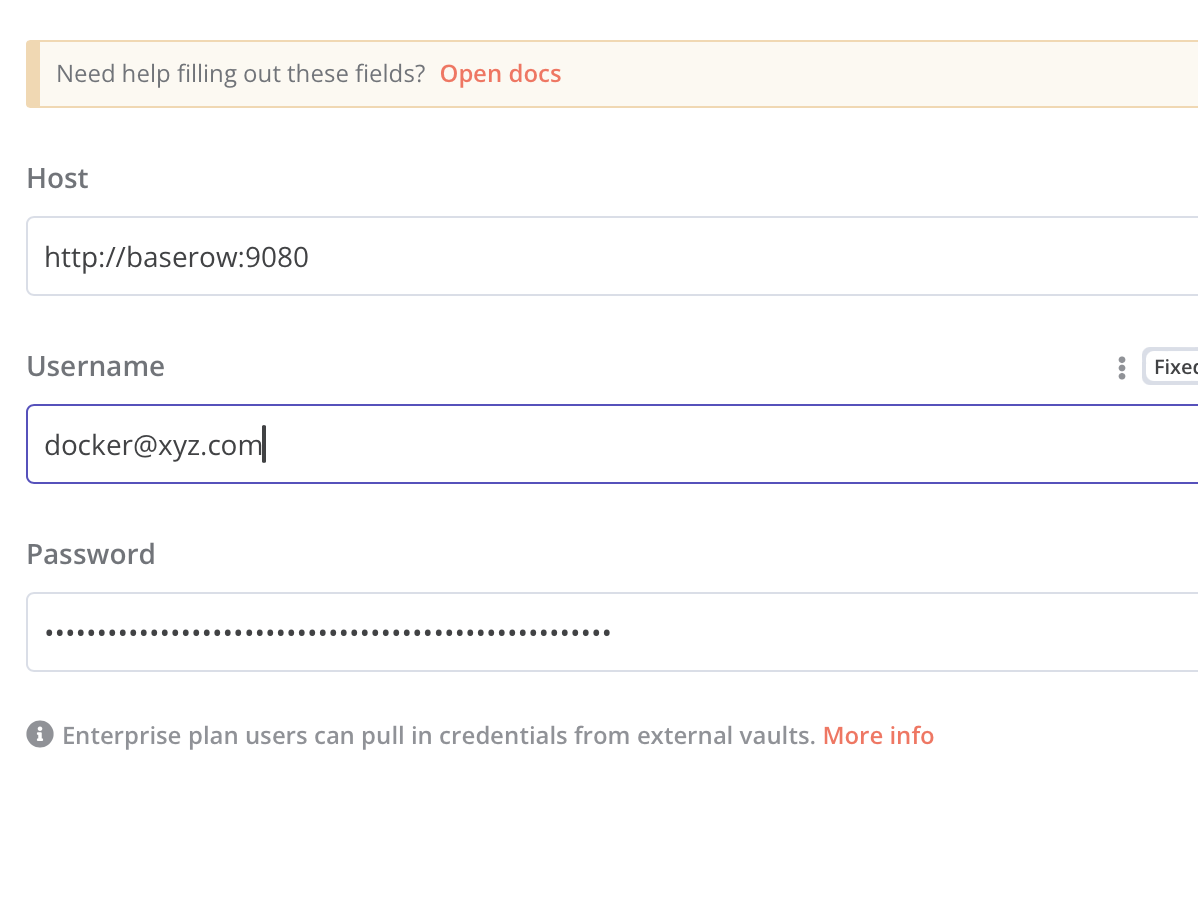
What Works
1. on my macOS : I can access both using localhost
2. on my n8n terminal : I can ping baserow
3. from my macOS : n8n GUI : I can’t access baserow using
Screenshots attached

---
### Author:  [@joffcom](https://community.baserow.io/u/joffcom)
#### Post date: [December 18, 2023, 6:31pm UTC](https://community.baserow.io/t/issues-with-n8n-and-baserow-integration/4130/10 "2023-12-18T18:31:57Z")
Hey @seanclt,
Is that using the compose file I put above?
---
### Author:  [@seanclt](https://community.baserow.io/u/seanclt)
#### Post date: [December 18, 2023, 6:45pm UTC](https://community.baserow.io/t/issues-with-n8n-and-baserow-integration/4130/11 "2023-12-18T18:45:13Z")
Hello yes
Exactly as is even using the host file entry on my macOS
I deleted all my images containers volumes left nothing
---
### Author:  [@joffcom](https://community.baserow.io/u/joffcom)
#### Post date: [December 18, 2023, 8:22pm UTC](https://community.baserow.io/t/issues-with-n8n-and-baserow-integration/4130/12 "2023-12-18T20:22:23Z")
From n8n can you try using 172.21.0.1 as the host with the 9080 port and let me know if that works.
---
### Author:  [@seanclt](https://community.baserow.io/u/seanclt)
#### Post date: [December 18, 2023, 8:48pm UTC](https://community.baserow.io/t/issues-with-n8n-and-baserow-integration/4130/13 "2023-12-18T20:48:15Z")
Hello
with [http://172.21.0.1:9080](http://172.21.0.1:9080) I get bad host
with [http://172.21.0.3:9080](http://172.21.0.3:9080) & [http://baserow:9080](http://baserow:9080) I get the following
ERROR: The service refused the connection - perhaps it is offline
connect ECONNREFUSED 172.21.0.3:9080
---
### Author:  [@seanclt](https://community.baserow.io/u/seanclt)
#### Post date: [December 18, 2023, 8:55pm UTC](https://community.baserow.io/t/issues-with-n8n-and-baserow-integration/4130/14 "2023-12-18T20:55:29Z")
I just added
- BASEROW\_CADDY\_ADDRESSES=[http://baserow:9080](http://baserow:9080)
to the compose file and now
1. n8n to API [http://baserow:9080](http://baserow:9080) works
2. browser on Mac can’t open [http://localhost:9080](http://localhost:9080)

something is odd here
1. without BASEROW\_CADDY\_ADDRESSES
browser can hit localhost:9080 but n8n can’t hit baserow:9080
2. with BASEROW\_CADDY\_ADDRESSES
browser can’t hit localhost:9080 but n8n can hit baserow:9080
---
### Author:  [@joffcom](https://community.baserow.io/u/joffcom)
#### Post date: [December 18, 2023, 9:57pm UTC](https://community.baserow.io/t/issues-with-n8n-and-baserow-integration/4130/15 "2023-12-18T21:57:21Z")
I tend to go without the caddy address as you don’t need it for your setup.
You could try adding the host options as well and removing the caddy part again, the problem here is there is technically no issue with n8n or baserow and it is down to docker networking being funky.
Are you planning to only keep baserow and n8n local or will you expose it to the outside world as well as that will change things as well.
---
### Author:  [@seanclt](https://community.baserow.io/u/seanclt)
#### Post date: [December 18, 2023, 10:31pm UTC](https://community.baserow.io/t/issues-with-n8n-and-baserow-integration/4130/16 "2023-12-18T22:31:26Z")
Long term plan is not to leave it on my local Mac, I might host it on azure or [slicie.com](http://slicie.com), I already have a ubuntu server with multi websites on it so might just host there.
at that point I’ll have sub domain name pointed to this
What am going to use this for.
1. I plan on going appsmith baserow & n8n route to build some in house apps
2. I am even looking at budibase, wondering if I can use buildibase with local db
---
### Author:  [@seanclt](https://community.baserow.io/u/seanclt)
#### Post date: [January 13, 2024, 2:54pm UTC](https://community.baserow.io/t/issues-with-n8n-and-baserow-integration/4130/17 "2024-01-13T14:54:34Z")
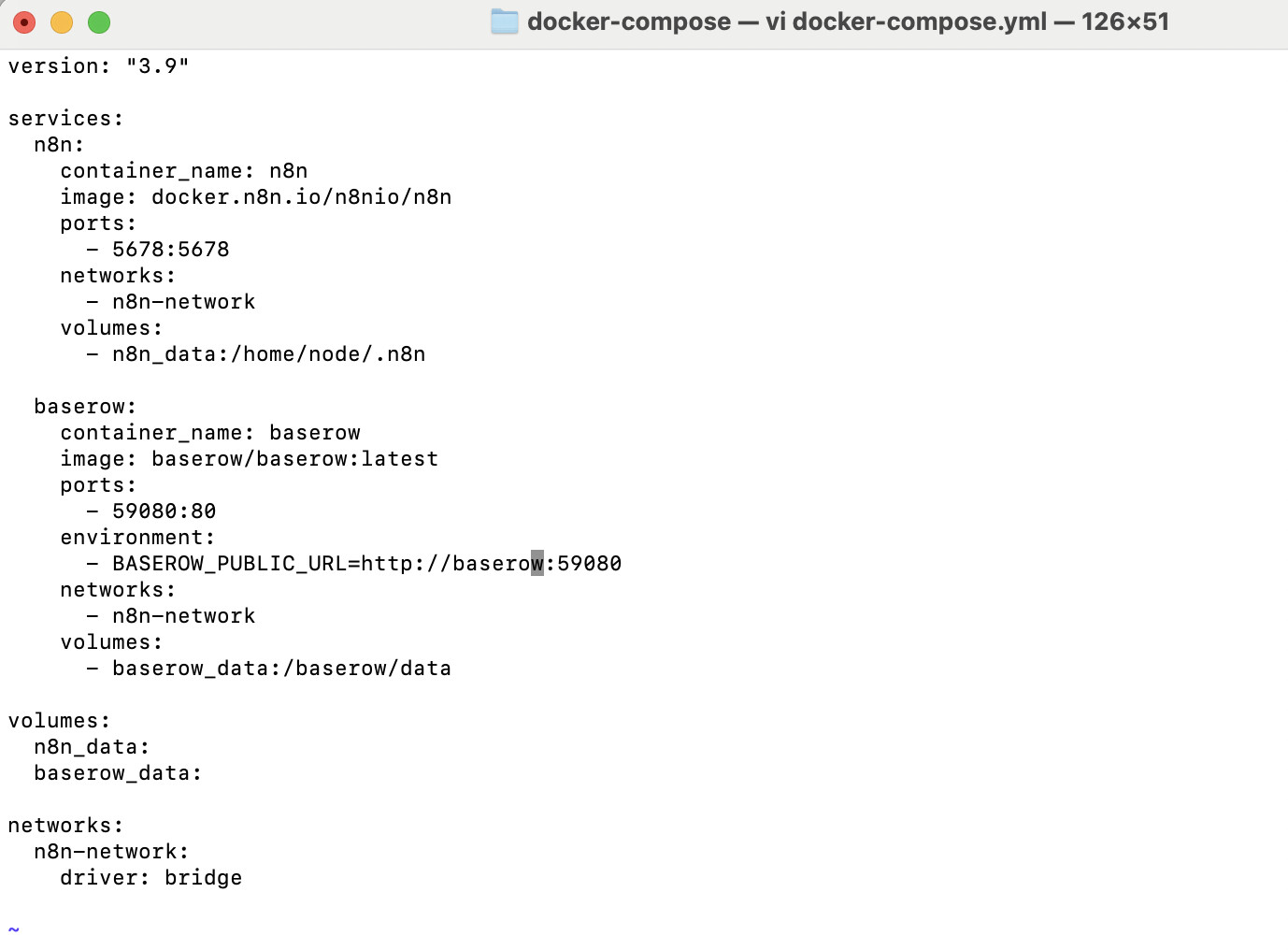
docker-compose.yml file screenshot below
with this file
- Web Front URL [http://baserow:59080](http://baserow:59080)
- API URL [http://baserow](http://baserow) or [http://baserow:80](http://baserow:80) both works but 59080 will not work
---
### Author:  [@seanclt](https://community.baserow.io/u/seanclt)
#### Post date: [January 13, 2024, 2:57pm UTC](https://community.baserow.io/t/issues-with-n8n-and-baserow-integration/4130/18 "2024-01-13T14:57:40Z")
Previous Comment was the final solution
it looks like bug that no matter what custom port you use API only works with port 80
I tested adding PUBLIC\_WEB\_FRONTEND\_URL [http://baserow:59080](http://baserow:59080) & WEB\_FRONTEND\_PORT [http://baserow:59080](http://baserow:59080) instead of BASEROW\_PUBLIC\_URL and then FRONTEND Stops working as well
makes no sense
personally it doesn’t matter, as I am not exposing port 80 anyway and only exposing 59080 to access baserow Remotely
---
### Author:  [@Ttaylor](https://community.baserow.io/u/Ttaylor)
#### Post date: [April 7, 2025, 7:34am UTC](https://community.baserow.io/t/issues-with-n8n-and-baserow-integration/4130/19 "2025-04-07T07:34:47Z")
Hello, I am having the exact same issue it seems from windows machine. I can have either the front ends work or the back end but not both. Seems to be docker networking issue. I’ve been trying to resolve this for over a week now - ~ 30 hours. I would be so grateful if someone could advise me for a resolution. I intend to keep baserow local and the only external connection I need is n8n api calls. Baserow stays local and is only updated manually through browser ui and n8n back end or http api calls…
Does that make sense?