# Publishing application for self hosting
**URL:** https://community.baserow.io/t/publishing-application-for-self-hosting/9294
**Category:** Application Builder
**Created:** [January 27, 2025, 11:34am UTC](https://community.baserow.io/t/publishing-application-for-self-hosting/9294 "2025-01-27T11:34:46Z")
**Posts on this page:** 4
**Page:** 1
### Author:  [@spacezmonkey](https://community.baserow.io/u/spacezmonkey)
#### Post date: [January 27, 2025, 11:34am UTC](https://community.baserow.io/t/publishing-application-for-self-hosting/9294/1 "2025-01-27T11:34:46Z")
Hello sir,
I am using self hosting version 1.30.1.
I have completed setting up my application, but i have problem publishing it.
below is my docker-compose setup in my synology server
```auto
services:
redis:
image: redis
command:
- /bin/sh
- -c
- redis-server --requirepass redispass
container_name: Baserow-REDIS
hostname: baserow-redis
mem_limit: 256m
mem_reservation: 50m
cpu_shares: 768
security_opt:
- no-new-privileges:true
read_only: true
user: 1026:100
healthcheck:
test: ["CMD-SHELL", "redis-cli ping || exit 1"]
volumes:
- /volume1/docker/baserow/redis:/data:rw
environment:
TZ: Asia/Yangon
restart: on-failure:5
db:
image: postgres:17
container_name: Baserow-DB
hostname: baserow-db
mem_limit: 512m
cpu_shares: 768
security_opt:
- no-new-privileges:true
healthcheck:
test: ["CMD", "pg_isready", "-q", "-d", "baserow", "-U", "baserowuser"]
timeout: 45s
interval: 10s
retries: 10
volumes:
- /volume1/docker/baserow/db:/var/lib/postgresql/data:rw
environment:
POSTGRES_DB: sampledb
POSTGRES_USER: sampleuser
POSTGRES_PASSWORD: samplepassword
restart: on-failure:5
baserow:
image: baserow/baserow:latest
container_name: Baserow
hostname: baserow
mem_limit: 3g
cpu_shares: 768
security_opt:
- no-new-privileges:true
read_only: true
ports:
- Xxxx:80
volumes:
- /volume1/docker/baserow/data:/baserow/data:rw
environment:
BASEROW_PUBLIC_URL: https:/myowndomain.com
BASEROW_CADDY_ADDRESSE: https://myowndomain.com:443
BASEROW_MAX_IMPORT_FILE_SIZE_MB: 1024
DATABASE_USER: someuser
DATABASE_PASSWORD: somepass
DATABASE_NAME: somename
DATABASE_HOST: somehost
DATABASE_PORT: 5432
REDIS_HOST: baserow-redis
REDIS_PORT: 6379
REDIS_PROTOCOL: redis
REDIS_USER: redsome_user
REDIS_PASSWORD: redsome_pass
EMAIL_SMTP: ____________
EMAIL_SMTP_HOST: ____________
EMAIL_SMTP_PORT: ____________
EMAIL_SMTP_USER: ____________
EMAIL_SMTP_PASSWORD: ____________
EMAIL_SMTP_USE_TLS: true
FROM_EMAIL: Your-own-gmail-address
restart: on-failure:5
depends_on:
redis:
condition: service_healthy
db:
condition: service_healthy
```
oh my baserow application “setting”, i fill up as following for domain.
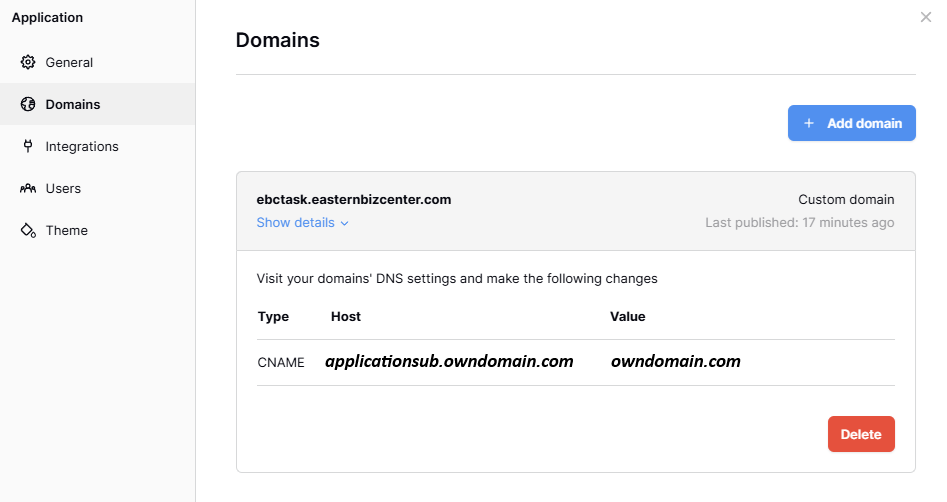
likewise, i fill up the same for dns setting at cloudflare.
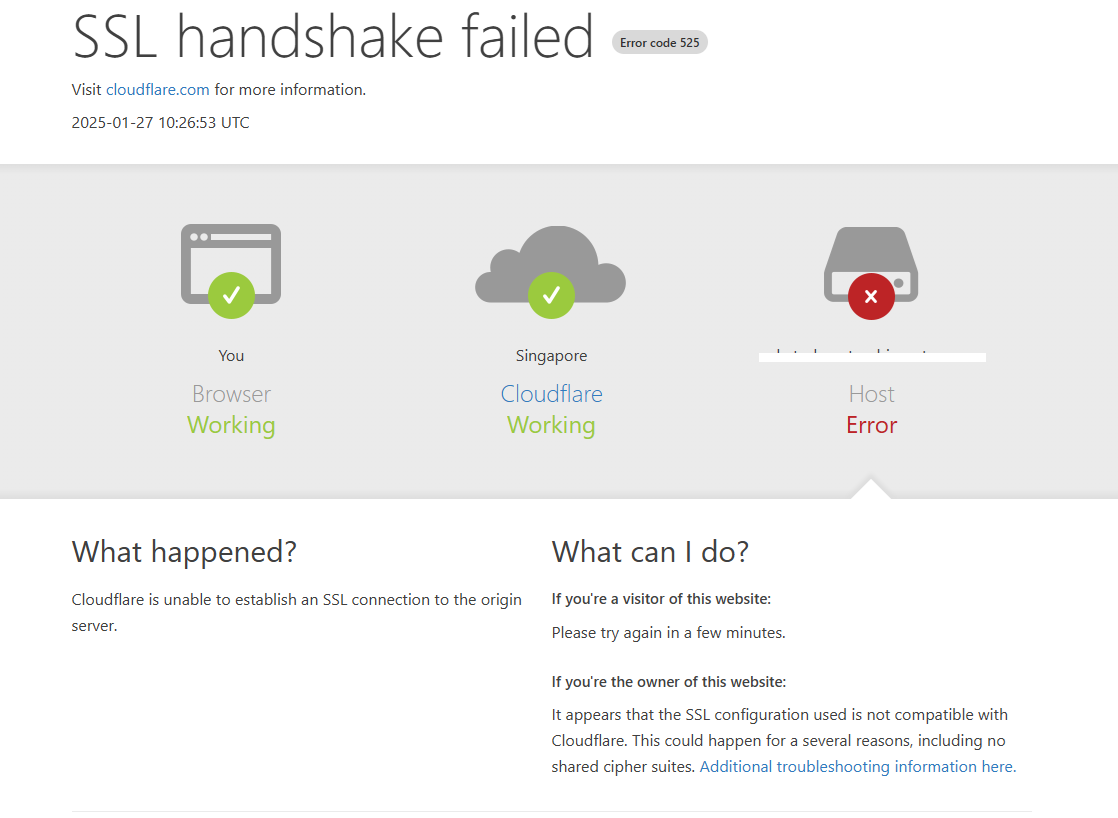
However, i get the following error when i visit my “[applicationsub.owndomain.com](http://applicationsub.owndomain.com)”
---
### Author:  [@picklepete](https://community.baserow.io/u/picklepete)
#### Post date: [January 29, 2025, 10:54am UTC](https://community.baserow.io/t/publishing-application-for-self-hosting/9294/2 "2025-01-29T10:54:21Z")
Good morning @spacezmonkey,
Under `environment` I see `BASEROW_CADDY_ADDRESSE`, which according to [our documentation](https://baserow.io/docs/installation%2Finstall-with-docker#application-builder-domains) should be `BASEROW_CADDY_ADDRESSES`.
Additionally, you might find [this Cloudflare community post](https://community.cloudflare.com/t/community-tip-fixing-error-525-ssl-handshake-failed/44256) useful.
Cheers,
Peter Evans
---
### Author:  [@spacezmonkey](https://community.baserow.io/u/spacezmonkey)
#### Post date: [January 29, 2025, 3:42pm UTC](https://community.baserow.io/t/publishing-application-for-self-hosting/9294/3 "2025-01-29T15:42:47Z")
sorry for the trouble. It is due to my careless mistake when typing caddy address variable
---
### Author:  [@picklepete](https://community.baserow.io/u/picklepete)
#### Post date: [January 29, 2025, 4:08pm UTC](https://community.baserow.io/t/publishing-application-for-self-hosting/9294/4 "2025-01-29T16:08:41Z")
No problem at all, I hope you’re enjoying the application builder!
Cheers,
Peter Evans