# When you try convert a field/column from a Single Line text field to Single Select field, fields go missing
**URL:** https://community.baserow.io/t/when-you-try-convert-a-field-column-from-a-single-line-text-field-to-single-select-field-fields-go-missing/12429
**Category:** Technical Help
**Created:** [May 18, 2026, 9:39am UTC](https://community.baserow.io/t/when-you-try-convert-a-field-column-from-a-single-line-text-field-to-single-select-field-fields-go-missing/12429 "2026-05-18T09:39:56Z")
**Posts on this page:** 12
**Page:** 1
### Author:  [@markusername](https://community.baserow.io/u/markusername)
#### Post date: [May 18, 2026, 9:39am UTC](https://community.baserow.io/t/when-you-try-convert-a-field-column-from-a-single-line-text-field-to-single-select-field-fields-go-missing/12429/1 "2026-05-18T09:39:56Z")
### Are you using our SaaS platform ([Baserow.io](http://Baserow.io)) or self-hosting Baserow?
SaaS
### What are the exact steps to reproduce this issue?
1. Import an excel sheet to use as a new table in Baserow
2. Select header of a column and click ‘Edit Field’. It is currently a Single line text type field.
3. From the field type dropdown, change your selection from ‘Single line text’ [current selection] to ‘Single select’
4. Click Save
5. The column updates but a number of random cells (that were previously filled with text) throughout the column go blank/empty
### Attach screenshots, videos, or logs that demonstrate the issue.
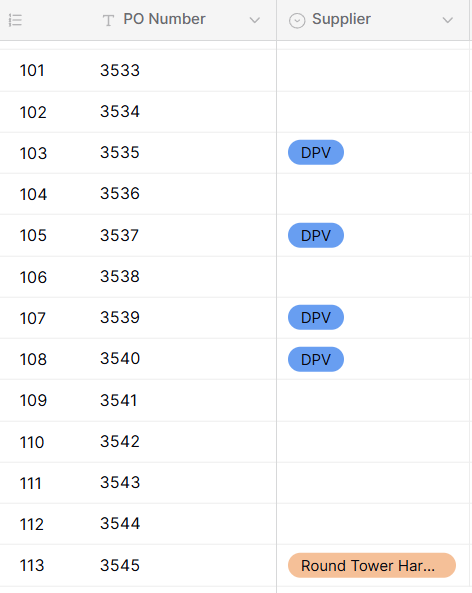
---
### Author:  [@olgatrykush](https://community.baserow.io/u/olgatrykush)
#### Post date: [May 18, 2026, 3:55pm UTC](https://community.baserow.io/t/when-you-try-convert-a-field-column-from-a-single-line-text-field-to-single-select-field-fields-go-missing/12429/2 "2026-05-18T15:55:35Z")
Hey @markusername, just to confirm, were the values that disappeared just short text values?
---
### Author:  [@markusername](https://community.baserow.io/u/markusername)
#### Post date: [May 19, 2026, 7:43am UTC](https://community.baserow.io/t/when-you-try-convert-a-field-column-from-a-single-line-text-field-to-single-select-field-fields-go-missing/12429/3 "2026-05-19T07:43:09Z")
Yes all short text values
---
### Author:  [@olgatrykush](https://community.baserow.io/u/olgatrykush)
#### Post date: [May 19, 2026, 1:37pm UTC](https://community.baserow.io/t/when-you-try-convert-a-field-column-from-a-single-line-text-field-to-single-select-field-fields-go-missing/12429/4 "2026-05-19T13:37:06Z")
And after the import, all the values were there, right? So they disappeared only after you changed the field type?
---
### Author:  [@markusername](https://community.baserow.io/u/markusername)
#### Post date: [May 19, 2026, 2:10pm UTC](https://community.baserow.io/t/when-you-try-convert-a-field-column-from-a-single-line-text-field-to-single-select-field-fields-go-missing/12429/5 "2026-05-19T14:10:28Z")
Yes all the values were there after import & yes they then disappeared after I changed the field type
---
### Author:  [@olgatrykush](https://community.baserow.io/u/olgatrykush)
#### Post date: [May 19, 2026, 3:24pm UTC](https://community.baserow.io/t/when-you-try-convert-a-field-column-from-a-single-line-text-field-to-single-select-field-fields-go-missing/12429/6 "2026-05-19T15:24:54Z")
I just tried to reproduce the flow, but it’s working for me. Does that file contain many rows?
---
### Author:  [@markusername](https://community.baserow.io/u/markusername)
#### Post date: [May 20, 2026, 7:58am UTC](https://community.baserow.io/t/when-you-try-convert-a-field-column-from-a-single-line-text-field-to-single-select-field-fields-go-missing/12429/7 "2026-05-20T07:58:35Z")
> [@olgatrykush](#):
>
> but it’s working for me. Do
112 rows in the excel sheet i uploaded
---
### Author:  [@olgatrykush](https://community.baserow.io/u/olgatrykush)
#### Post date: [May 20, 2026, 9:49am UTC](https://community.baserow.io/t/when-you-try-convert-a-field-column-from-a-single-line-text-field-to-single-select-field-fields-go-missing/12429/8 "2026-05-20T09:49:07Z")
I suspect that more than 100 of them are unique values, and we have a limitation when converting a text field into a single select field, where the frontend only retrieves unique values with `limit=100`, limiting the number of options to 100.
Could that be the reason? Or do you have fewer than 100 unique values in that field?
---
### Author:  [@markusername](https://community.baserow.io/u/markusername)
#### Post date: [May 22, 2026, 10:23am UTC](https://community.baserow.io/t/when-you-try-convert-a-field-column-from-a-single-line-text-field-to-single-select-field-fields-go-missing/12429/9 "2026-05-22T10:23:38Z")
No there’s probably only 30-40 unique values in the field
---
### Author:  [@olgatrykush](https://community.baserow.io/u/olgatrykush)
#### Post date: [May 25, 2026, 1:30pm UTC](https://community.baserow.io/t/when-you-try-convert-a-field-column-from-a-single-line-text-field-to-single-select-field-fields-go-missing/12429/10 "2026-05-25T13:30:47Z")
Hey @markusername, that’s strange. Could you please try again?
---
### Author:  [@sila](https://community.baserow.io/u/sila)
#### Post date: [September 17, 2026, 1:36am UTC](https://community.baserow.io/t/when-you-try-convert-a-field-column-from-a-single-line-text-field-to-single-select-field-fields-go-missing/12429/11 "2026-09-17T01:36:03Z")
I am getting the same bug. For me, when converting a single-line text field to a single-select one, only the first new single-select option (out of the converted list of all the possible values) becomes empty when the field is converted.
Also, it seems that renaming this same single-select option seems to be a workaround for now, making the cells with that value be properly mapped (instead of disappearing) upon conversion.
---
### Author:  [@olgatrykush](https://community.baserow.io/u/olgatrykush)
#### Post date: [September 30, 2026, 1:03pm UTC](https://community.baserow.io/t/when-you-try-convert-a-field-column-from-a-single-line-text-field-to-single-select-field-fields-go-missing/12429/12 "2026-09-30T13:03:18Z")
Hey @sila, how many unique values do you have in that field?