Are you using our SaaS platform (Baserow.io) or self-hosting Baserow?
Self-hosted
What are the exact steps to reproduce this issue?
We’ve moved from SaaS to our own server.
I have a table with inventory. I use a Autonumber fiel to generate inventory-IDs
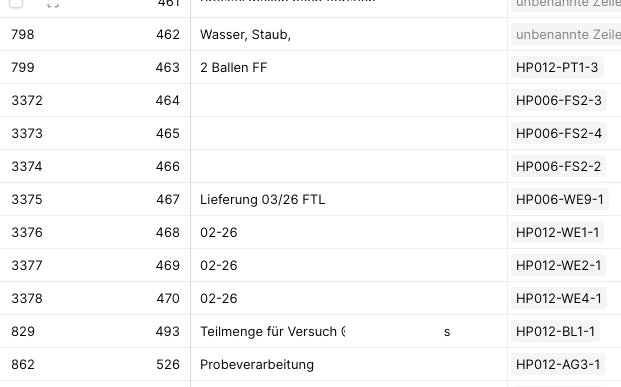
After moving to the new server the Autonumber field randomly started at an earlier number. It started with 464 instead of continuing with a number above 3000
This is quite confusing and makes me a little scared.
It would not be a big problem if numbers are not in chronologic order of their generation. That is acceptable for us.
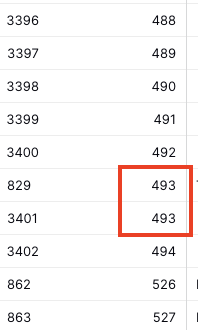
But it would be a big problem if Baserow will not recognize that upcoming 493 already exits (see screenshot).
I would like report this behavior as a bug.
Furthermore I would like to ask the experts:
- any chance to tell Baserow where to continue the next Autonumber?
- does Baserow check if its next Autonumber already exits and prevent duplicates?
Attach screenshots, videos, or logs that demonstrate the issue.
Hey @be_Berlin, in general, we use a race condition safeguard to ensure that two rows don’t end up with the same ID.
If you’re seeing a large number of skipped IDs, it likely means those IDs were assigned, but the row creation process failed — so the rows don’t appear in the table.
Do you have any automations running?
I’ve added more details here: Custom field autonumber skipping numbers - #6 by olgatrykush
Hi @olgatrykush ,
Thank you for your quick respond.
But I would like to point out that it is not about the ID (=row_id) of the rows.
row_ID as in in column 1 on the left side in my screenshot.
But it is about a Autonumber field. The second column in my screenshot.
As I wrote: it doesn’t not only skip any numbers. It started “back” at an earlier number (after moving the instance).
So for my understanding this is a separate issue(?). And regarding that, I’d like to come back to the questions I mentioned above.
Oh sorry for the mix-up! Let me check this with the dev team 
I’m happy to contribute to the development by reporting bugs properly.
However, the two questions I mentioned above are still open:
I would like to ask the experts:
I have no problem if at least one of the questions can be answered with ‘yes’.
But if both are answered with ‘no’, then I’ll have duplicates, won’t I?
No — this isn’t supported. The Autonumber field has no settings for start/offset. Only possible workaround is manually updating it in the database (self-hosted only).
Yes — Autonumber values are unique and duplicates are prevented. Upcoming fixes should also eliminate gaps.
Hey @olgatrykush ,
I’m sorry but the prevention of duplicates does not work.
See screenshot. First column shows row_id, second column shows Autonumber field.
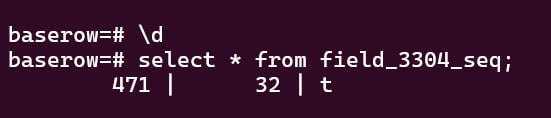
Our database is self-hosted. So we can touch the Progres database.
Would it be this field? Can we just update it to set the counter? Or will it broke anything else?
Hey @be_Berlin, this is a bug - thanks for reporting it. As a quick fix, you can change the field type to something else and then change it back. That should resolve the problem for now. We’re also prioritizing a more robust fix to address all related autonumber issues.