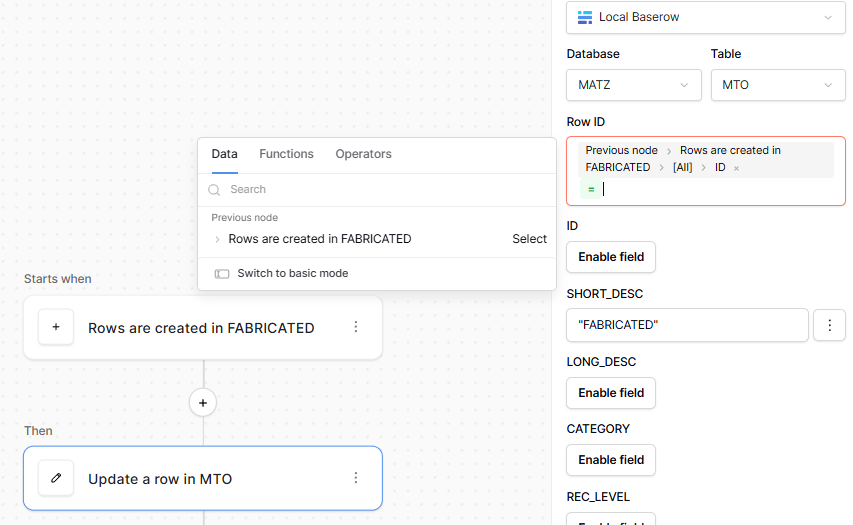
Hi everybody - having a hard time trying to build first Automation(s) and wonder if any of you kind people out there can lend a hand.
Consider a Table called Fabricated the unique Primary Field is called “ID” (no quotes) and is in fact a drawing number - an excel import every week.
Consider another Table called MTO - this has the same Primary ID as Fabricated except here there are N (usually less than 20) records ALL with the same ID or Drawing Number.
What I need to happen is that as a record is inserted in Fabricated - it automatically determines the (say) 20 records in the MTO that have the same ID and updates those 20 records by zapping “FABRICATED” into a single text field called “Fabricated” and updating Now() date and time to a Fabricated Advised Date.
(In Views in the MTO table I can then filter out using the Fabricated column to list only what is left…i.e unfabricated at this time).
The Automation starts with Insert Trigger into Fabricated….yes?
Then I have tried everything - the next event is update Table ? (that is what Kuma did before it gives up)…..
I am trying to say Fabricated Table ID = MTO Table ID to find the 20 records…..but get very confused….tried FILTER, SEARCH……tried other events like List all records and tried a step for iteration…..i just go round and round trying every combination. Something keeps coming up about about “id” (lower case) or rowid and it says must be an integer - just cannot figure that bit out.
The documentation does not even mention the {All} 0.1,2 etc select box- no idea what that all means.
It is clearly failing to find any records to update/not working. (using SHORT_DESC as a trial).
This seems to be the pivot of why it is NOT working ? I cannot express = MTO Table ID!!!
What am I doing wrong guys ???
Appreciate all help very much.
Hello again @mikemitch,
Is this the same problem you faced in your previous topic? An idea that’s worth trying is sharing this information with our AI assistant, Kuma. If you describe your requirements to it, it can create a workflow for you; it’s great.
Cheers,
Peter Evans
Hiya Peter… yep… same old same old… and I gotta crack it!!!
I tried Kuma and it often gave network error and gave up…when it finished it did not work…the start trigger and update records is what it did…so I gotta plug away at this !!!
Mike
Could you try on baserow.io? Kuma will be set up there, and once it’s working, you can export the application and import it into your self-hosted version.
Cheers,
Peter Evans
good idea…will try that and let ya know.
Thanks
Mike
HMMM….IN BASEROW.IO AND TRIED A PROMPT TO BUILD THE AUTOMATION - HERE IS WHAT I GOT AFTER ASKING KUMAR “It isn’t possible to create the requested automation with the current Baserow automation tools because they can only update one row at a time and lack an iterator for bulk updates. You would need to use an external script or API call to loop over the matching MTO records and update their Short‑Desc field”
Good morning @mikemitch,
We can update multiple rows, but just not in one operation. If you iterate over a list of records with our “iterator” node, and within the iterator node, add an update row node, it achieves the same thing, but sequentially. It’d essentially become:
- Rows are created in FABRICATED
- Iterator (rows are created in FABRICATED → click the “select” on the right)
- Update a row in MTO (Item → the property you want to use in each update).
Cheers,
Peter Evans
Thanks again Pete….I have a young man in Indonesia now to try and write this stuff…I will pass this on to him.
Many Thanks for all your input - you (and presumably other guys) are making Baserow a super product.