Are you using our SaaS platform (Baserow.io) or self-hosting Baserow?
SaaS
What are the exact steps to reproduce this issue?
Contrary to the note in the doc, the table element can use a single row as a source (but with a twist)
Use case: a vertically aligned table element used for a long list of fields on a single record page (esp. useful on mobile).
Details: single pages for Orders and Returns + underlying tables.
Returns: working; unexpected “property” in the settings listing linked fields in the source table (not showing when multiple row source used); need to select one for the setup to work.
Orders: not working; only one, scarcely populated, linked field; in element settings, all Orders fields do show in the picker but the table element itself does not display anything (“no records found” error).
(Clunky) workaround: self-link all of the records in the Orders source table.
Questions: is the linked field dependency added by design? If so, for what reason? If it is needed, is there a way to avoid the workaround? Or perhaps you make a feature out of it?
Interested to see any comments.
When you use a Single Row data source for a Table element, it expects you to select a property within that data source to display the data. This property can be a Link to table or Multiple Select field because those field types can hold multiple values for the single records.
The limitation is here that you can only show the id, order or value of that selected property. The value will be the most left field of the linked table, the id and order are internal Baserow id and order numbers.
Hi @frederikdc - thanks for your reply. I am not sure I understand. First, when I select a single row source, I can see all of the fields in the picker, whether or not I have selected anything in the property field. However, if I have not selected a linked field as a property in the table settings, nothing is visible in the table (no records found) - otherwise, I can select whichever field I need, not just the field id. Does this make sense? Thanks again.
Hi @frederikdc, thanks for your reply. If the “property” is selected, I am getting the same.
My point is a bit different and perhaps it was not very clear but when I first attempted to use the table element to show single row data, I did not have any relevant linked fields in my source. However, I could see all of the fields in the picker and could select the fields they would just not display.
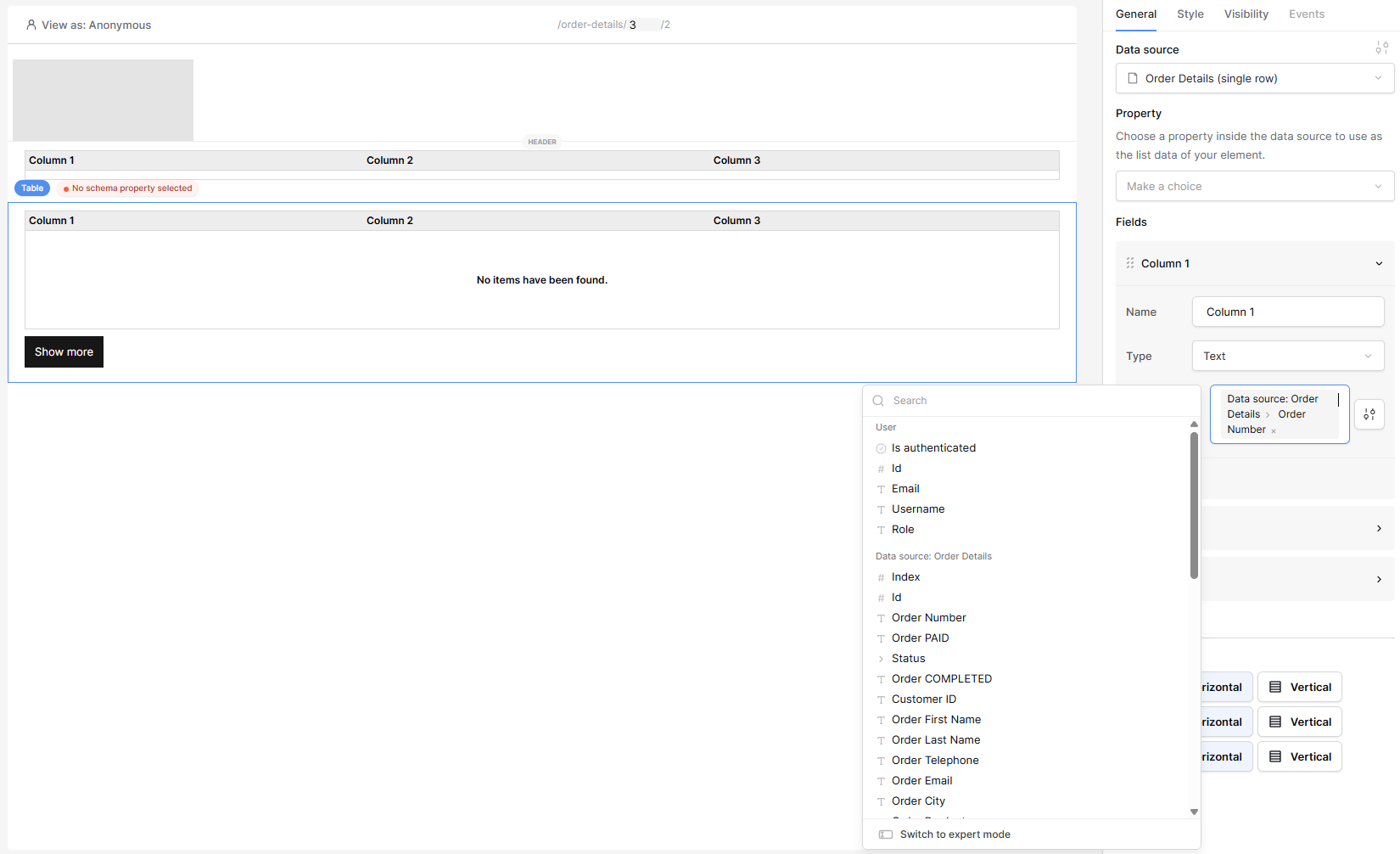
The screenshot below illustrates this point: a table with a property error flagged but also with the field picker showing all of the fields and a field selected for Column 1.
When I realised that the (undocumented?) “property” was a link field, I got it to work by self-linking all of the records.
So my questions were:
Despite what you say in the docs, the table element clearly works with a single row source, but it needs a “property” - why is this the case?
And can you make it work directly without a “property” or a workaround like my single-purpose self-linking? Right now what I need requires manual linking or an automation which is a bit inefficient.
Yes, now I understand the issue and I’m able to replicate it.
The Table element is intended to display a collection of items. This is either:
Multiple rows
A property of a single row that can contain multiple items:
Link to table fields
Lookup fields
Multiple select fields
All other usages of the Table element are not intended. For your use case, you can work around it by creating a Multiple rows data source and set the filters so that it only returns a single record. You can use that data source to the table element.
I’ll check with the dev team if we need to make any changes here
OK, thanks. So, for large records, the ability to display the single record data in the table is extremely useful, especially, as I mentioned, when you consider the mobile use case.
I will check the filter approach and if I can get it to work in the archive-detail page set up, then perfect. If not, I will continue with my kludge.
However, part of my original question was whether you would consider “derestricting” the use of the table and removing the need for the “property” in the single row source context (I still do not understand what it is for, especially since it is not used in the table with a multiple row source and only appears when the single row source is used).
The property option is to select a field when you select a Single Row as the data source. The field types are the ones where there can be multiple values. For example: Link to table fields or Multiple select fields.