Bug when deleting rows and updating rows with files

:robot: Kuma (Baserow’s AI assistant): often the fastest way to get help. Try asking Kuma before posting here. Available to all SaaS users, and to self-hosted users with a connected AI model.

on

Are you using our SaaS platform (Baserow.io) or self-hosting Baserow?

SaaS

What are the exact steps to reproduce this issue?

  1. Create an application.
  2. Add new Data Source.
  3. Action: List multiple rows.
  4. Select the database.

Row Deletion Error:

  1. Add a Table (application element).
  2. Add a Button field.
  3. In the Button’s Events: Add action “Delete a row”.
  4. Select the same database and in Row ID: Data source: BD > id || if I copy and paste, I get: get('current_record.id').
  5. (Optional, does not change the error): Add action “Refresh data source”.
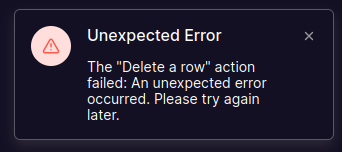
  6. Publish the application and when testing, the error appears:

Unexpected Error: The “Delete a row” action failed: An unexpected error occurred. Please try again later.

Error Updating a Row Containing Files:

  1. In Page Settings, set a Path parameter: /:uuid.
  2. In Data Source, add a Filter with Formula: Where [UUID] [is] [Parameter > uuid]
  3. Add a Form (application element).
  4. Add a File input inside it.
  5. In “Initial file URL”, add: Data records > BD > File > [All] > url || get('data_source.181----.field_906----.*.url').
  6. (Alternative that also doesn’t work): In “Initial file URL”, add: Data records > BD > File > 0 > url || get('data_source.181----.field_906----.0.url').
  7. Add an event in On Submit: “Update a row”.
  8. Select the database and in Row ID: Data records > BD > id || get('data_source.181----.id').
  9. In the File field space, select: Form data > File || get('form_data.1298----').
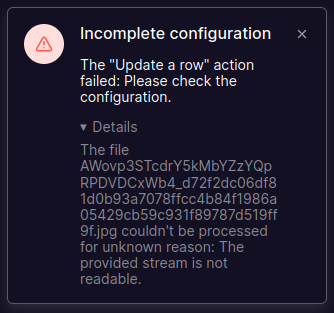
  10. Publish the application and when testing, the error appears:

Incomplete configuration: The “Update a row” action failed: Please check the configuration.»

Important notes:

  • This wasn’t happening before.
  • The first goal is to delete a row from the table.
  • The second goal is to update the content of a row that contains a file while keeping by default the values already set through the selected Data Source.
  • The ---- characters replace the actual numeric field ID value.
Attach screenshots, videos, or logs that demonstrate the issue.

Hey @khalil.io, thank you for the detailed explanation, this helps a lot. :slightly_smiling_face:

The development team is going to take a look at this. Someone will get back to you soon with an update.

Hey @khalil.io, it’s a bug: Delete row returning 502 bad getaway - #5 by picklepete

Hi @olgatrykush

And regarding the issue with updating rows that have files?

Or should I report it with a separate forum post?

I’m standing by and thanks in advance

Hey @khalil.io, I’ve asked the development team, and they’re going to double-check the issue with updating rows as well. :raising_hands:

Thank you very much @olgatrykush, I can confirm that the row deletion bug has already been fixed by @picklepete here Delete row returning 502 bad getaway - #7 by picklepete! However, the row update bug with files still persists. Is there any news on that?

Hi @khalil.io, sorry for the delay on this. To help me debug the row-update bug properly, a workspace export of that database and application would really help. It ensures I test your exact steps.

Cheers,

Peter

Hello @picklepete, don’t worry, I actually appreciate the help. As a private message, I sent you the ZIP with the exported database and application from the Workspace.

In the application:

This specific issue is located here inside:

In the database:

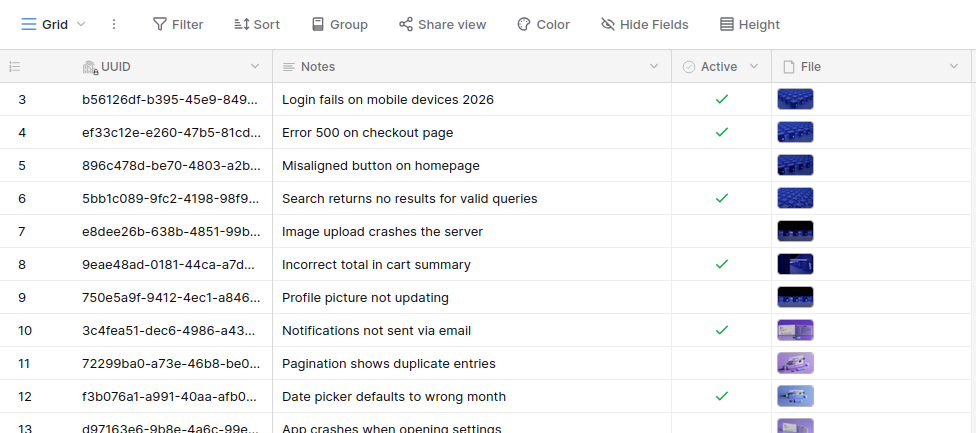
The table that’s connected to the application is called: Bug: DB Update and only contains sample data:

Important notes:

  • The goal is to update the content of a row that contains a file while keeping by default the values already set through the selected Data Source.
  • This issue occurs across every application I have and with any database.
  • This problem didn’t happen before.

Please let me know if you run into any situation or questions, I’ll be on the lookout since several clients depend on this row-update feature.

Thank you very much in advance!

Thank you so much @khalil.io, that was by far the best bug report I’ve ever received! What a great idea to create an application out of it, I love it. :heart_eyes:

I easily replicated the problem, and it’s now being resolved as we speak. Hopefully, if we have capacity to review it, it’ll be included in the next release.

Cheers,

Peter

I’m so happy to hear that :grinning_face:, @picklepete! Especially that it’s useful for you to continue making Baserow awesome!

Thank you so much for resolving it, I’ll keep an eye out for the next version and for any action needed to follow up.

Cheers!