Is there any way this could get fixed?
Rich text field in grid view:
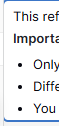
Markdown text field displays like this in the application builder:

Is there any way this could get fixed?
Rich text field in grid view:
Markdown text field displays like this in the application builder:
Hi @Iokaar,
To create bullet points in Markdown, simply use a hyphen.
To create bullet points in Markdown, simply use a hyphen.
Thanks for the reply, but I think there’s a misunderstanding. I am well aware of how to format Markdown. The issue isn’t the syntax…it’s how the Application Builder renders that syntax when it is pulled dynamically from a table.
I should also note that typing a hyphen in the table field already automatically converts the text into a bullet.
To clarify:
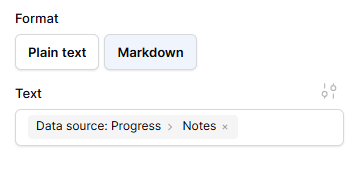
The Data Source: I am using a table with a Rich Text/Markdown field.
The Display: In the Grid View, the bullet points render perfectly.
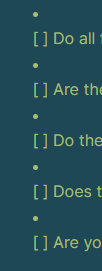
The Bug: When that same data is “injected” into the Application Builder, the bullet points are forced onto a separate line above the text (as shown in the green screenshot).
Consistency Issue: Interestingly, numbered lists (see previous message for images) from the same table render correctly in the App Builder. Only bulleted lists (using hyphens or asterisks) exhibit this “line-break” behavior. Checkboxes also do the line break behavior and add a bullet point next to them. (see image)
This appears to be a rendering conflict within the Application Builder’s markdown element specifically. How can we ensure the App Builder maintains the same formatting that is clearly visible in the backend table?
Again, everything looks goo in the Baserow data table field. This only happens to a markdown field.
Curiously, toggling the list from numbers back to bullets fixes the rendering. While this confirms the Markdown is correct, it’s a frustrating manual hurdle to clear every time I add data.
Okay, I understand better what you’re trying to do.
I was able to reproduce the issue, but I can’t seem to find a scenario that reliably triggers it. Most of the time, it works fine. It seems to really depend on how you edit the bulleted list in the rich text editor.
I would appreciate it if you could provide a screencast showing how you edit your content in the rich editor and whether you can still reproduce the issue.
As for the checkbox lists, this definitely needs to be fixed, as the issue is 100% reproducible.
Edit: I’ve created a GitHub issue to track the progress : Inconsistencies in bullet lists rendering · Issue #5275 · baserow/baserow · GitHub
I tried a variety of things.
I typed manually using the -
example:
- Bullet list (pressed enter)
- Bullet list (pressed enter)
I tried to click on the bullet list button.
I tried typing in Notepad (on PC) and then copy/pasting into the rich field. All of that rendered the bullets correctly.
However, I do think I figured out the issue.
I copied a list from Google that already had bullet points. I went back to my table and double clicked in the rich text field and pasted. I even hit the arrows later and expanded it all the way and pasted it in that way too with the same result. However, this was not the case for other broken bullet point lists. The only thing I can think of is I made some lists way back before a lot of updates happened.
On another note, I was getting frustrated because I was trying to paste into the box, but it was instead shooting me across the screen. Here is a video of that. Maybe it’s because the text didn’t copy, and I was trying to paste blankness (the technical term  )
)