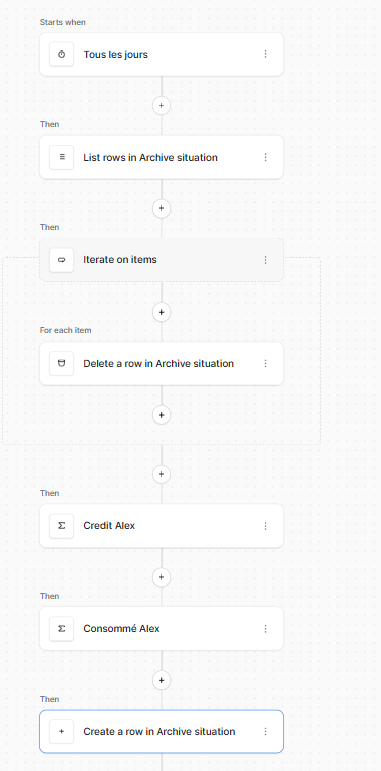
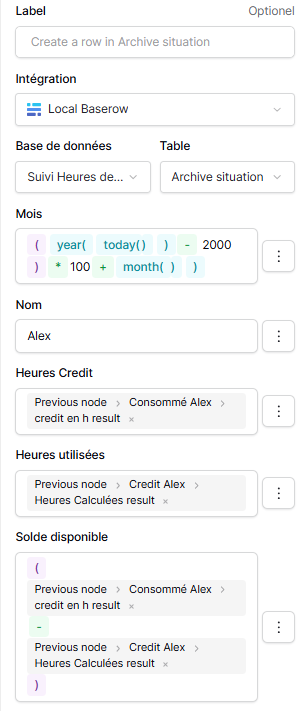
Can you confirm for me where this formula is being written? Is it on the database side, in a formula field? I just have to ask because the database and automation formulas don’t work the same way.
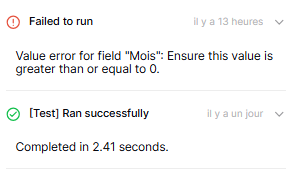
What kind of field is “month”? If it’s a number, it’s looking like that formula is resolving to null, which would explain that error message.
Finally, could you confirm what you mean by the creation step? Is it the above, where the row is being created?
Thanks in advance, the more information I have, the easier it’ll be to diagnose your issue!
If you could provide some screenshots of your forms, that’d be great too.
Can you confirm for me where this formula is being written? Is it on the database side, in a formula field? I just have to ask because the database and automation formulas don’t work the same way.
The formula is in the automation step, where you figure which data is given to the row
Month is a number. I don’t understand how this can work while testing and fail when the automation runs on itself triggered by 5am in the morning.
Are you self-hosting or using baserow.io? If you’re self-hosting, which version are you running?
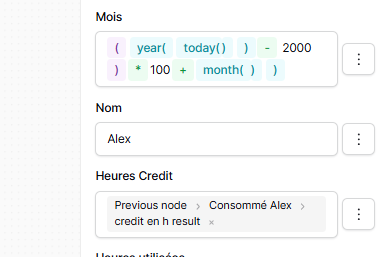
In the Mois formula, it looks like you have one too many ) at the end. If I replicate that, however, I get a syntax error, so I’m curious why it’s not happening for you…
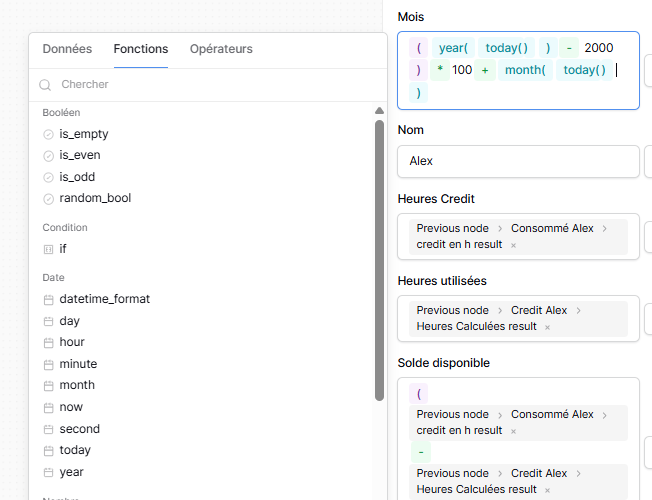
The month function takes an argument, could you try month(today())?
Then, when I go back to the step later the “today()” mention is replaced by a single ) (in green without any error message) I mentionned it in my first message. Just like this new screen cap :
I think this bit is the crucial bit, if I’m following you correctly…
You start with the intended month( today() ), but you end up with month() ). When you say you go back to the step later, do you mean you leave the form → do something else → return to the form? So, somehow, the formula changes?
Yes it is. The screen shots were made 3 or 4 minutes one later than the other, I only clicked on another step of the automation and went back on it to make the screen cap.
Hello again @Thierry, thank you for your patience.
I’m afraid the problem is a little complex, so I’ve created this Github issue for you to keep track of it. We’ll hopefully have it resolved soon, and once it’s deployed, we’ll let you know here.
It turns out we have a problem with multiple nested parentheses in our formulas, causing the last functions to be removed (i.e. your last today() in month).
Thank you for your feed back. What puzzles me is that it do not work fully automated, but when I click on “Start Test Run” without any prior change, it works fine!