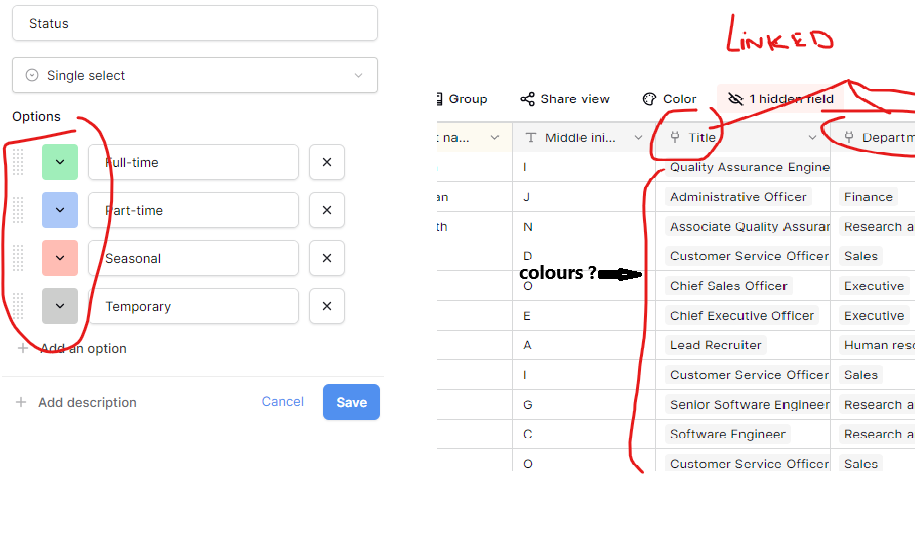
Please, I have one question. Is it possible to add different colours to multiple selection-linked fields (i.e., fields that come from another table), similar to single or multiple select fields? I appreciate any help you can provide.
hello @domar and welcome to the Baserow community 
Unfortunately, this isn’t currently possible. However, I’ll discuss it with the team as a potential new feature request. 
Hey @domar, the problem is that we don’t know how to decide which colors to apply. Should it be done using the row coloring settings or perhaps based on the single select field? How do you see this feature being implemented?
I would very much like to see this feature implemented for both linked and lookup fields.
Since it is the rows themselves that are linked from the related table, rather than single-select fields, the colouring cannot be based on those fields.
However, the formatting options available in single- and multiple-select fields could serve as an example.
Ideally, the linked field menu would display all associated values — much like a single- or multiple-select field — allowing us to assign colours to the linked or looked-up entries.
Hey @Mary-Lou, we discussed this feature with the team, and unfortunately, we don’t think we’ll be moving forward with it for now. Link-to-table and lookup fields work quite differently from single/multiple select fields — we can’t simply assign colors to the linked values, and we don’t currently see a feasible way to implement this.
If you have any examples or references showing how this feature is handled in other tools, please feel free to share them — we’d be happy to revisit the request. Thank you! 
I’d like to throw in a vote for this feature as well, or potentially a workaround, if possible. I’m currently experimenting with building term databases with Baserow. I have one table with concepts and one table with terms that are subsumed by the concepts. For each concept in the concepts table, there is an according list of terms (linked from the terms table). Terms have a property (single-list) of their status, i. e. preferred, dispreferred, obsolete. It’d be great to have colours to have quick indication of their status in the concepts table. Currently, I am solving this by havin a link field and next to it a lookup field, so for each position in the link field, the status of the term is shown in the lookup field, but I have to count which position I am looking at. I also tried a concetanation of links and lookups, yielding a field with entries of the sort “term1 (status_of_term1)”, but these are only strings and the links to the term entries are lost. If colours are not an option, might there be some other workaround?
Hey @oliver.czulo, you can try applying row coloring based on a specific condition: Row coloring in a Baserow grid view
Hi @olgatrykush , thanks for the pointer. Row colouring would, however, not be informative enough. I am attaching an image of what the setup currently looks like: In the first field, there would be a definition, in the second field various tags which links to terms that fall under the definition and each of which can have a different status. Currently, I am adding a third field which displays the status, but I have to count: second tag in the third field displays the status for the second tag in the second field. It’d be great to have some other option, either a colouring for the tags in the second field, or an extended label for the link tags in the second field such as “Term_1 (bevorzugt)”

Do you have any examples of this feature being implemented in similar tools?
I have been looking around a bit with other nocode db providers, but haven’t been able to find anything of this sort, I’m afraid
@oliver.czulo, I see. It’s also difficult to think of how to implement it. 
We also have this issue in the pipeline: Conditional cell coloring · Issue #2941 · baserow/baserow · GitHub. Perhaps this one would work better in your case?
@olgatrykush Thank you, yes, that sounds interesting! I’ll keep an eye on it