In app builder, it’s possible to change the background color for about any container.
Is there a way however to set the BG color to correspond to the conditional colors (row conditions) as defined in the database?
If not: seems like a missing feature.
thanks,
David
Thanks for your input, David! I’ve shared the request with the team 
Hi @DavidCeulemans, Peter from the automation & application team here!
We love this idea, and it’s something we’ve considered for a while now. The idea is that many styling choices could be formulas, not just the background color.
At the moment, the biggest hurdle to building this is maintaining our page performance, and this idea would definitely slow things down. Hopefully, in 2026 we’ll dig deeper into supporting both however, keep an eye on the release notes!  .
.
Cheers,
Peter Evans
I certainly understand.
Currently, I have a ‘statistics’ pages, with lot’s of Summarie fields, but also 10+ sorted (single) repeating fields to show Top brand, Last used, Most used, etc.
Sometimes a reload is needed to load all stats.
But nevertheless, I’d still like to be able to 
Hi Pete,
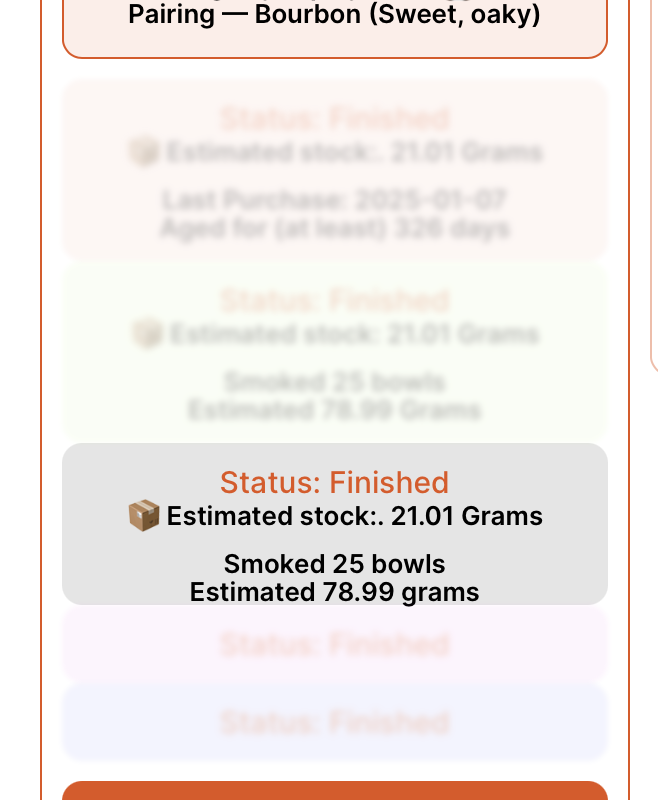
FYI, for now I’ve found an interim solution to adapt BG colors of a field or a container with conditional visibility. I have duplicated some containers, changed their BG colors as required, and defined their visibility on a certain condition.
This is not very elegant, as it results in several duplicate fields, BUT has the added advantage that I can add or remove fields from a container, that are not ‘relevant’ to the condition.
For instance, a tobacco in my wishlist doesn’t need to show the number of bowls smoked (as it would-be zero), or a tobacco I haven’t smoked yet, doesn’t show a rating field.
Perhaps this method can help someone.
David
I’ve come across a limitation, though:
in the example above I have a containers ‘status finished’ that is visible only when the status of the field status is, … well, ‘finished’, with some fields regarding current stock, etc.
I have another field ‘Wishlist’, that shows tobacco’s on my wishlist. This could either be tobacco’s that I have tried before (I’d like to fields last purchased and last smoked to be visible then). It could also be a tobacco that is new to me.
A visibility condition (field) doesn’t seem to work in addition to a visibility condition ‘within’ a containers.
David
I stand corrected.
conditional fields do work within a conditional container.
There might be an issue with condition formulas:
(last date smoked) != ‘‘ → last date smoked field is not ‘empty’ → doesn’t ‘work
(number of totals bowls smoked) >= ‘1’ → Does work.
issue with dates?
Hi @DavidCeulemans,
Nice experiments, I love it! On this one:
(last date smoked) != ‘‘ → last date smoked field is not ‘empty’ → doesn’t ‘work
I’d be curious to see that formula. On paper, it appears to be a comparison between a date (left) and a boolean (right). On the right, you’re evaluating if a lastDateSmoked isn’t empty, which I’m guessing would be true/false.
Cheers,
Peter Evans
Hi Pete,
The visibility conditions was just that:
(field last date smoked) != ‘’ (these are two single quotes’). Idea is to only show the field/container if the tobacco was ever smoked. Seems like a valid formula to me…
However, I’m suspecting the problem might not be dates, but the fact that the field referred to is a ’rollup’ (max) from a date smoked field.
EDIT: seems that using TAGS as type helps, but this component isn’t clickable, so I have to add a column to have a button for the detail view… it would be nice having Tags clickable like Link and Button.
Hi, any news about conditional color on elements? I have an appointment table in my App and it would be soooo useful to color buttons based on appointment’s status…
Thanks
hey @Luciano We don’t have any updates on this request at the moment. It’s not currently on our roadmap, and there are some performance concerns around this type of functionality.
For now, a possible workaround is to create multiple buttons with different styles and show them conditionally based on the appointment status.
Related feature request: Allow an element's background/font color to be a formula · Issue #3393 · baserow/baserow · GitHub