I setup a self hosted Baserow Docker install. My docker-compose.yml file is shown below.
- I’m using the v2.0.3 all-in-one image
- I use a custom port for Baserow (in this example, 12345)
- This setup sits behind an Nginx Proxy Manager reverse proxy.
I can access Baserow at http://192.168.1.xx:12345 fine. The issue I’m having is that when I publish an Application Builder app, it turns the URL into something like this:
https://baserowapp.mydomain.com:12345
This link doesn’t work. However, if I use https://baserowapp.mydomain.com, it works fine.
How can I keep Baserow from including the custom port in the published app URL?
docker-compose.yml
services:
baserow:
container_name: baserow
image: baserow/baserow:2.0.3
environment:
BASEROW_PUBLIC_URL: ‘http://192.168.1.xx:12345’
BASEROW_EXTRA_ALLOWED_HOSTS: ‘192.168.1.xx,http://baserowapp.mydomain.com’
ports:
- “12345:80”
- “56789:443”
volumes:
- baserow_data:/baserow/data
volumes:
baserow_data:
Nginx Proxy Manager
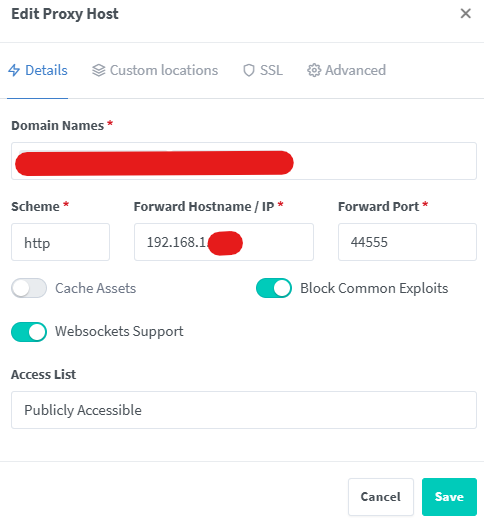
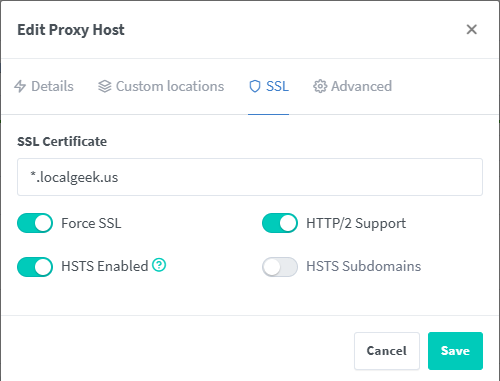
ps- I have a Caddyfile in the same Docker directory, but not sure if it’s needed. It’s the default one- I didn’t make any changes to it.
{
on_demand_tls {
ask {$PRIVATE_BACKEND_URL:localhost:8000}/api/builder/domains/ask-public-domain-exists/
}{$BASEROW_CADDY_GLOBAL_CONF}}
{$BASEROW_CADDY_ADDRESSES} {
tls {
on_demand
}@is_baserow_tool { expression "{$BASEROW_PUBLIC_URL}".contains({http.request.host}) } handle @is_baserow_tool { handle /api/* { reverse_proxy {$PRIVATE_BACKEND_URL:localhost:8000} } handle /ws/* { reverse_proxy {$PRIVATE_BACKEND_URL:localhost:8000} } handle /mcp/* { reverse_proxy {$PRIVATE_BACKEND_URL:localhost:8000} } handle /assistant/* { reverse_proxy {$PRIVATE_BACKEND_URL:localhost:8000} } handle_path /media/* { @downloads { query dl=* } header @downloads Content-disposition "attachment; filename={query.dl}" # Allow to call head from public url to get size header { Access-Control-Allow-Origin {$BASEROW_PUBLIC_URL:http://localhost} Access-Control-Allow-Methods "GET, HEAD, OPTIONS" Access-Control-Allow-Headers "*" Access-Control-Expose-Headers "Content-Length, Content-Type" } file_server { root {$MEDIA_ROOT:/baserow/media/} } } handle_path /static/* { file_server { root {$STATIC_ROOT:/baserow/static/} } } } reverse_proxy {$PRIVATE_WEB_FRONTEND_URL:localhost:3000}}