Kuma (Baserow’s AI assistant): often the fastest way to get help. Try asking Kuma before posting here. Available to all SaaS users, and to self-hosted users with a connected AI model.
on
Are you using our SaaS platform (Baserow.io) or self-hosting Baserow?
SaaS
My database Ed’s CRM shows in the sidebar, but when I click it, Baserow says it has no tables. Trash shows nothing deleted, and I am the only member. Can you help me recover or locate the missing tables?
What are the exact steps to reproduce this issue?
Steps to reproduce:
- Log in to my Baserow account.
- Open my workspace.
- Click the database named Ed’s CRM.
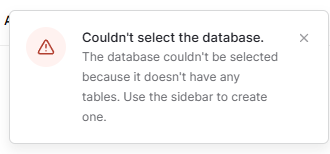
- Baserow shows this error:
“Couldn’t select the database. The database couldn’t be selected because it doesn’t have any tables. Use the sidebar to create one.”
Recent changes:
I was manually editing fields in my CRM database, mainly in the Tasks / Follow-Ups table. I started getting repeated “Action not completed” unknown error messages while trying to save field changes. After logging out and back in, Ed’s CRM would no longer open.
Other details:
- Trash shows nothing deleted.
- I am the only member/owner.
- The database previously had many tables and had been worked on for about a week.
- I tried refreshing and using an incognito/private window, but the issue still happens.