Are you using our SaaS platform (Baserow.io) or self-hosting Baserow?
Self-hosted
If you are self-hosting, what version of Baserow are you running?
1.23, attempting to upgrade to 1.33
If you are self-hosting, which installation method do you use to run Baserow?
Docker version 26.1.3
What are the exact steps to reproduce this issue?
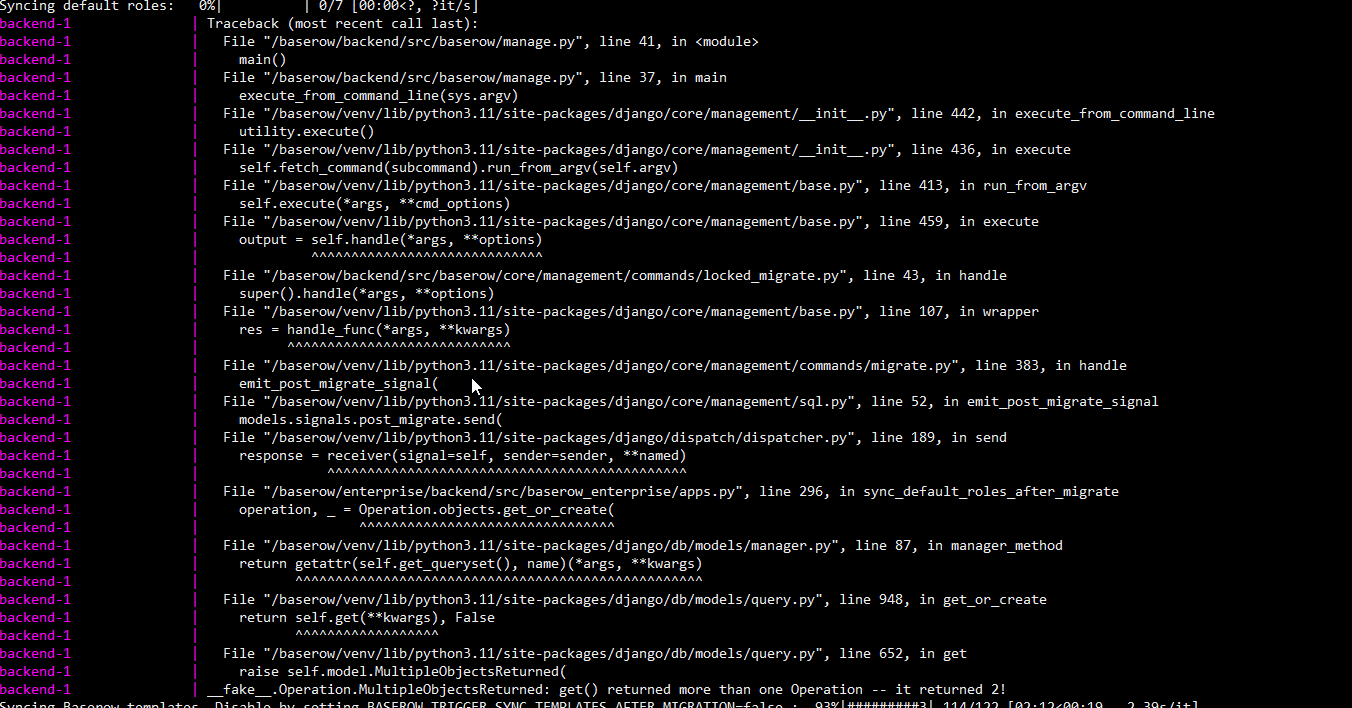
Currently I am trying to upgrade from 1.23 to 1.33, which also involves upgrading from Postgres 11 to Postgres 15 as 11 is no longer supported. Changing the db image in docker-compose.yml to pgautoupgrade/pgautoupgrade:15-alpine3.8 seems to update the database successfully, but seems to produce an error afterwards in the backend-1 container - something to do with manage.py. See image attached. Steps taken to reach this point are outlined below:
- Started baserow version 1.23 (using individual containers) with docker compose up -d
- Created data entries
- Bring baserow down (docker compose down)
- Run backup command, checkout version 1.33
- Enable pgautoupgrade in docker-compose.yml: # image: pgautoupgrade/pgautoupgrade:15-alpine3.8
- Update successful, but backend containers produces an error (see attached image)
Attach screenshots, videos, or logs that demonstrate the issue.
Hi!
If you didn’t change anything in core_operations or in baserow_enterprise_role_operations, you can delete contents of those tables and rerun the migration. This should recreate default role/operations mappings.
Hi Cezary,
This seemed to work in our test environment - thank you so much.
I had a follow-up question, would more frequent updates prevent issues like these in the future? What would you guys recommend in terms of how often we update versions?
Thanks
I had a follow-up question, would more frequent updates prevent issues like these in the future? What would you guys recommend in terms of how often we update versions?
It all depends. If you’re looking to have a fairly fresh version (new features/improvements), then yes, you should update more frequently. If you’re running a production-grade deployment, you probably want to have more elaborate update policy to preserve stability.
We release a new version every month or two. In most cases, the update process is almost automatic - you usually just need to bump the version number and restart the deployment.
In some cases, a new version may introduce a breaking change. Each new version has upgrade notes with a changelog. You should consult those before each update you want to apply. Also, remember to do a backup copy before updating anything.