Are you using our SaaS platform (Baserow.io) or self-hosting Baserow?
SaaS
What are the exact steps to reproduce this issue?
Export view as csv or Excel.
Open the exported data: all displayed fields, plus the id are exported, except the Primary Field.
Notes:
the Primary Field is shown correctly on the view (i.e. it’s not affected by the behavior reported elsewhere, where in some instances the Primary Field was not shown on the view itself).
the Primary Field is defined with a formula. Other formulae outputs are exported but not the Primary Field. Also exports of views where the Primary Field is not a formula seem to work fine.
Out of curiosity, I duplicated the Primary Field column and made the duplicate the new Primary Field. That’s when I discovered the original Primary Field column had been set to hidden. I unhid it, switched the Primary Field back to the original column, deleted the duplicate, and exported the view again - and this time, the Primary Field column was included in the export. My guess is that I had hidden that column in this view at some point before designating it as the Primary Field from another view.
In short: the fix that’s supposed to prevent the hidden flag from applying to the Primary Field column doesn’t seem to cover every situation - exporting a view being one of them.
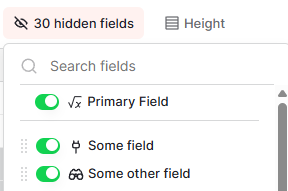
Side note: honestly, I wouldn’t mind (= prefer it) if the Primary Field column could actually be hidden, as long as it appeared in the “Hide Field” menu at the top in a fixed, non-editable position. Something like that: