General setup:
A table “companies” connected 1:n to one or more addresses of this company (addresses are stored in a second table). Then there is a third table “Services” which is linked to “addresses” (as one company may offer different services at different addresses).
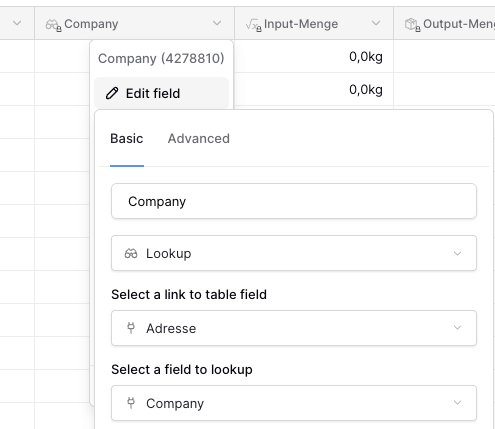
Tabel “Services” has a “Link to Table”-field to the table “Addressess”. And it has a “Lookup”-field showing the company which it receives out of table “Addresses”.
Now my question for the Application builder:
I want to show a page with all details of the company.
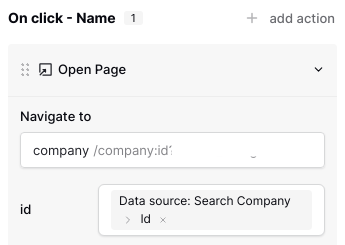
For opening that page I pass the “Id” of that company, see screenshot
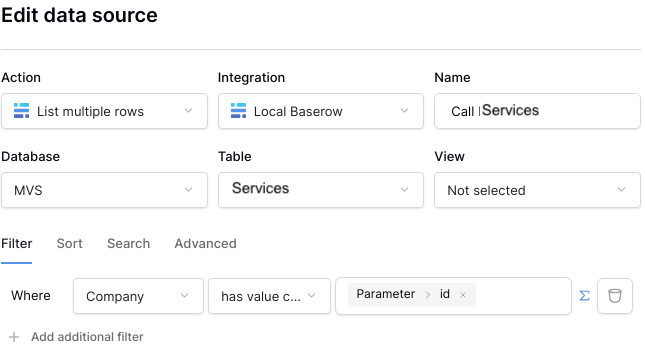
I set up a data source filtering table “Service” to the (Lookup)-field “Company”. See Screenhot.
What is the mistake? Does filtering on a lookup-field with the technical (row) Id don’t work? Does it only work with the value? (which I don’t have as a parameter)
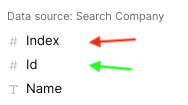
By the way, another question (maybe related)? What is the difference between “Index” (marked red) and “Id” (marked green in screenshot)?
Hello @be_Berlin!
Hmm, we can filter on a lookup field, so something must not be matching correctly. What field is the lookup targeting? Is it possible you’re matching a different property against Parameter > id?
By the way, another question (maybe related)? What is the difference between “Index” (marked red) and “Id” (marked green in screenshot)?
The Index is the current iteration index, whereas the Id is the unique identifier of that record. For example, with data such as:
[
    {
        "id": 42,
        "name": "be_Berlin"
    },
    {
        "id": 123,
        "name": "picklepete"
    }
]
If we were to iterate on that (with a repeat, or table element):
The Index isn’t always useful, but it can be if you want to know in a repeat/table element which iteration you’re currently cycling through.
I hope this helps!
Cheers,
Peter Evans
Thank you for the explanation of “index” - understood : )
About my main question (problem of filtering the lookup):
In the table “Services” the lookup field “Company” looks like that:
In this table “Services” the field Company is displayed with a gray background - which I think shows that it is the related data (and not a text or anything else)
In table “Adresse” (German for address  ) the field “Company” is a Link to Table-Field to the table Company.
I’m not sure if I fully understood what you mean with “matching a different property“. Did I answer you question with the information above or do you need more?
Hello @be_Berlin!
I think I understand your issue - I’ve replicated the schema of the three tables, and when I filter the lookup in Services, I don’t get the expected results.
This is because the value you’re trying to filter on isn’t the ID, but the name of the Company instead (as it’s the primary ‘first’ field). If you change your parameter to a Company name, it should suddenly work.
Some suggestions to get around this:
- You could change the primary field in the Company table, so that it’s a unique ID (such as
autonumber). The downside is that you can’t easily distinguish between the companies very easily from the address/services tables.
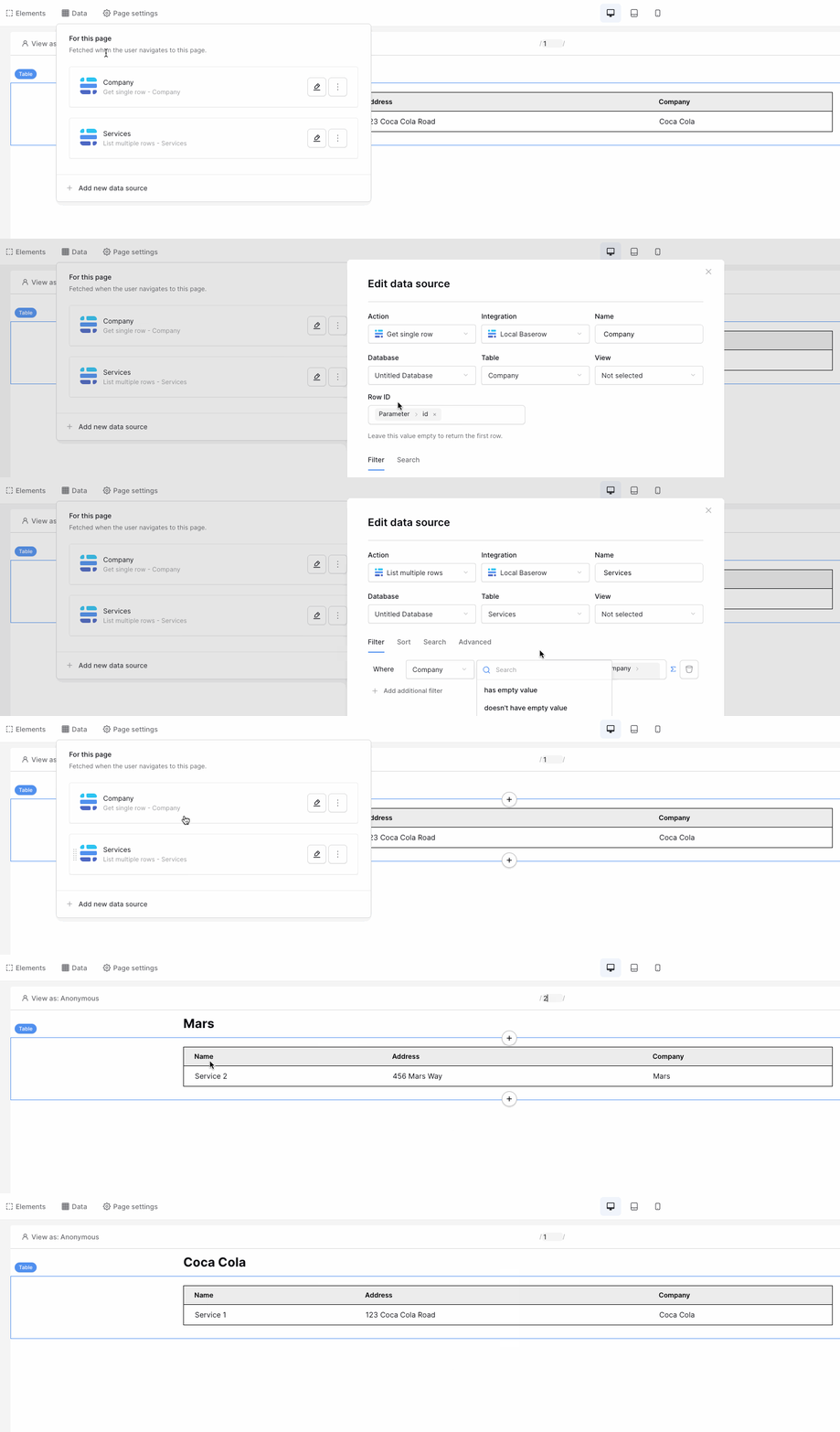
- The better option: add a
Get Row data source to the mix.
- Create a
Get Row data source in your application before your Service data source (this is important). This single-row data source will point to the Company table, and its row ID will be Parameter > id.
- In your
List rows data source (the one pointing to Services), change your filter to: Company - has value equal - Data source > Company > Name (i.e. point your Get Row data source to it).
- Now, when you change
Parameter > id, we will get the company record for this ID, and the services data source will receive the correct company name to filter upon.
Here’s option 2 in action…
Cheers,
Peter Evans
Great solution. (Option 2)
I wasn’t aware that I can use the results from a previous data source in a later one. That is a very strong and important feature (it also solves some other issues I faced before).
Should be highlighted 
Thank you so much.
Works perfect!