In the last week or so I’ve noticed that font styles are inconsistently displayed in the application builder. I have the fonts set in the app settings, have not changed them anywhere else (if it were possible). The correct font will display on the builder page, but not the live page. Since I am trying to integrate my baserow site design visually within a larger web project, this is noticeable to me.
Hi @msaldana, first of all, welcome to the community! 
Thanks for the feedback, we will try and reproduce this on our end. To ensure we cancrecreate the right conditions, could you share a few details and screenshots of how you have set up your app in regards to styling and show some examples of the issue?
Also, I just re-clicked the link that was displaying correctly a minute ago and it was also using the wrong font this time.
My typography settings for the app all are set to use Georgia as the font.
Here is a page in the builder with the fonts correctly displayed:
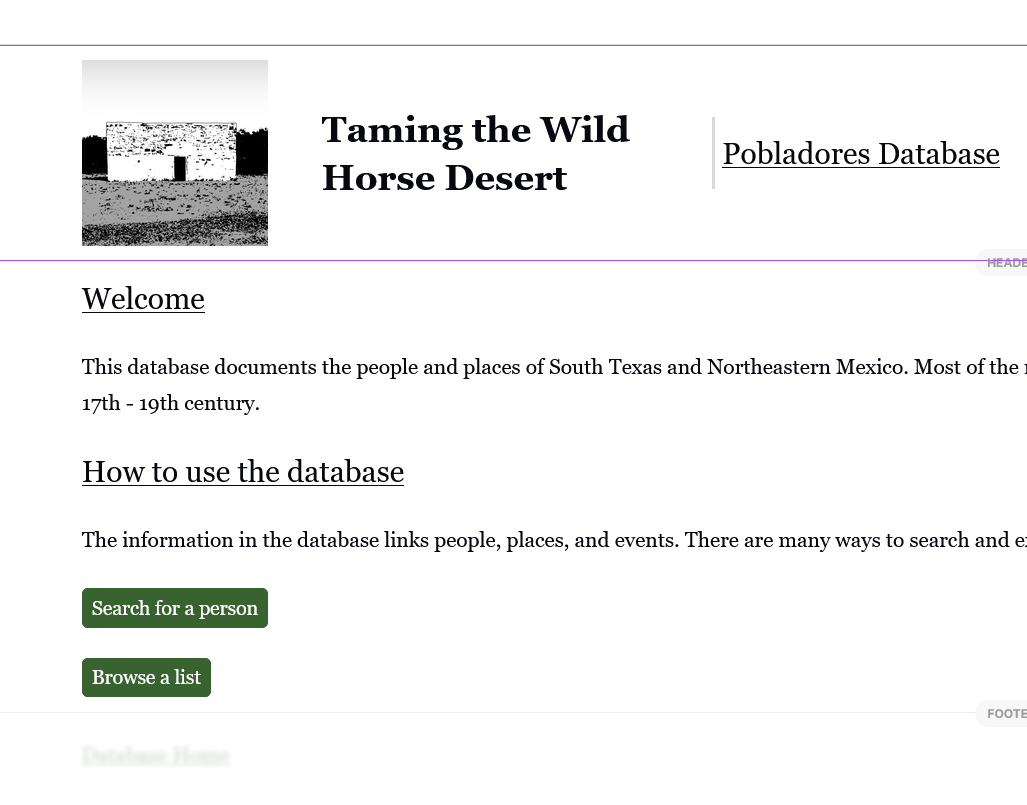
However the live version uses sans serif font:
link to page
Whereas this page displays the correct fonts.
I would include more screenshots but I am only allowed to upload one image here.
As far as I know there isn’t another way to change the fonts except in the app settings, and I haven’t knowingly altered anything that I think would cause this.
All changes are published, etc. and I have checked on multiple devices.
Thanks for your help!
Thanks @msaldana for the details. The team has already discovered the problem and working towards a fix. I’ll update with more info when I have it available.