Hello! I am very much a novice, so please be gentle 
I have a table where the rows are tasks in a project we are managing. There are additional fields like due date, task name, etc. I would like to generate a weekly digest email of all of the tasks that are due within 30 days. The information should be generated in a table in the email, much like what you would see if I filtered the table manually.
So far, I have managed to successfully set up the trigger and to get it to List Multiple Rows that have the correct filter applied. I have also managed to set up the SMTP integration with my email address and have sent some test emails. So that’s what working, at least.
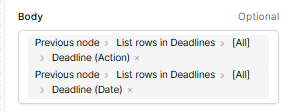
The problem is that the text of the email displays the data as one string instead of in a table. This is what the test email generates:
deadline1,deadline2,deadline3,2026-07-06,2026-06-26,2026-07-10
This is what I have put into the body of the email in the Automation builder:
How can I get this to display as a table, like this:
| Task Name |
Deadline |
| deadline1 |
2026-07-06 |
| deadline2 |
2026-06-26 |
| deadline3 |
2026-07-10 |
|
|
Is this where I would use an Iterate node? If so, can someone help me understand how to use that? The documentation is pretty sparse on the topic. I tried using Kuma AI and it could not help after 30 minutes of trying.
Hi @acupofmeck,
I love the idea behind this, but I think you’ll struggle to generate a nicely formatted email using the nodes we have at the moment.
The SMTP node can send emails, but I think your use case might be too complex for it, as we have limited support for advanced HTML templating. For example: ideally you would want, in your HTML body, to have the ability to loop over records so that individual <td> and <tr> are added. We just don’t have that capability… yet!
My suggestion is that you use a third-party email provider (at an additional cost), such as Sendgrid for example, and send this data to them. In Sendgrid’s case, you can send an HTTP request with the relevant data, and it’ll format it using the template ID you send.
If you do go down this path, you can send this data to Sendgrid with our HTTP request action node. That would make the flow:
- Baserow
- Once a week, fires a workflow from your projects table
- Gathers the data from the past 30 days
- Sends an HTTP request to Sendgrid (or other email provider)
- Sendgrid
- Receives the HTTP request from Baserow
- Generates an email, using that template, and the Baserow data, and delivers it.
I hope this helps! Hopefully in the future the SMTP node’s body will be a little more advanced to handle cases like these.
Cheers,
Peter
This is helpful; thanks so much Peter! I appreciate the reply.
1 Like