I’m new to the Baserow Application Builder and I’m trying to build my first app to give a nice UI to my data. My database and app are in baserow.io.
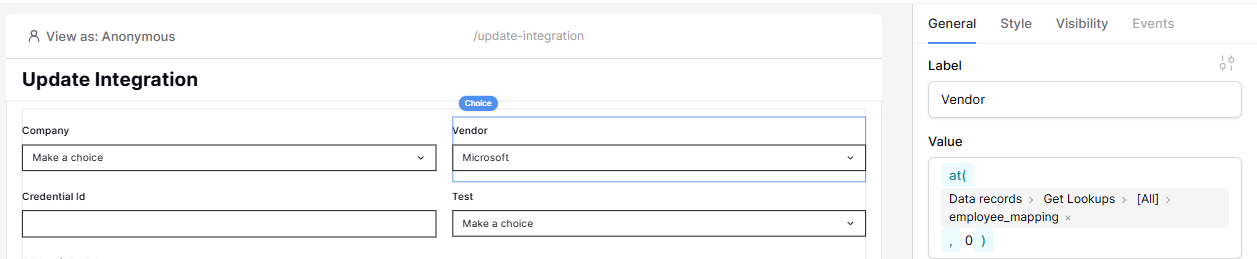
I’m running into an issue with the functions where I would like to populate fields based on the id of what’s selected in a Record selector (‘Company’ in this case).
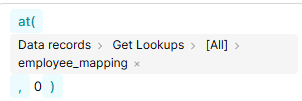
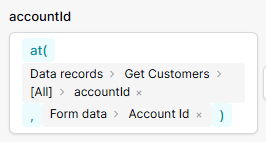
The idea is to use the id from the selection in the ‘Company’ field to get the value (through at()) from the employee_mapping on the same row. Here 0 is just a placeholder, but I was hoping to use Form data > Company, like I’m able to with a text element.
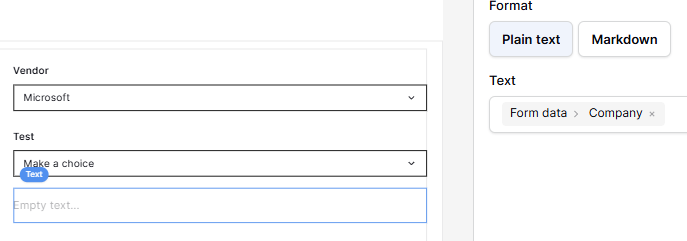
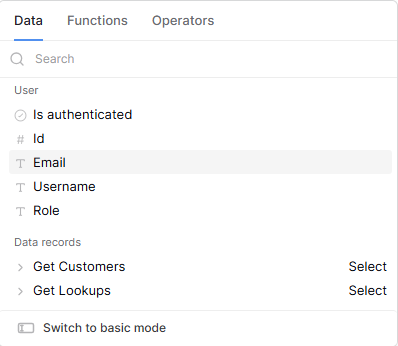
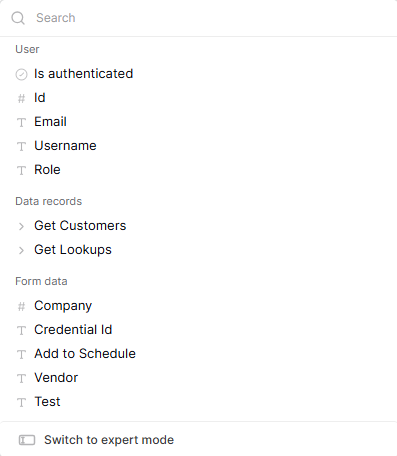
But surprisingly within the ‘Vendor’ value field, I can only use the data records, whereas in the text and I have access to the data records AND the form data.
Hi @guillaume ,
While I’m not an expert at Baserow, I think I understand what you want to do.
I think there might be more than one problem in your approach.
As I read in the documentation, the funktion AT() uses the index of an array. But you have to be aware that the index is not the same as the id. @picklepete explained that answering another question from me, please find his explanation here
The field that you want to populate is also of type “Record Selector”, right?
As I said: I’m not an expert with Baserow.
But I assume that fields of type “Record Selector” must be populated by a “Data Source” and can not be populated by a function or formula as you are trying to do.
I’m working on a form where I need to set the value of a Choice field using the value (String) from an employee_mapping column. Here’s what I’m trying to do:
Form data > Company returns the line number of the selected choice from the Company Record Selector. Confirmed as I can see the number in a Text Field.
I want to use that number with the at() function to fetch the corresponding employee_mapping string from the same row.
However, it seems the Choice field only accepts a Data Source (like a Record Selector), which makes it difficult to dynamically pull a value from a specific column. This is frustrating because I can’t figure out how to:
Retrieve data from my rows,
Modify it (e.g., update the Vendor),
And then save the result back to the correct row.
Am I missing something, or is there a workaround for this? Any help would be appreciated!