HELP: UI to add specific view to app data source not there!

Are you using our SaaS platform (Baserow.io) or self-hosting Baserow?

SaaS

What are the exact steps to reproduce this issue?

  1. Go to app builder
  2. Go to a page
  3. Go to data sources
  4. Try literally any combination of types of data sources - I have never seen any option to choose a specific table view. I’ve tried literally everything I can think of - adding repeaters and tables to the page, etc.
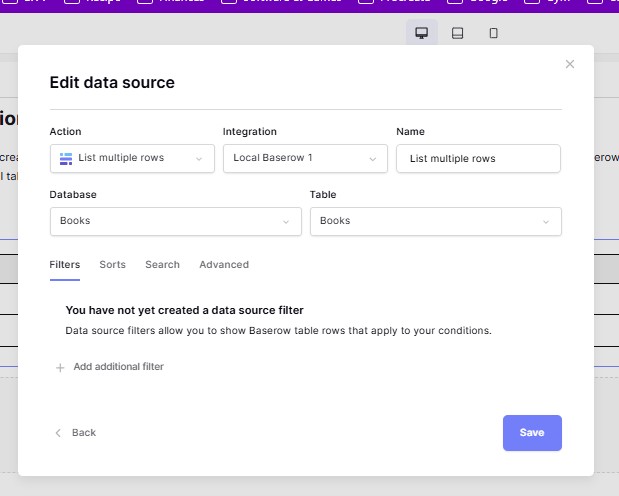
Attach screenshots, videos, or logs that demonstrate the issue.

Hi @britastic, unfortunately this is a bug taht was introduced in 1.34 and the team is already aware of it and working on a fix. I’ll post an update on it as soon as I have one.

Hi @britastic,

Please accept my apologies for the inconvenience! We’ve resolved the issue and deployed our fix, if you try again on baserow.io you will find that the view dropdown has re-appeared.

Thanks for reporting the issue to us!

Cheers,
Peter Evans

I switched to self-hosted since then; I’m on 1.34.2 so I guess I’ll have to wait for the next release. Glad it’s getting fixed!