The field „weight“ in that table Inventory is set to have one decimal.
Weight can get bigger or smaller so that new numbers should be stored to document that changes.
I build an application that gives the user the chance to add a new weight or take away weight.
It works that way that there are to different Input Forms in the App. One Forms to add weight, the other to reduce weight.
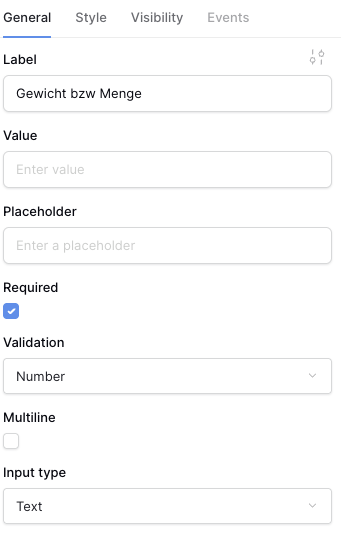
In these two different Input Forms I have elements type “Data Input”.
They are labeled “weight to add” and the other (in the other Input Form) is labeled “weight to reduce”
I set the first Data Input (“Add weight”) with the property of “Validation” to Number.
By accident I forgot to do that for the other Data Input (“Reduce weight”). So now it has Validation “Any”
Question 1:
How exactly does the validation of “number” work?
I recognized that enter data like “3a2” immediately shows the error “The field must be a number.”. Enter data like “3,2” brings no error as well as “3.2” (regardless of the language system of my local system)
But also enter data like “3,2,.2,” does not show the error. Although it is obviously not a number.
I assume the field at the applications webpage just checks if there are only numbers and characters comma or full stop. Is that right? So the field not really checks if the entered data is a (float) number?
- Question 2 :
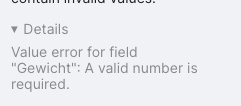
If I enter “3,2” in Data Input “Reduce weight” with it validation set to “any” the application excepts the data. It tries to write a new row but then it show this error in the upper right corner (Screenshot ).
Thank you for the detailed report. You are absolutely right: entering 3,2 and having it stored as 32 is not expected behaviour.
The Number validation is intended to accept valid integer and decimal values. At the moment, however, the Data Input first normalises the value using the active locale. In an English locale, a comma is treated as a thousands separator and removed before validation. As a result, 3,2 becomes 32; similarly, 3,2,.2, can become 32.2, which explains why it passes validation.
With validation set to Any, the raw value 3,2 reaches the Number field unchanged and is rejected server-side, which explains the error toast.
This is a bug in the Application Builder input parsing and should not be relied on for comma-decimal input. Until it is fixed, please use one ungrouped decimal format matching the application’s active locale—for example, 3.2 in an English locale—and do not mix , and . or use thousands separators.
I’ve created an issue in our backlog where you can track the progress: