Are you using our SaaS platform (Baserow.io) or self-hosting Baserow?
SaaS
What do you need help with?
Hi Baserow team and community,
I’m currently working with linked tables and lookup fields. I’d like to know if there’s a way to filter the data returned by a lookup, for example:
Only show related dates in the past
Or filter lookup results based on a condition (e.g. status = “active”)
From what I’ve seen, the lookup() function returns all related values, but I can’t apply any filter to it directly. Is there a workaround, or is this something planned in the roadmap?
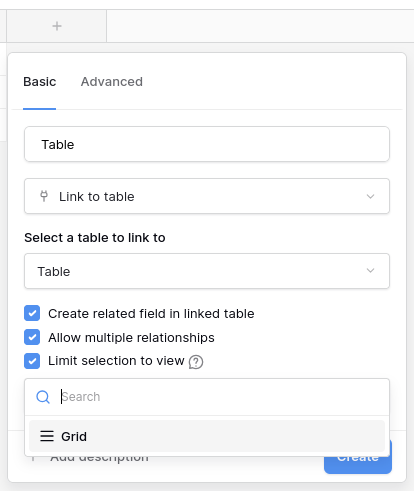
The way to do this in Baserow is to create a new view on the table you want to look up that will house all your filtering. Then you can create a lookup field with the view selected:
Hi @petrs , thank you for your answer. I tried your suggestion, but it doesn’t work as expected. Your method limits the selection field, but my use case is a bit different. Let me explain.
I have two tables: Workers and Services.
The Workers table contains:
a name
a contract start date
a linked service
The Services table contains:
a name
a link field to the Workers table
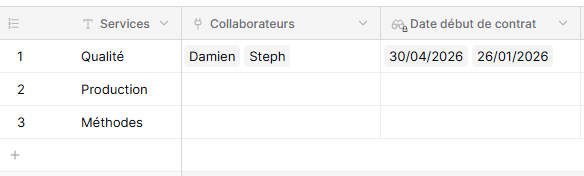
What I’m trying to do is add a field in the Services table that shows only the contract start dates that are in the future. The goal is to know, for example: *“*In the Quality service, two new people will arrive on these dates.”
I usually handle this in Airtable by configuring filters on a lookup field, but I can’t find a way to achieve the same result in Baserow.
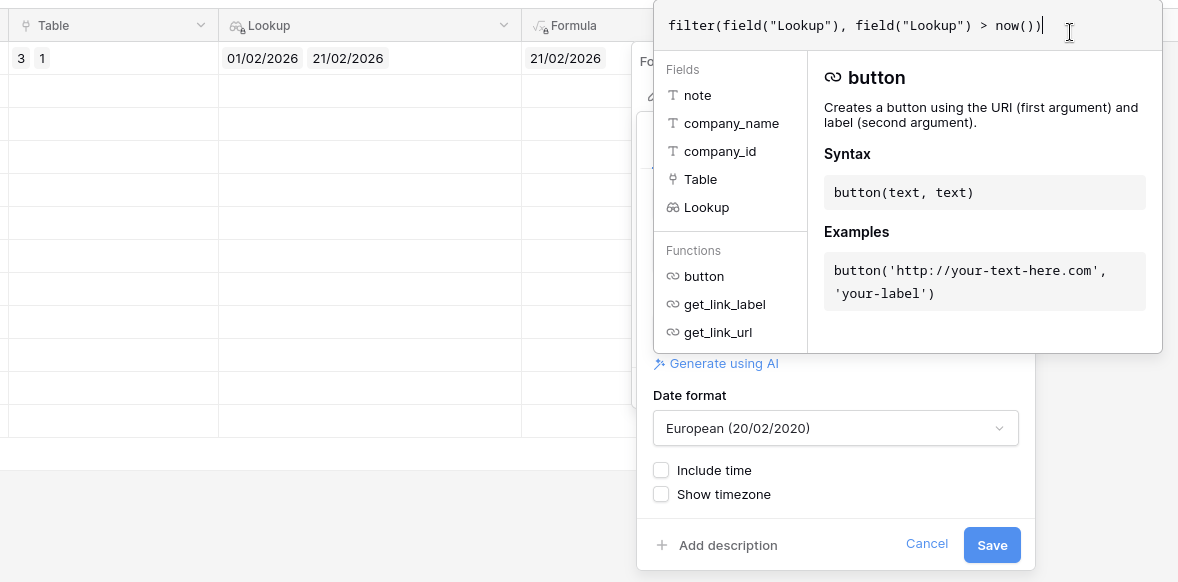
If I understand you well, you might be able to do it with a lookup field and a formula field filtering values from the lookup fields with `filter(field(“Lookup”), field(“Lookup”) > now())` formula: