Is there a way to set conditions? For example: changing a text or the visibility of an element based on a data condition.
Hey @josefernandez, this is definitely something that is on the table in the future for the app builder. There are currently 2 issues in Gitlab related to this:
Add complex conditions to element visibility tab (#2472) · Issues · Baserow / baserow · GitLab and Add support for advanced formulas (#3164) · Issues · Baserow / baserow · GitLab
Hi, any news on this? Thanks
Hi @josefernandez and @Luciano, I’m happy to report that this feature became available in the 2.0 release. If you open an element’s “Visibility” tab, there is a new formula field in there called “Visibility condition”. If this evaluates to true, then your element will be visible.
Cheers,
Peter Evans
Thanks a lot! Would you please link documentation or explain the exact syntax? I’m having issue using Visibility condition”, it don’t work as I tested
Hi @Luciano, please accept my apologies, you found a little bug which is being resolved at the moment.
The element visibility is working correctly, but if you use form data in your formula, it won’t. You can try other formula values in the meantime, so long as the result is “true” then the element will be visible.
Cheers,
Peter Evans
Thanks a lot Peter!
Unfortunately I’m still having problems understanding, for instance, how to show a component IF a field from Data source CONTAINS a specific value.
Same problem if, le’ts say, I need to show a component only if a a field from Data source HAS ANY VALUE. Or using a regex.
I can’t find theese operators in the choices:
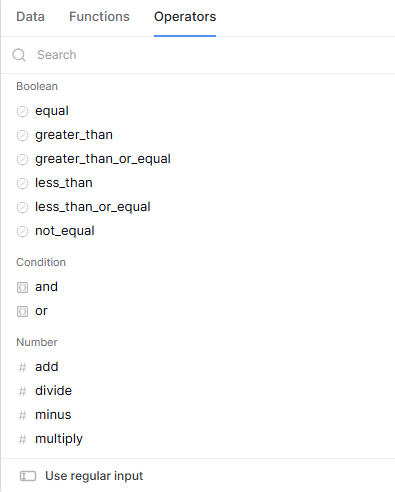
Do you have some documentation I can refer to formula and operators for this kind of scenario?
My pleasure!
The “advanced mode” (with the operators and functions) is very new; it was introduced in Baserow 2.0 recently. As a consequence of this, we’re still adding new functions and operators, so there could be some gaps in the functionality.
For now, what I suggest is using the get/list rows data sources, in combination with filters, to reduce your data down to “has any value”.
Once this is done, if you swap to your element’s visibility, and apply this formula, it will hide/show the element if your filters returned rows:
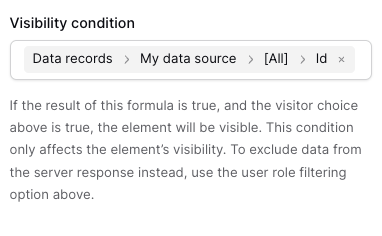
Once we have a length function, which should arrive very soon, it will be a little easier to implement.
I hope this helps!
Cheers,
Peter Evans
Thanks for your answer.
Can I ask if there is any documentation arround because I’m trying to use the “or” function without success so far.
The visibility page seems out to date.
This is working : get(‘form_data.4813’)=“oui”
This is working : get(‘form_data.4813’)=“non”
But this is not : get(‘form_data.4813’)=“oui”||get(‘form_data.4813’)=“non”
Thanks !
Hello @qtld,
My apologies for the slow reply. I can confirm there’s an issue somewhere in our formula parser, it’s incorrectly applying the OR operator (||). I’ll share this with the team when they return, we’ll hopefully have a fix at some point in January.
Cheers,
Peter Evans
Any news on this issue?
Hi @FredrikS, are you experiencing a similar issue? Can you describe your problem for me?
Cheers,
Peter Evans