I’m experiencing an issue with a “Link to table” field in an App Builder form where the default value is not being saved when updating a row without user interaction.
Setup:
App Builder form for updating existing rows
Link to table field connecting to “Ledgers” table (Allow multiple relations turned off)
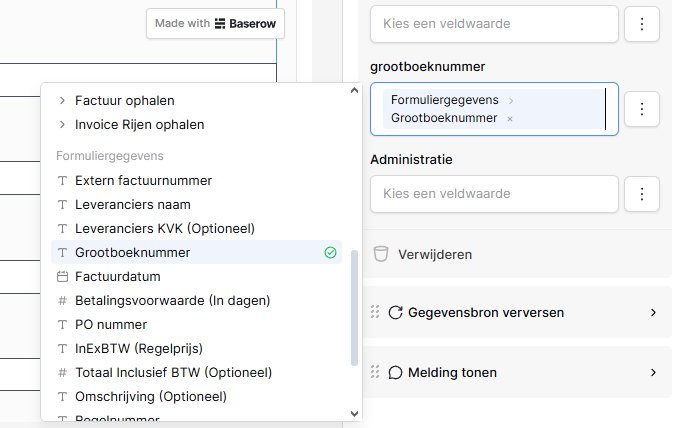
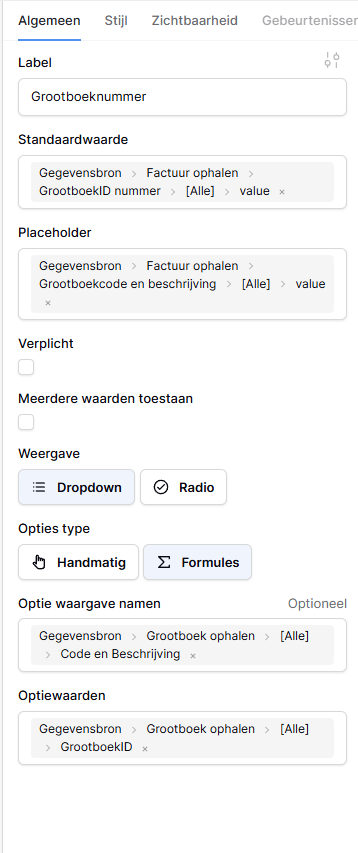
Default value set to: Data Source > Factuur Ophalen > Grootboeknummer > [all] > value
Placeholder displays the linked record correctly (e.g., “1706 - Crediteuren”)
Self-hosted Baserow instance
Problem:
When I update a row through the form without clicking/interacting with the link field, one of two things happens:
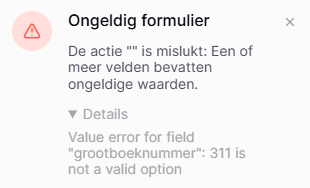
Error message: “Grootboeknummer 24525598 does not exist” (even though it does exist in the Ledgers table)
The field is saved as empty/null in the database
What works:
If I manually click the dropdown and select the same value that’s already displayed, it saves correctly
The exact same data source path (Data Source > Factuur Ophalen > Grootboeknummer > [all] > value) works perfectly in a regular text field
Expected behavior:
The link field should use the default value from the data source without requiring user interaction, just like text fields do.
It seems the link field isn’t registering the default value until the dropdown is manually opened. The placeholder shows the correct visual representation, but the underlying record ID isn’t being passed to the form submission.
Has anyone encountered this? Is there a workaround, or is this a known limitation with link fields in App Builder forms?
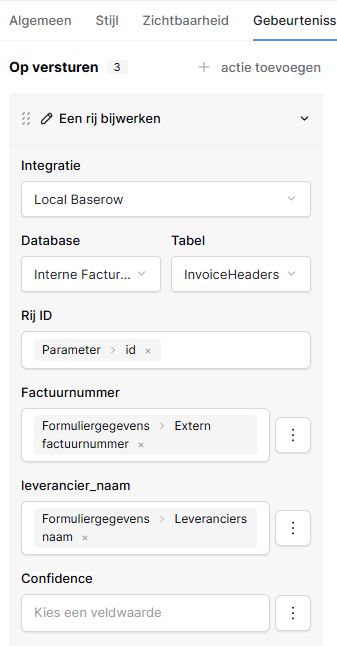
We’ll investigate further and see if we can reproduce it. In the meantime could you paste a screenshot of the configuration of the update row action and the choice element?
I had a read through your description of the problem, and one thing stood out to me: for your "default value” (Standaardwaarde) I can see you’re assigning an array of values (All → Value). Even if the link_row relationship is one-to-one vs one-to-many (our default), the result will still be an array containing one element in your scenario.
Could you instead use a single record (e.g. list rows → index 0, or via a get row data source), and this time give it the id property instead?
It may not be the root of your problem, but it’ll be a factor, I imagine.
Thanks for your reply. If I select either the value or id of the first item, index 0, I get an error message stating that the id or value is not a valid option, while it does exist. When I do select the same value that is shown as default in the dropdown, it uses the same id but this time it does recognize it.
Morning @LucasMathijssen! Please accept my apologies for the slow reply.
There’s a chance that we have resolved this recently in our develop branch, but it hasn’t yet been deployed to baserow.io nor released to self-hosters.
In the meantime, as we’re finding this a little difficult to replicate, would you be open to sharing a workspace export containing your application with me? It’d help @jrmi and I debug this a little easier. My email address is myName@baserow.io.
Thank you for the reply. I’ve sent the export via email to myName@baserow.io. Can you confirm that that is the correct email, or should I have replaced “myName” with your name?
Problem solved. The default value needs to be an ID that matches one of the option ID’s. Although the default value was the same as one of the options, they didn’t link. By selecting the ID instead of the value in both fields the default value works again.