Are you using our SaaS platform (Baserow.io) or self-hosting Baserow?
SaaS
What are the exact steps to reproduce this issue?
- Create a web app page with a login form element (connected to a “users” table with password and user levels).
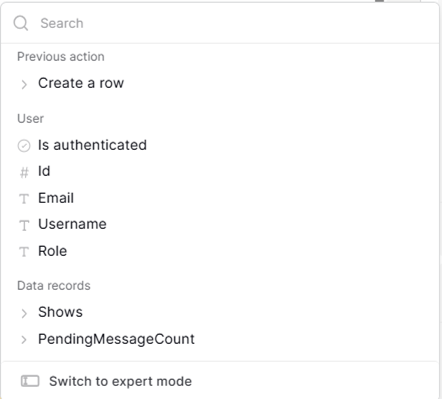
- On the actions tab of that login form element, as action “After Login”, create a Show Notification (or any action, such as a create row) and in the message, use the popup to select User > Username (or any of the User variables).
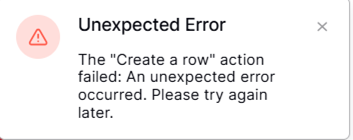
Run your page in preview or after publishing. You will get an error. This has been the case for about 2 months. Before then, once the user logged in sucessfully, the User variables were populated and accessible in the ‘After Login’ events.
Please restore the original function as this allows us to write to the user table with info like ‘Last Login’ or to read from the user table to know where to send this specific user (their custom home page). It is difficult to do these tasks without this ability.
Attach screenshots, videos, or logs that demonstrate the issue.
Hi,
I did a test and everything seems to work fine.
- Creating a new application
- Setting a user source
- Adding a login form to the Homepage (page with the path
/)
- Open the action tab and add 2 actions
- Open the Examples page
- Creating a record in a table that is not the Users table
Is this different from the steps you take? Can you check the console of your browser to see more details about the exact error to create the record?
Actually, you are correct. I tried to recreate my steps and it worked perfectly. So, I returned to my app to determine why it was not working. After some in depth testing, I found where it is breaking.
To recreate the issue, complete the steps listed above, with one difference. On the Login Control, set it’s visibility to “Logged Out Users” (as I don’t want a login form to appear for users that are logged in already). Then run it in preview. You will get an error.
Apparently, once the user logs in, remaining task on the control that has visibility set to logged out users does not work the same.
It looks like I can accomplish what I need to for now using the visibility condition setting if the control is set to appear for all users; however, I don’t believe that is the intended function of this control. After all, the events for the control only run “After Login”, so if the visibility is set to “Logged Out Users” since login is not necessary for someone that is logged in, then the events will only run for Logged In users.