Hi! I’m struggling to automate updating date fields.
The database table I’m building is a simple cost transaction log. Each row has a formula field ‘Cost next date formula’ that calculates the next cost date based on the fields ‘Cost date’ and single select field ‘Cost type’.
The formula is as follows:
if(or(field(‘Cost type’) = ‘Per usage’, field(‘Cost type’) = ‘One time’), ‘-’, if(field(‘Cost type’) = ‘Annual subscription’, datetime_format(field(‘Cost date’) + date_interval(‘1 year’), ‘DD/MM/YYYY’), if(field(‘Cost type’) = ‘Monthly subscription’, datetime_format(field(‘Cost date’) + date_interval(‘1 month’), ‘DD/MM/YYYY’), ‘-’)))
As filtering the data based on the formula field is not currently supported, I’m trying to build a workflow, which based on the calculated 'Cost next date formula’ would update a date field ´Cost next date´.
In the workflow step ‘Update row’, when I map that formula field value to the date field ‘Cost next date’, I receive the following error: “Value error for field “Cost next date”: Value cannot be converted to a date.”
I’ve also tried adding an additional formula field that manipulates the date_format, but the error persists. For example:
datetime_format(field(‘Cost next date formula to date’), ‘YYYY-MM-DD 00:00’)
The mapping in the ‘Update row’ I have as follows. I’ve tried to map both ‘Cost next date formula’ and ‘Next cost date helper field’:
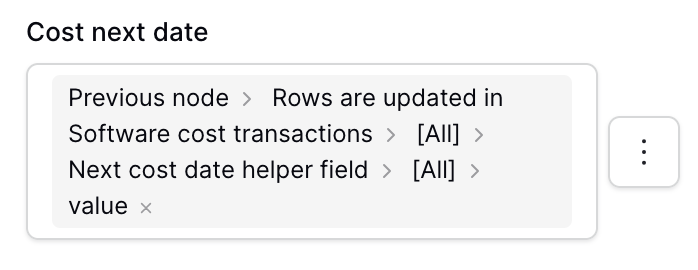
The payloads I’ve received and tried to map from the workflow trigger include:
“Cost next date formula”: [
{
“id”: 1,
“value”: “19/03/2027”
}
“Next cost date helper field”: [
{
“id”: 1,
“value”: “2027-03-19”
}
“Next cost date helper field”: [
{
“id”: 1,
“value”: “2027-03-19 00:00”
}
Previously, I also tried automate updating a single select field (choosing another value from the list) with Baserow automation, which resulted as similar data type / mapping error. When I tested Relay App via a webhook, it was able to update the single select field in an instant, by using the exact same payload value that resulted as an error in a Baserow workflow.
As it feels unnecessary to use a third party tool for simple date and single select field updates, I would want to understand and learn what I’m missing here?
 I’ll follow the progress!