The best method/logic to use when updating rows in one DB from another

Greetings! Super excited to begin using automations!

I am trying to create an automation that takes values from one DB table and based on an ID match updates a table in a different DB.

Would love some direction on what would be the best practice here using automations.

Example:

DB1 = “Recipes”

Table 1 = “Final Formulas”

DB2 = “Financials”

Table 2 = “Cost Elements”

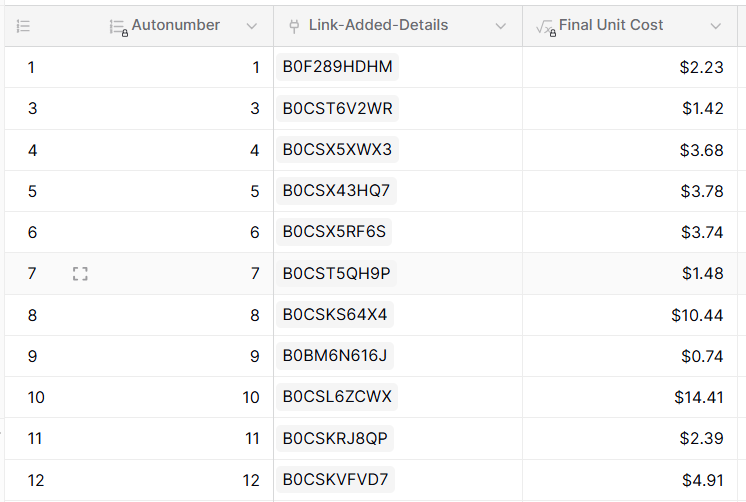
I would like an automation to run once per day and go through all the rows in DB1/table 1 and update all the rows in DB2/Table 2 (using the “Link Added Details” field in table 1 and “name” in table 2 as the matching keys)

What method would you us in automations to do that?

I’m very excited about this because it will alleviate the need to synchronize entire tables!

Hey @Allllan, did you try asking Kuma AI? It can already build automations for you. :grin:

I did, but the response I got was this:

“At this time the built‑in automation builder does not have the actions needed to loop over every row in a table (List multiple rows and Iterator). Without those actions you cannot create a daily workflow that reads each record from the “Recipes‑Kits‑Final” table, extracts the “Final Unit Cost” and updates the matching row in the “ASIN Cost Elements” table. To achieve this you will need to use an external solution – for example a custom script that calls the Baserow API on a daily schedule, or an integration platform such as Zapier or Make that can list rows, iterate over them, and perform the update.”

I’m having a hard time believing that’s true. There has to be some way to do it with automations.

FYI…here was my prompt: [Create an automation that every Day goes through all the records in the DB “Recipes” table “Recipes-Kits-Final” and takes the value from the field “Final Unit Cost” and puts it in the DB “Financials” in the “ASIN Cost Elements” table and updates the field “Final_Recipe_Cost” Where the "Name field in that table matches the “Link-ASIN” field in the “Recipes-Kits-Final” table.]

Hi @Allllan - we’re still working on improving Kuma, but in the meantime, you can manually create a workflow like this:

What I’ve done is:

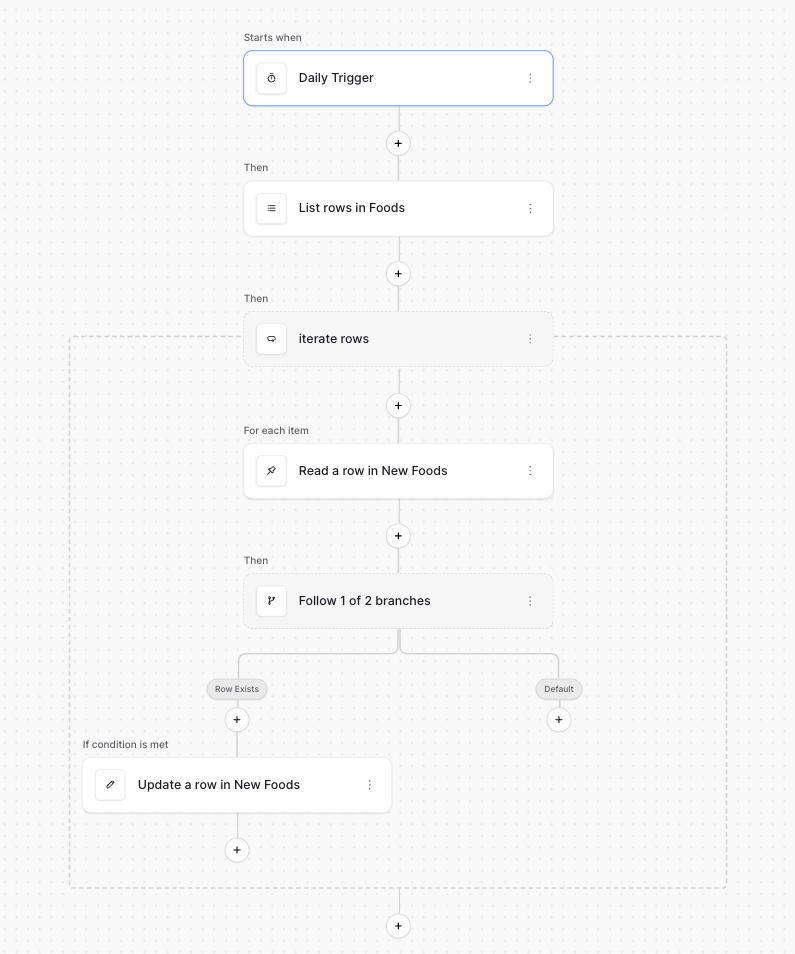
  • Create a “Periodic” trigger node that runs once a day
  • Create a “List multiple rows” action node that lists the first table
    • In my example, it’s the “Foods” table
  • Create a “Iterate on items” action node that loops over the previous node.
    • I give it a label of “Iterate rows”
    • I set the Source to “Previous node → List rows in Foods”.
    • In the Iterator node, I create a “Get a single row” node.
      • I specify the second table, in my case it is the “New Foods” table.
      • The Row ID is blank.
      • I create a Filter where Name is “Current iteration → Iterate rows → Item → Name” (you’ll need to enable Formula mode)
    • Below the “Get a single row” node, I create a “Router” node.
      • For the branch condition, I use the Expert mode in the data explorer, and I set the condition to be “Previous node → Read a row in New Foods → Name” != '', effectively turning this into a boolean expression. You may want to adjust this to be a bit more robust.
    • Finally, in the condition branch (not the default branch), I create a “Update a row” node.
      • I select the second table, e.g. “New Foods”.
      • For Row ID, I specify “Previous node → Read a row in New Foods → Id”
      • I enable the “Notes” field (the field I want to update) and set it to “Current iteration → iterate rows → Item → Notes”.

This should hopefully get you most of the way to implement what you described. Let me know if you have any questions!

@paljort

This is VERY close to what I was trying…the only logic I was missing is the router. Unfortunately I still can’t figure out that part :slight_smile:

If I skip that step, it writes all of the prices in the first field it matches (so I think that’s a good sign it’s working up to that point).

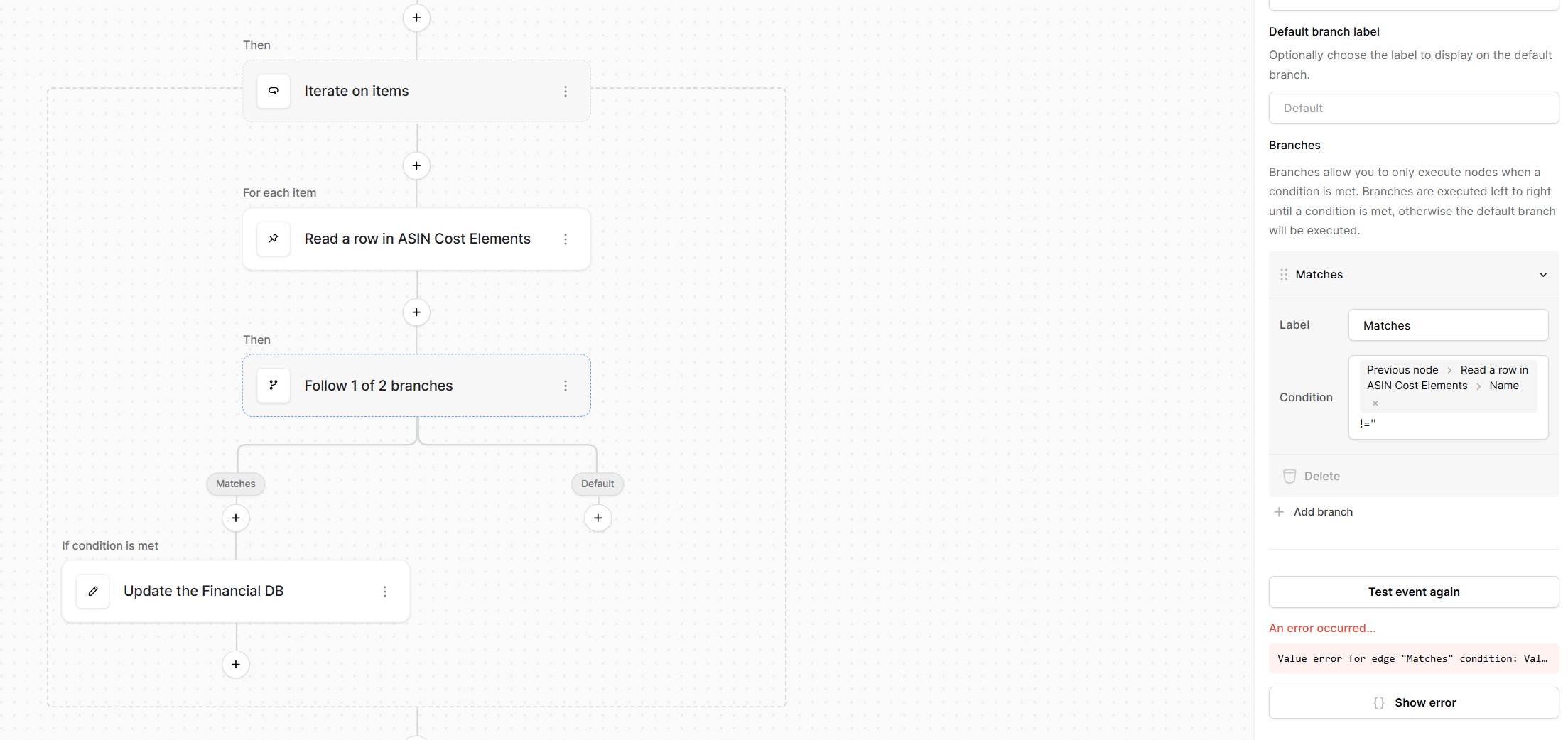
Here is the router portion and branch info.

As you can see I am getting an error. It says: “Value error for edge “Matches” condition: Value is not a valid boolean or convertible to a boolean.”

I’m not sure what it isn’t liking there. Any ideas?

Again, I am a low/no code guy, so I apologize if it should be obvious :slight_smile:

Also, let me know if you need to see any of the payloads.

Hi @Allllan you’re pretty close! The only thing missing is that you need to enable “Expert mode” first. See the attached screen recording :slight_smile:

@paljort I feel dumb for that one…lol

Okay, I am almost there, but still not quite. I have two issues left:

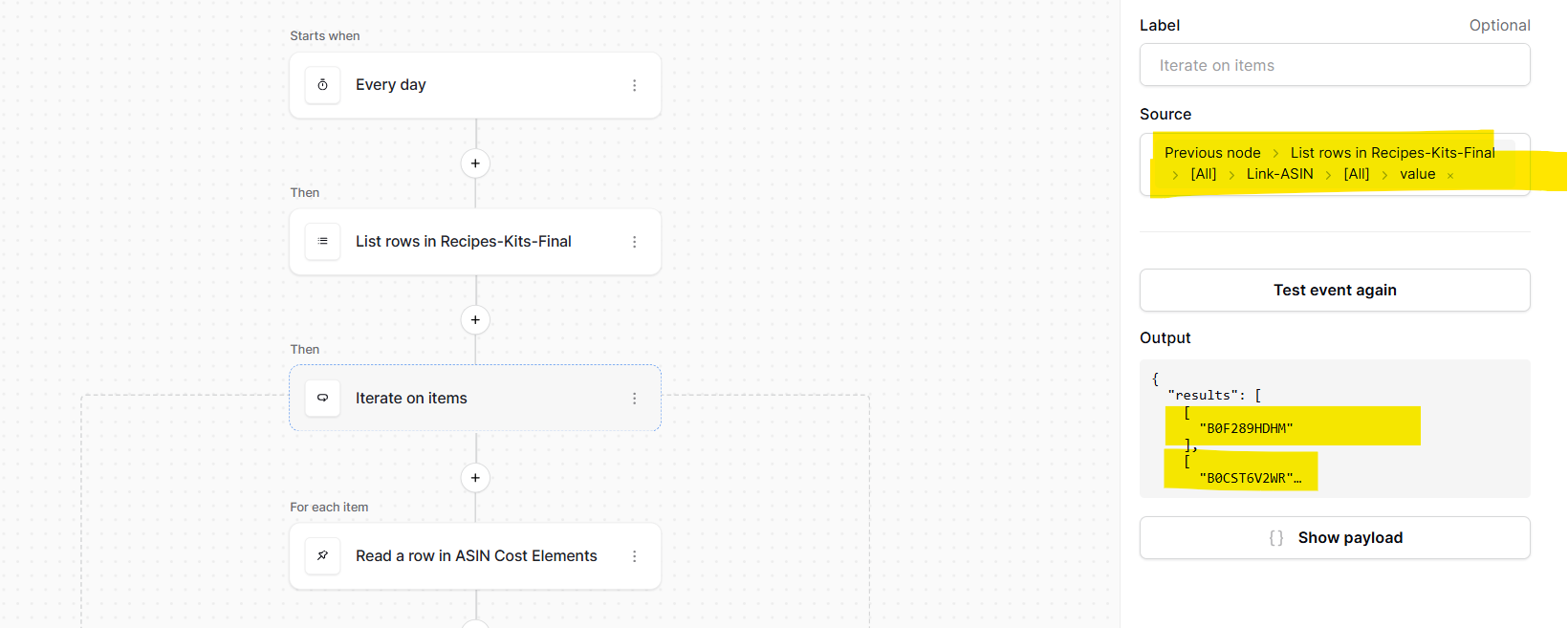
  1. When I iterate on items, my Source is the name of the item from the first db/table:

Which you can see nicely returns all the names I am trying to match to on the second table.

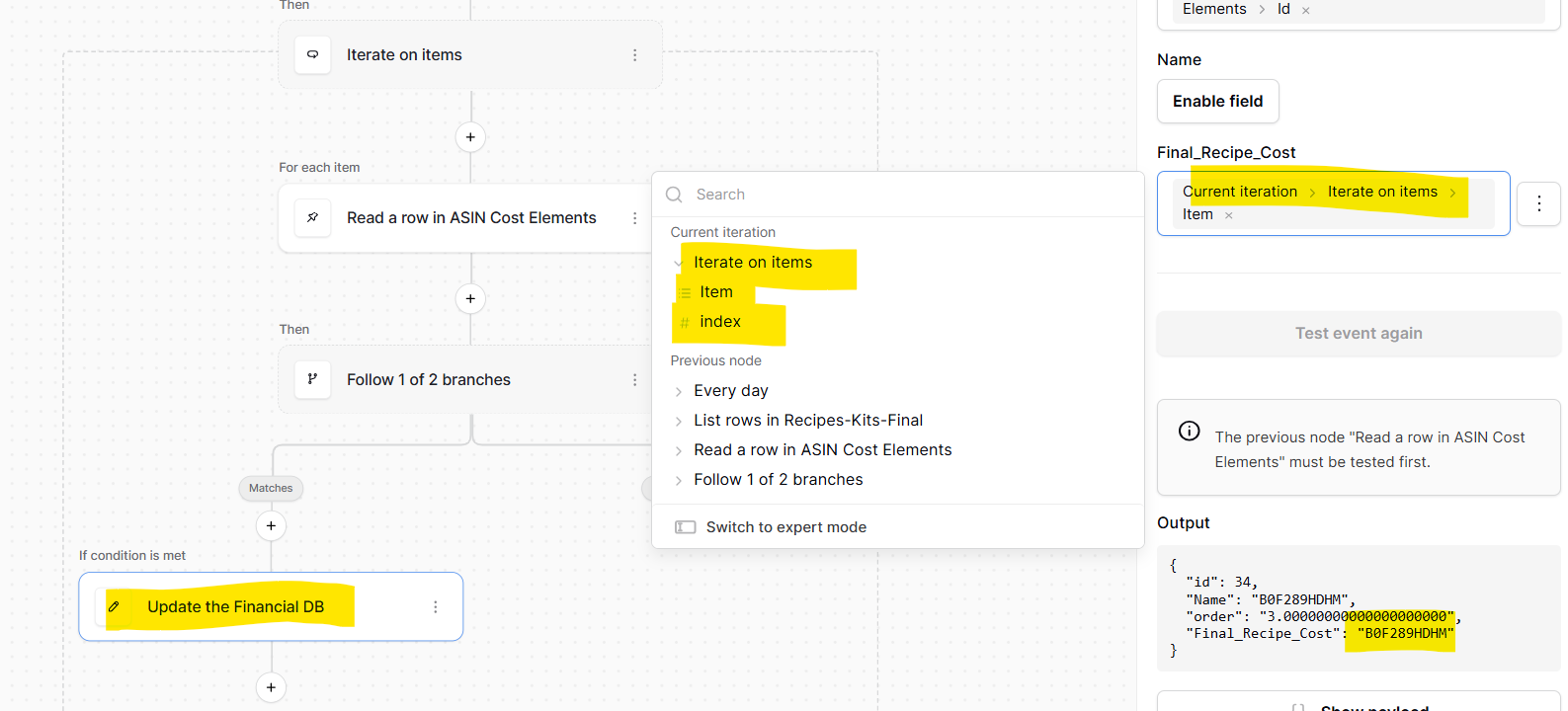
HOWEVER, when I try to update the price field on the second table, that’s not an option. The only thing I have is the item or the index (probably because that is all I pulled in??)

So what am I doing wrong here? How do I get the price from the first table to be an option?

I know I must be REALLY close!

  1. How do you keep it going when it doesn’t find a match?

I noticed that the automation ran until it didn’t find a match. I’m assuming that’s because it went down the other branch of the router. How do you get it to skip that item and keep going?

BTW: You are the BEST! I can’t believe you’ve taken the time to help me sort this out. Automations is a HUGE feature and I’m excited to incorporate it into my workflows and re-write a bunch of crazy synch tables so that I don’t have duplicate data everywhere!

hi @Allllan - no worries at all, I’m glad you’re getting close to having something fully working :slight_smile:

  1. The reason you’re not seeing all the columns of your table on the “Iterate on items” node is that you’ve selected too specific of a source. Instead, just select “Previous node → List rows in Recipies-Kits-Final”. In my example, notice how I only select “Previous node → List rows in Fruit Inventory”; I don’t drill down further.
  2. If a match isn’t found, the row will be skipped, so I believe this is already doing what you want. If you need further branching logic, you can just add another child Router node.

Here is a full end-to-end screen recording of my database and automation workflow.

@paljort

Okay…I found an error in your example (or at least it wasn’t working for me), and a couple of other twists and turns but it looks like it is all working with just one remaining issue. I am recording this for you so you can see my results and maybe offer advice on how to deal with a non-matching scenario.

Thanks again!!! Hopefully this last issue is a simple resolution :slight_smile:

Hi @Allllan okay, so I think your use-case will be straight forward once we have this PR released. Until then, we’re lacking some formula functions (like is_empty and length) to be able to neatly evaluate the previous node’s output.

In the meantime, I was able to get your use-case working doing this:

In my example, my first table is named “Fruits” and the second table is named “Fruit orders”. The “missing” row in my second table has the name “Unknown”.

In the screen recording, you’ll notice that the “Unknown” row is skipped, while the rest of the rows are processed.

You’re right about me selecting the wrong table in my previous example, which I’ve fixed in the latest screen recording.

The biggest difference is the usage of the upper() formula in the Router node (i.e. “Follow 1 of 2 branches”). Here is why need to do this.

The “List rows in Fruit Orders” node will either return a list of data if it finds a row, otherwise it will return just [] (an empty array).

The “Follow 1 of 2 branches” node needs to know whether the above output is [] or not. The PR I mentioned earlier introduces the is_empty() and length() formula functions, which are able to directly evaluate whether the output is empty or not. However, since we don’t yet have these functions, we need another way to tell if the previous node is empty.

We therefore use the existing upper() formula function, which takes any input, converts it to a string, then upper cases it. Using this, we can convert [] to ”[]”; this allows us to compare this converted value against a literal string of ”[]”. Thus, when the previous output is not [] (because we matched on a row containing “Unknown”, i.e. a row that doesn’t exist in the first table), the branch node is selected.

I hope this makes sense. Sorry about the weird work-around, but once we have that PR merged and released, you should be able to simplify your automation workflow :slight_smile:

@paljort It’s not completely working. If you:

  • Add 2 other items to you Fruits table (row 5 = peach, Row 6 = Strawberry)
  • Add Strawberry to your second table (as row 6)

You’ll see the automation actually stopped processing at row 4 in your Fruits table and won’t keep going. Once it finds a non-match it stops evaluating rows from the Fruits table.

So close!!

hi @Allllan I’ve reached out to you via DM as I think it’s a specific issue related to your configuration.

@Allllan Thanks for sharing your workflow. It helped to narrow down a bug in the Read a row node. I’ve created an issue for this. We need to discuss internally on the solution, but I’ll let you know once we have a fix in place.

In the meantime, I think I found a workaround for you. Instead of using Read a row node, you can use the List rows node. Please see the screen recording attached.

Thank you!! The workaround totally does the trick for now!

This is a HUGE feature for automations as it basically allows us to do VLOOKUP’s across DBs within the Baserow platform. As an MS Access guy trying to get used to not having the ability to do Queries of Queries on the fly, etc., this helps a ton fill the gap!

It will be cool to eventually have events triggering automations and more sophisticated criteria loops…but what a great step forward!

Thanks again for the amazing support!

Alan

Awesome, I’m happy this is working well for you :smiley: , and no worries, it was fun solving this with you!