Is it possible to use webhooks or something to input data into Baserow? I want to use Fillout, a free form software, to allow users to input data into a Baserow table.
I contacted Fillout, wondering if they could add Baserow as an integration option like they do with Airtable. They suggested I use a webhook.
I like Fillout because I can add images on the form, image choices, conditional flows, etc.
Baserows forms are extremely limited (like Airtables is), so Fillout has been great.
Hey @Iokaar, since we don’t have an integration with Fillout, we can only suggest connecting both tools via API or using external tools like n8n, Make, or Zapier.
Hello @Iokaar,
If this is still not fixed then I also recommend you go with the same tools as @olgatrykush suggests.
But I would like to explain the workflow.
→ Create form in Fillout. Setup Direct or Make’s webhook.
→ When the form is submitted it triggers the Make’s Scenario and saves Data to Baserow.
→ Make’s scenario included: Webgook → Save to Baserow.
If you still have any issues come back with some screenshots. I would like to help.
The following examples are of Fillout and Airtable integrations.
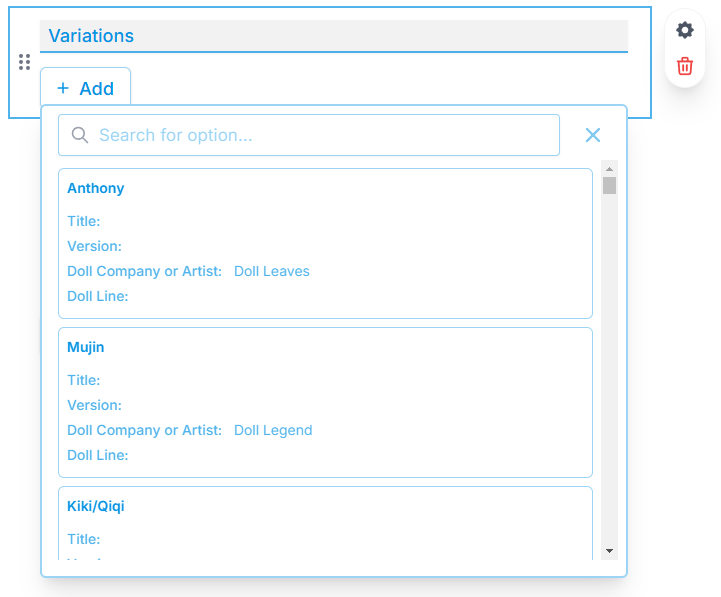
I specifically asked about Fillout integration because you can select items from your tables. For example, you can click on the button “Add” and a list of your table items will pop up, (you can also search if there are a lot) to add a linked field(s) to the record. You can select more than one option.
I am not sure if a webhook can get a list of rows to choose from and make linked records.
And best of all, Fillout is free!
Make/Zapier are pricey and their free options are severely limited, rendering them almost useless for my use case. I am trying to build a free community-built fan database. I am not a big company, just an individual with a little project in mind. This is why I’m so hopeful for Baserow, as the Airtable options are more pricey.
All that being said, I am a total noob at everything. It is probably up to Fillout to add integration with Baserow using Baserow API. Maybe Baserow can give Fillout a little nudge or something.
I’ll try to play with webhooks to see what happens. Creating the setup in Make looks a bit overwhelming.
Ok I can understand your concern.
For use most of free or trial based automation tools.
If you have coding(programming) expert then I would recommend to try n8n.io and https://pipedream.com/
Iokaar and dilipborad - Could not stop thinking about this, so I also tried creating a new Fillout form, and instead of using a default integration with Airtable, I selected a ‘Zapier’ zap integration, and using a free level Zapier account, I created a Zapier zap that had a trigger of a new Fillout form submission, with an action of creating a new record in a specified Baserow database table, and that worked fine. Tomorrow, I will also try using Pipedream to see if that works. I liked being able to connect the Fillout form to the Baserow database table as it solved my problem of having a very long form (lots of fields) that I had to fit inside the maximum allowed height of a Baserow iFrame application element of 2,000 px, by being able to place multiple Fillout form fields on the same form line/row. I hope this helps!
dilipborad - Thank you for your suggestions! I tried pipedream.com, and it seems that it does support using a Fillout form to populate data into a Baserow database table. I have not finished doing that, getting late, but I will try it tomorrow. Thank you again for your help!!!
I’ve actually been thinking about this a lot more as well!
The Reason We Need a Fillout Integration with Baserow
Fillout Features That Are Game-Changing
Image Choices: I really like how Fillout handles images, specifically their IMAGE CHOICES feature. That is a huge deal for my forms! I’ve even tried adding some CSS and JavaScript to my app builder to create image choices, but right now it is really clunky and when you click on a choice it reverts the entire list to plain checkboxes again (but that’s another problem for another time in another place).
Linked Record Selector: This is totally possible in the Airtable/Fillout integration, and it’s essential. Idon’t think it’s possible to have such a linked record selector when using Make, Zapier, or equivalent external automation tools for form submissions, so having a Fillout integration to Baserow is critical for this!
Survey Style Form: I love their super smooth SURVEY STYLE form structure. Crucially, these forms allow for more than one file field, unlike Baserow forms (Baserow, in this case). I see you can technically achieve a survey style now, but it is VERY complicated and confusing (I gave up trying to set it up). It’s also incredibly clunky because of the SLOW BASEROW APP LOADING TIMES. People would definitely give up waiting for the page to load before they even finish the form.
Guiding Content: I also like the ability to add text and images directly to a Survey Style form so that a user can get a little guidance they may need alongside the question.
Conditional Logic & Styling: They support if/then conditional logic, which Baserow’s native forms do too. However, I have MANY MANY form fields, and using the raw Baserow form is tedious because it’s so long—users get tired of scrolling. When injecting the form via iframe, there is a possibility for the super long form will have a double scroll bar, and that is incredibly annoying. Plus, you cannot style Baserow’s raw forms, so they don’t match my application at all! The Survey Style presentation solves both the length and the styling issues perfectly!
I know most of this is unlikely to become reality, yet I can’t help holding a tiny candle of hope. Maybe the Baserow devs will see this, offer a quiet nod of agreement, and let an integration or a few of these features drift into the not-so-distant future.
I found an easy way to use a Fillout form with Baserow for data input into a Baserow database table. I designed the form in Fillout, then clicked on the ‘Share’ link for the form, then copied that URL link into a Baserow iFrame element on a page. When I preview or access that page in the published Baserow application, it displays the Fillout form, which I tested for multiple records entries, and everything worked. Granted, my Fillout form is not super complex, but is long/large, and has many text entry fields, 2 multiple choice fields, and a file upload field, and everything worked. I did not need to use any integration tools with this approach, just a Baserow iFrame element on the application page with the Fillout form shared URL.


 The Reason We Need a Fillout Integration with Baserow
 Fillout Features That Are Game-Changing
