{
  "body": {
    "error": "System.ArgumentException: The value 'sales-invoice-form' is not a valid GUID. Please provide a valid GUID in the correct format, for example: 'FA896E59-5EAF-450E-AA6B-E2321D96026B'. (Parameter 'input')\n   at Manager.GuidExtensions.ToGuid(String input) in

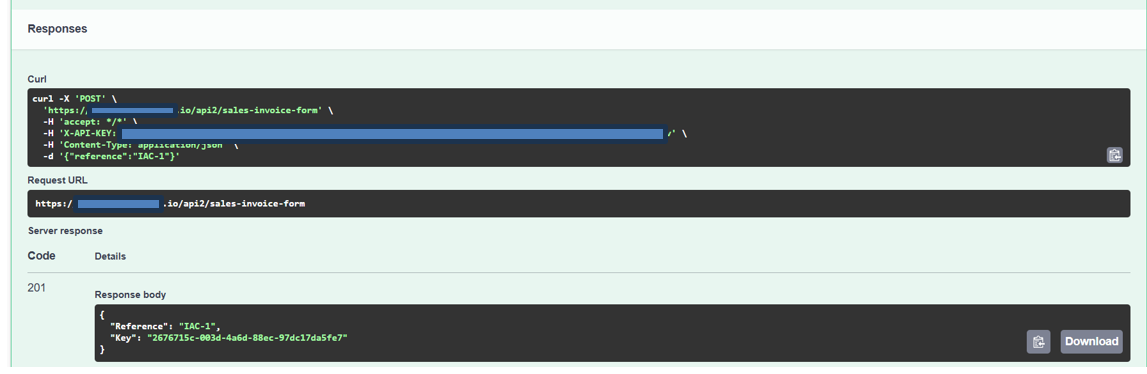
Any way to see the cURL.

What am I not understanding in how the HTTP request wokflow node works?

Thanks all.
Is the example in your initial screenshot something you’re able to do yourself, or have you been sent that screenshot? I’m just curious if you can execute the request yourself, manually.
This message:
The value ‘sales-invoice-form’ is not a valid GUID. Please provide a valid GUID
Definitely makes it sound like that endpoint doesn’t exist. Does the domain (underneath the censored bit) match what is in the screenshot?
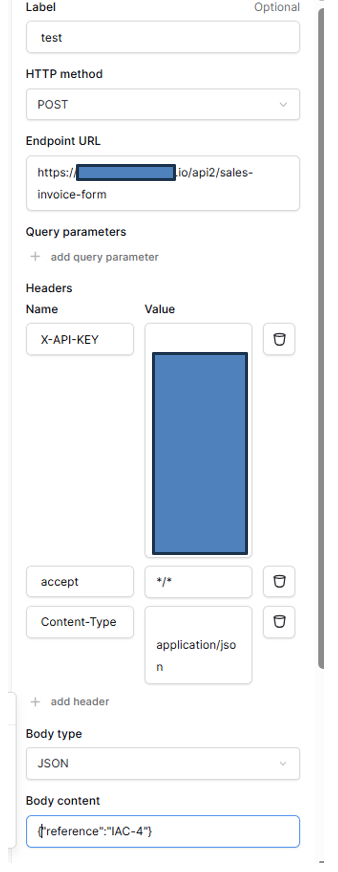
Based on the configuration in the second screenshot, it should work.
OK, thanks for the confirmation! Based on that error message, we are sending an HTTP request to that endpoint, it’s the endpoint that is telling us that sales-invoice-form isn’t a valid GUID.
The only thing I can think of is there are additional characters in the Endpoint URLfield, would you mind typing it out again (not copy→pasting) in case it matters?
If that doesn’t work, would you mind sharing the full domain with me? Based on the endpoint, and some Googling, I can guess what product you’re using, but it’d help narrow things down further!
When sent as a POST it doesn’t need a GUID {Key}, but it does as a GET. Any chance that Baserow is somehow sending a GET instead of a post? If it were a GET the returned message would make sense to me.
That makes sense, you’re POSTing to their list endpoint, whereas the key would be for a detail endpoint.
We’re definitely sending POSTs, but I did re-check in just in case
A few more ideas, if you don’t mind!
Could you try sending a POST to https://webhook.site (the site will give you a random URL to test with), and check what is being sent?
I can see line breaks, or whitespace, before your X-API-KEY and Content-Type headers, mind remove them? I don’t actually think they’re the cause, but it’s worth a try.
Is the API key a formula, or a raw string?
Are you a baserow.io user, or are you self-hosting?
I’ve sent a variety of requests to that endpoint from baserow.io, and I never get that GUID error, so I have to assume it’s something that appears after authentication is successful.
OK, sent to webhook.site and the body looks correct. I’m at a loss. I’ve posted to Manager.io forum also.
I’m new to this so I could well be missing something. Manager definately seems to think it needs a GUID when sent from Baserow. Any chance a '/’ is being appended to the POST so that it thinks it should be expecting a {key} parameter?
OK, I think I figured it out. Here is the issue - It appears the issue is caused by redirection. When the POST is sent to https://{{subdomain}}.manager.io/api2, it is apparently automatically redirected to a regional endpoint such as https://{{subdomain}}.us-east-1.manager.io/api2
I updated the URL to directly reference the regional endpoint and: