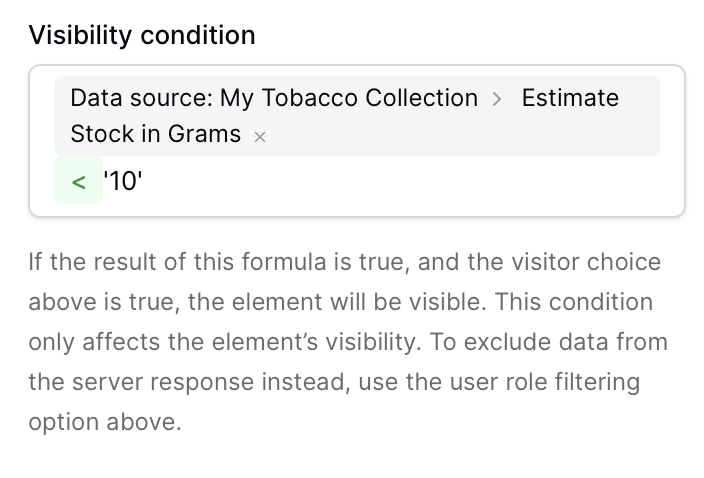
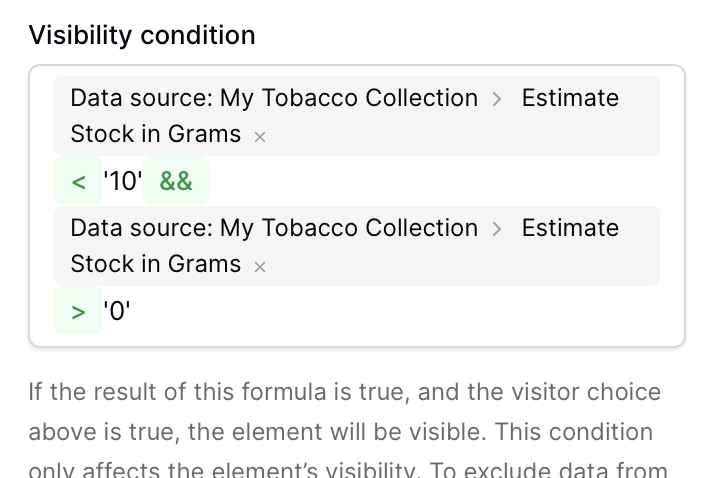
Any reason this wouldn’t work?
Or any of the variations '10.00’ or 10, …
I’m not a pro for Baserow but I think the additional information would be helpful to know what kind of type the field ‘Estimate Stock in Grams‘ is? A number field? A lookup? A function field?
it’s a formula result
actually, it’s a calculation, based on total weight purchased, minus the calculated tobacco usage (based on tobacco a pre-defined (theoretical) density (depending on tobacco cut) and bowl size (depending on pipe used bowl dimensions and theoretical fill-level).
Nothing really useful, but it was fun to try and see if this stuff is calculable.
I’ll be checking over time wether the parameters are correct/consistent or if I need to change them.
but bottomline = I want a certain button to be only visible if my theoretical stock is below 10 grams.
Hi @DavidCeulemans, apologies for the slow response. A few things to check…
My Tobacco Collection is checking?Visibility Condition) have you got configured? These will actually override the condition.Cheers,
Peter Evans
I noticed that in the screenshot of @DavidCeulemans at the beginning it says “Data source:” and not “Data records”.
I checked the visibility conditions of buttons in my app and there it says “Data records >”
Is that something that gives a hint?
What is the difference between “Data source:” and “Data records >” ?
Thanks for thinking along, be_Berlin.
‘Data source’ is indeed the source of my repeat-element, so I need to use that.
the visibility formula below does work (but only shows on that specific weight)…
(data source: my tobacco collection > estimate stock in grams) = ‘7.63’
perhaps related to Visibility condition on Application Builder' s elements ?
Not sure what you mean in 1?
the button sits inside a repeat element, so it should check agains the value of the tobacco-weight in the repeat. As said above ‘=’ seems to work.
with 2: all visitors.
Did some testing. It’s a bit weird…
=’7.63’ → works for the exact value
!=’7.63’ → also works as expected
<‘7.63’ → button shows always (also not when value is lower)
>7.63’ → button never shows
however, when using a value that doesn’t exist EXACTLY, like ‘10.00’ the above doesn’t work.